LTE Router Installation | 51
Aprisa LTE User Manual 2.1
Power Supply
The input voltage for the Aprisa LTE is +9 to +32 VDC. The maximum power input is 15 W.
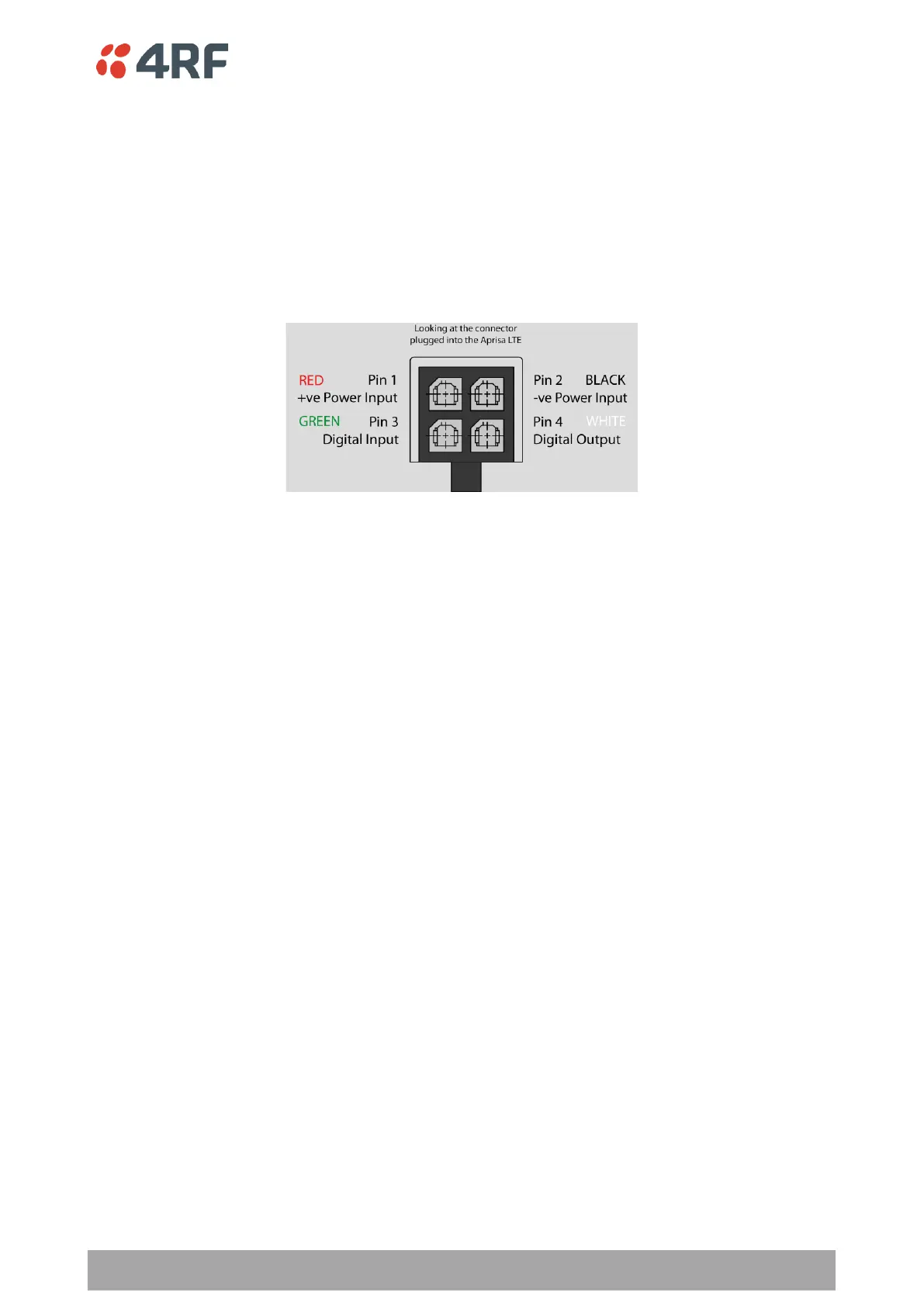
The power connector required is a Molex Micro-Fit 3.0 4 pin female connector. The power supply input
connects to pin 1 +ve and pin 2 -ve.
The Molex Micro-Fit 3.0 4 pin connector clips into the LTE socket. It also has a power retention clip and
screw (supplied with the LTE) that enables the connector to be secured to the LTE with a screw. Do not use
the product if the power retention clip is missing or loose.
The negative supply of the Aprisa LTE power connection is internally connected to the Aprisa LTE enclosure.
Power must be supplied from a negative earthed power supply.
A 1 metre power cable fitted with 4 pin Molex Micro-Fit 3.0 female connector and wire ended is supplied in
the box with each LTE.
Additional power cables of the same type can be ordered from 4RF as accessories:
4RF LTE Acc, Cable, Power, 1m
4RF LTE Acc, Cable, Power, 10m
Wire your power source to the power cable and plug the connector into the LTE.
Spare Molex Micro-Fit 3.0 connectors can be ordered from 4RF:
4RF LTE Spare, Connector, Molex 4 Pin Micro-Fit 3.0, Female, 1 item
Turn your power source on:
• The OK and AUX LEDs will light orange while the LTE is booting up. The SFP, TX, RX and Wi-Fi LEDs
will be off.
• When the LTE is ready to operate, the OK LED will light green.
If the LEDs fail to light, check the power supply polarity and voltage.
If a voltage greater than the specified voltage range of 9 to 32 VDC is applied to the LTE power supply input,
or the polarity is reversed, the internal fuses may have blown to protect the unit. See ‘Spare Fuses’ on page
237 for instructions on how to replace the fuses.



 To Next Page