Aprisa LTE User Manual 2.1
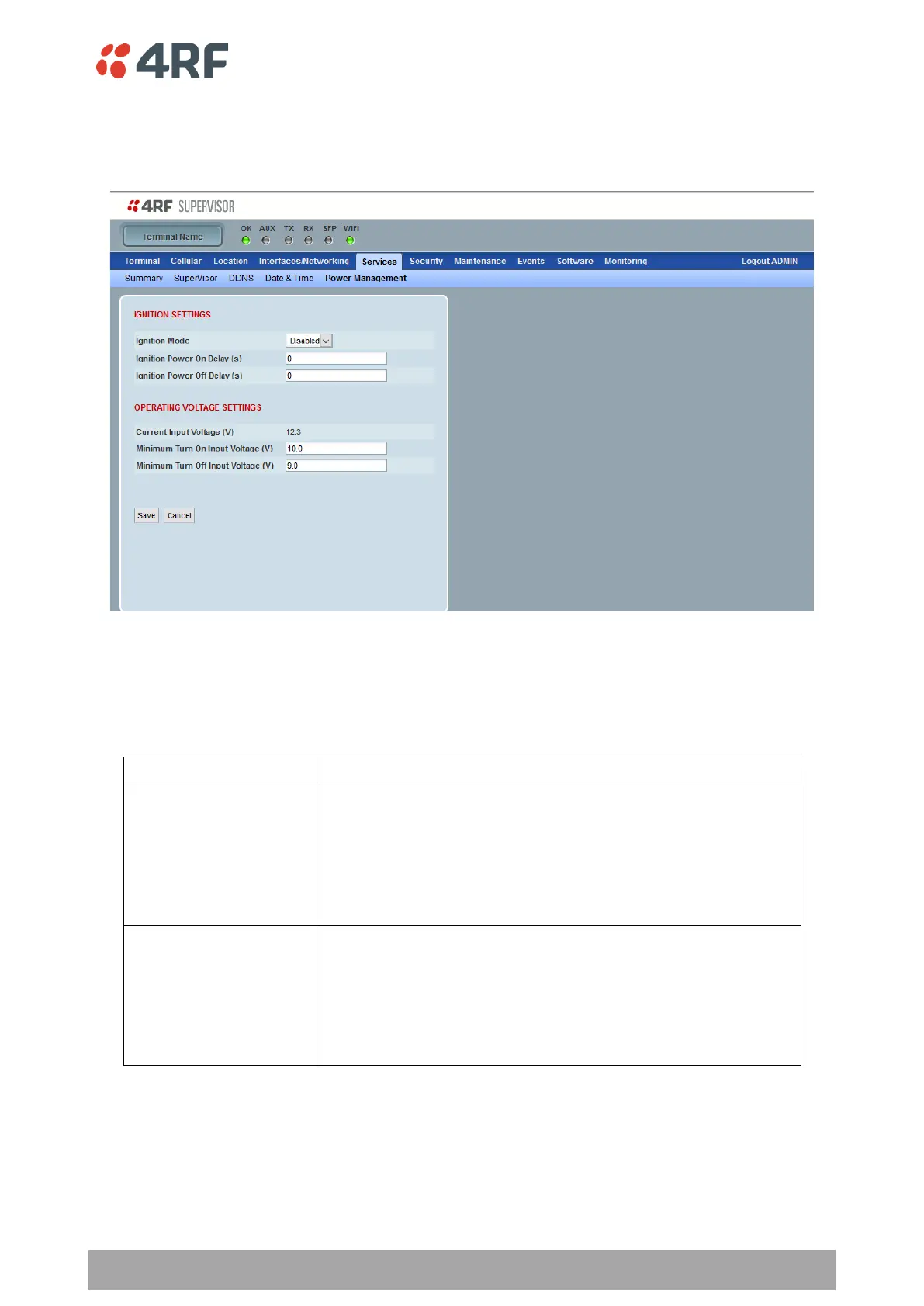
Services > Management
This page sets power management options for the Aprisa LTE.
IGNITION SETTINGS
Ignition Mode
Sets the method used to turn on and off the Aprisa LTE.
As soon as power is applied on pin 1 and 2 of power connector (see
‘Power Supply’ on page 39), the Aprisa LTE will turn on and stay
on.
This setting ignores the ignition sense pin behavior (i.e. power
supply pin 3 is not controlling the power on/off of the Aprisa LTE.
In this setting this pin 3 is acting as GPIO input for any other
purpose not related to power on/off.
The Aprisa LTE will turn on after the configured ‘Minimum Turn On
Input Voltage’ time only when Ignition sense/GPIO input pin (see
‘GPIO’ on page 62) is active and turn off after the configured
‘Minimum Turn Off Input Voltage’ time only when ignition
sense/GPIO input pin is inactive.
The active state of the GPIO input pin is configured on the ‘Events
> Alarm I/O Setup’ on page 202, and defaults to active high.
Ignition Power On Delay (s)
Sets the time between the alarm input going active and the LTE turning on.
Ignition Power Off Delay (s)
Sets the time between the alarm input going inactive and the LTE turning off.



 To Next Page