PROPRIETARY INFORMATION
CONFIDENTIAL MATERIAL
Not for Customer Distribution Hardware
AEROSET
®
System Troubleshooting Guide 233
94816-107—November 2004
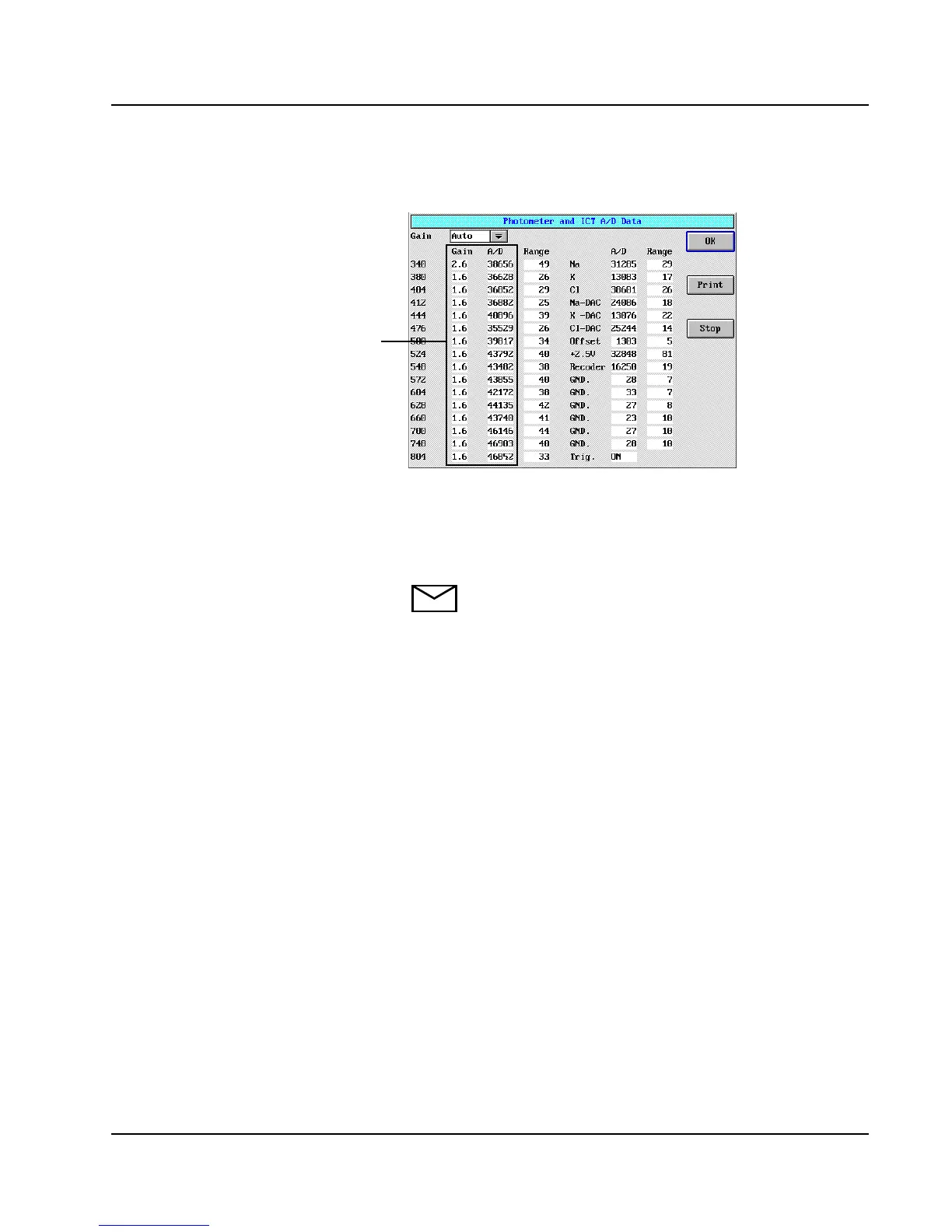
7. Select <Data>. The Photometer and ICT™ A/D Data
screen displays.
Figure 17: Photometer and ICT A/D Data Screen
8. Observe the displayed Gain and A/D values. Ensure the
Gain values are 울 2.6 AND A/D readings are > 35,000,
with a range of < 300.
NOTE: If the Gain value is 2.6 AND A/D reading
is 울 35,000, or if the Gain value is 4.0, replace the
lamp. Refer to Source Lamp Replacement in
Section 9, Service and Maintenance of the AEROSET
System Operations Manual. After lamp
replacement, recheck the Gain and A/D values;
verify all Gain values are 울 2.6 and A/D readings
are > 35,000. If not resolved, contact your Abbott
Representative.
9. Print the screen for reference. Select <OK>. The Rxn Area
page of the MAINTENANCE UTILITIES screen displays.
10. Select Shutter <OFF> to close the shutter.
11. Using the Rxn Crsl buttons, rotate the Reaction Carousel
to replace the cuvette segment.
12. Select Rxn Crsl <Home>.
13. Select <OK> to exit the Rxn Area page.
14. Select <Cancel>.
Gain and A/D Values



 To Next Page