PROPRIETARY INFORMATION
CONFIDENTIAL MATERIAL
Assays/Reagents Not for Customer Distribution
26
AEROSET
®
System Troubleshooting Guide
94816-107—November 2004
Factor Mode—POS/NEG Results
When the system is configured for Qualitative Ranges, results
print as POS for a value equal to or higher than the Multi DOA
Cutoff calibrator, and NEG for a value lower than the
Multi DOA Cutoff calibrator. A POS result is interpreted as
positive; the specimen contains drug. A NEG result is
interpreted as negative; the specimen does not contain drug or
drugs are present in concentrations below the cutoff level for
the assay being tested.
Perform the following steps to configure an assay in Factor
mode.
1. Select <Assays> in the Information Access Area of the
Main Display. The ASSAYS screen displays.
2. Select the desired assay button. The ASSAY STATUS
screen displays.
3. Select <Config> in the right column of the screen. The
Assay Configuration screen displays.
4. The Outline page is the default view.
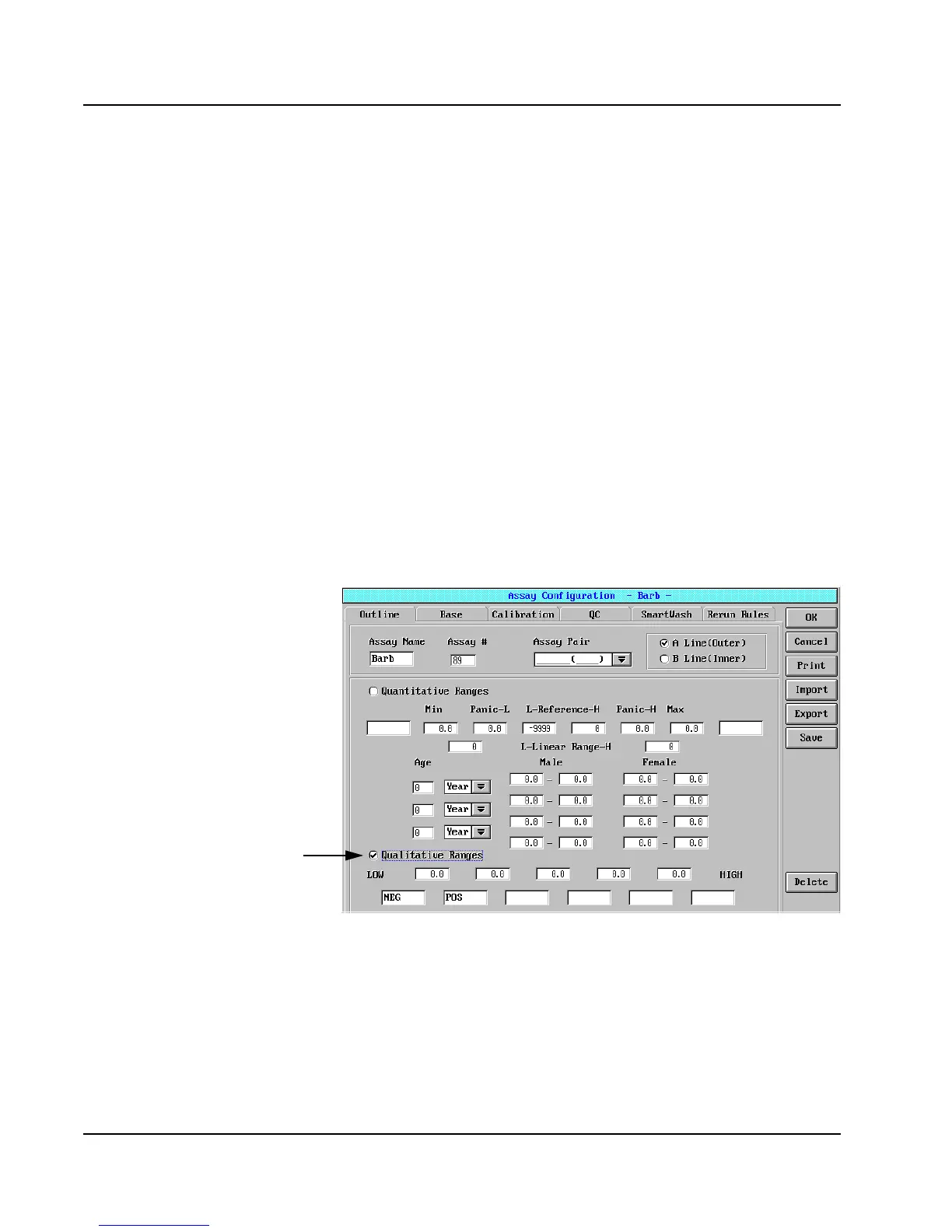
Figure 3: Assay Configuration Screen, Outline Page
5. Quantitative Ranges is the default setting. Select the
checkbox (聺) next to Qualitative Ranges.
Select



 To Next Page