EasyManua.ls Logo

Acom 700S - Figure 7-2 | Examples of USB to RS-232 Converters; Table 7-2 | RS-232 Connection Cable Wiring

Acom 700S
92 pages
Print Icon
To Next Page IconTo Next Page
To Previous Page IconTo Previous Page
Loading...
User's Manual | ACOM 700S | 1.8-54 MHz Linear Amplifier
April 2024
S e c t i o n MAINTENANCE | Page 61 of 92
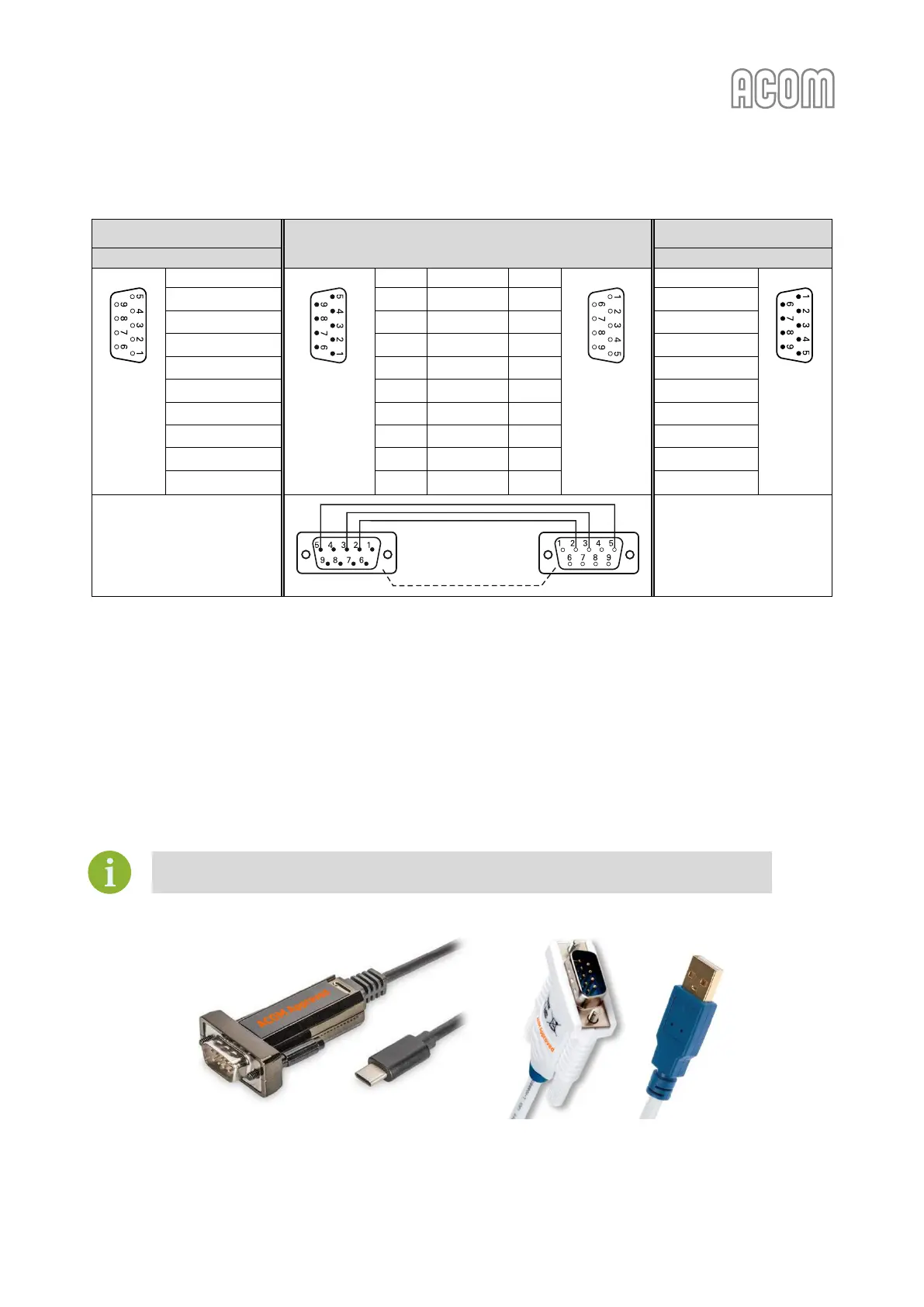
Table 7-2 | RS-232 connection cable wiring
ACOM 700S Rear panel
Connecting cable
Personal Computer
RS-232 connector
RS-232 connector
D-sub
connector,
9-pin,
female
(Front
view)
1 | Not connected
D-sub
connector,
9-pin, male
(Solder view)
1
Not connected
-
D-sub
connector,
9-pin, female
(Solder view)
1 | DCD
D-sub
connector,
9-pin,
male
(Front
view)
2 | TxD
2
––––––––
2
2 | RxD
3 | RxD
3
––––––––
3
3 | TxD
4 | Not connected
4
Not connected
-
4 | DTR
5 | GND
5
––––––––
5
5 | GND
6 | DSR
6
Not connected
-
6 | DSR
7 | Not connected
7
Not connected
-
7 | RTS
8 | CTS
8
Not connected
-
8 | CTS
9 | Not connected
9
Not connected
-
9 | RI
Housing
Housing
Ext. shield
Housing
Housing
Table 7-2 | RS-232 connection cable wiring
OR
"USB to RS-232" converter.
Nowadays, most computers do not have a built-in RS-232 interface (port). But all computers
have a couple of USB ports. So, if this is your case you have to use a "USB to RS-232"
interface converter.
The ACOM recommends using "USB to RS-232" converters produced by FTDI
(www.ftdichip.com) or based on an FTDI chip.
Figure 7-2 | Examples of "USB to RS-232" converters

USB (connector type C) to RS-232 converter
USB (connector type A) to RS-232 converter
Figure 7-2 | Examples of "USB to RS-232" converters

Cable shield

Table of Contents

Other manuals for Acom 700S

Related product manuals