User Manual – General instruction for use
USER MANUAL • X-MIND prime • (19) • 01/2020 • NXMPEN010C
8.4.1 Main GUI area functions
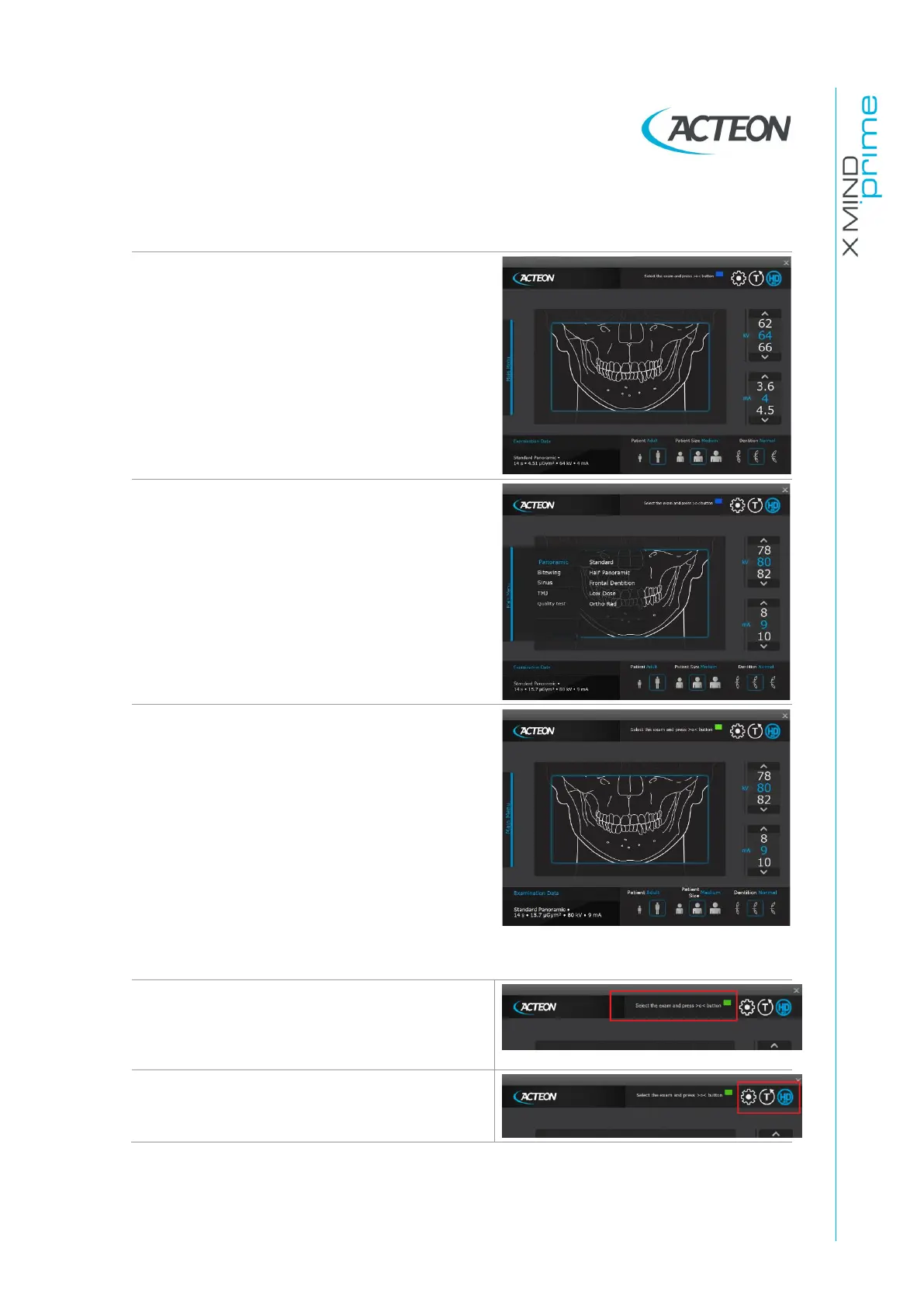
In the main area of the Virtual Interface, a
picture shows the anatomical region matching
the corresponding selected exam.
Click on Main Menu to open the exam
selection menu. After selecting the exam
mode (i.e. Panoramic), the user can choose
further options (i.e. Half Panoramic Left).
The user can choose from different options.
•
Adult/Child: the suggested pre-set
exposure values (see paragraph 8.11) will
be automatically loaded. For Panoramic
exams with child selection, the exposure
values and the trajectory length are
reduced
•
Patient Size: the correct pre-set exposure
values will be automatically loaded
•
Biting type: the position of the focus layer
will be automatically adjusted
•
kV/mA selection: the user can manually
change the exposure parameters
A virtual LED indicates the current status of
the unit, while a virtual display shows all
service messages related to the current
status of the unit and possible error
messages.
Close to the virtual display there are three
different keys that may be selected by the
user: Settings, Test mode (enable/disable),
HD mode (enable/disable)















 To Next Page