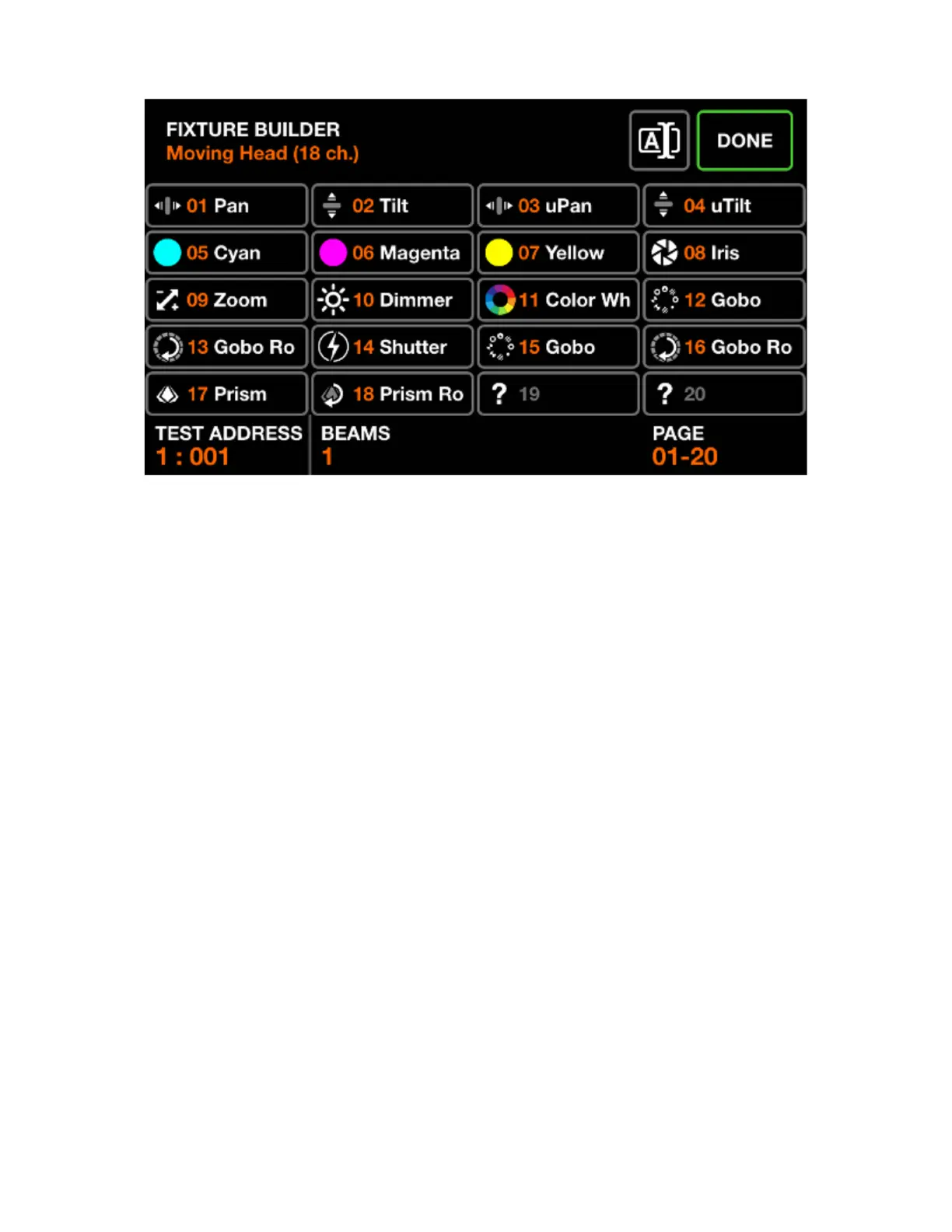
FIXTURE BUILDER
The xture builder is used to create xture proles. A xture prole is a list of channels and features
associated with a particular xture.
Fixture channels screen
Displayed data:
• A grid showing the xtures channel types.
• The xtures starting address used for testing, number of beams, xture name and total number of
channels.
Encoder actions:
• Move the rst encoder to set a test address for the xture. This allows for a connected xture to be
tested in real-time whilst it’s being built.
• Move the second encoder to adjust the number of independently controllable beams a xture has.
For example, an LED bar may have 4 independently controllable RGB beams. Each Wolfmix xture
prole may have up to 64 beams.
• If the xture has more than 20 channels, the fourth encoder can be used to navigate between each
page of 20 channels. Each Wolfmix prole may have up to 255 channels.
Toolbar actions:
• Rename xture.
• Tapping DONE will exit the xture builder. If a change has been made, a save prompt will be displayed.
Other actions:
• Tapping on a grid button or one of the matrix buttons will navigate to the editor of the corresponding
channel. If the channel is empty, a channel type picker will be displayed rst.
12














 To Next Page