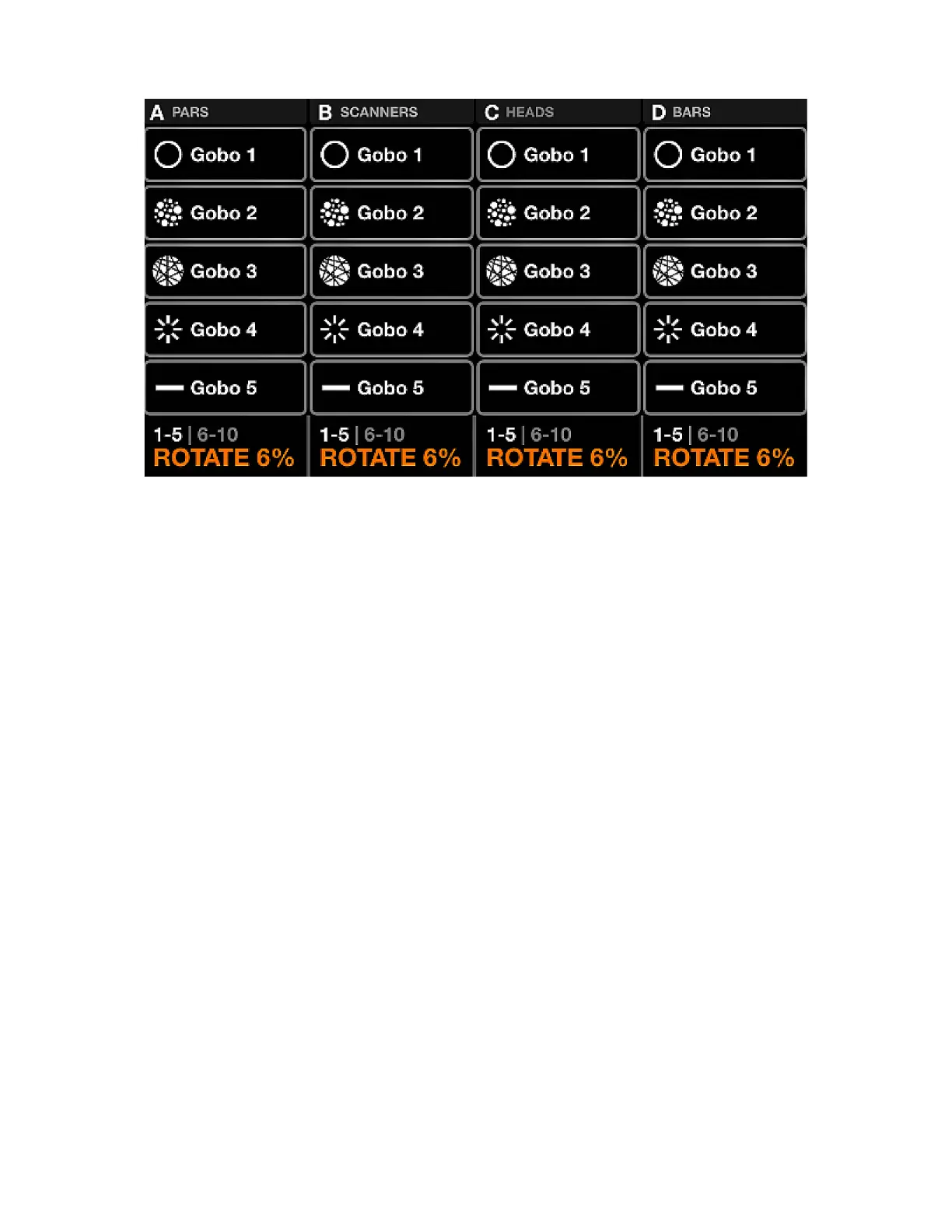
STATIC GOBO
The static gobo screen contains a palette of 10 gobos per group. Selecting a gobo will recall the gobo on
all xtures in the group. If a gobo is not selected, the open gobo will be triggered. When a xture is added
to a project, the Wolfmix will try to group similar gobos together within the rst 5 palette items.
1. Tunnel
2. Holes
3. Fragments
4. Spokes
5. Shape
Displayed data:
• Four columns containing ve gobos. Each column represents one group. Shift + hit the BPM TAP
button to toggle between groups A-D and E-H.
• Gobo bank (colors 1-5, and 6-10).
• Gobo Rotation speed of xtures within the associated group.
Encoder actions:
• Move the encoder to change the Gobo Rotation speed.
• Pushing the encoder toggles between gobos 1-5 and 6-10.
Other actions:
• Tapping one of the gobo buttons triggers the gobo. Shift + tapping one of the gobo buttons allows for
the gobo to be changed. Note that as this is a gobo palette, the new gobo will be applied to all presets.
• When editing a gobo, tapping the ashing Matrix button stores the new gobo and closes the gobo
editor. Tapping any other button cancels the change.
26














 To Next Page