IMPLICIT COMMUNICATIONS WITH AN EDS
SMD17E2 User Manual
ADVANCED MICRO CONTROLS INC.
106
3.3 Host System Configuration
Studio 5000 is used to configure both the ControlLogix and CompactLogix platforms. When using these plat-
forms, you have the option of using a separate Ethernet Bridge module or an Ethernet port built into the pro-
cessor.
If the Ethernet port is built into processor, the only step you have to take before adding an AMCI SMD17E2 is to
create a new project with the correct processor or modify an existing project. Once this is done, the Ethernet port
will automatically appear in the Project Tree. If you are using an Ethernet bridge module, you will have to add it to
the I/O Configuration tree before adding the unit to your project.
Refer to your Rockwell Automation documentation if you need instructions for configuring the ethernet port.
3.4 Add the SMD17E2 to Your Project
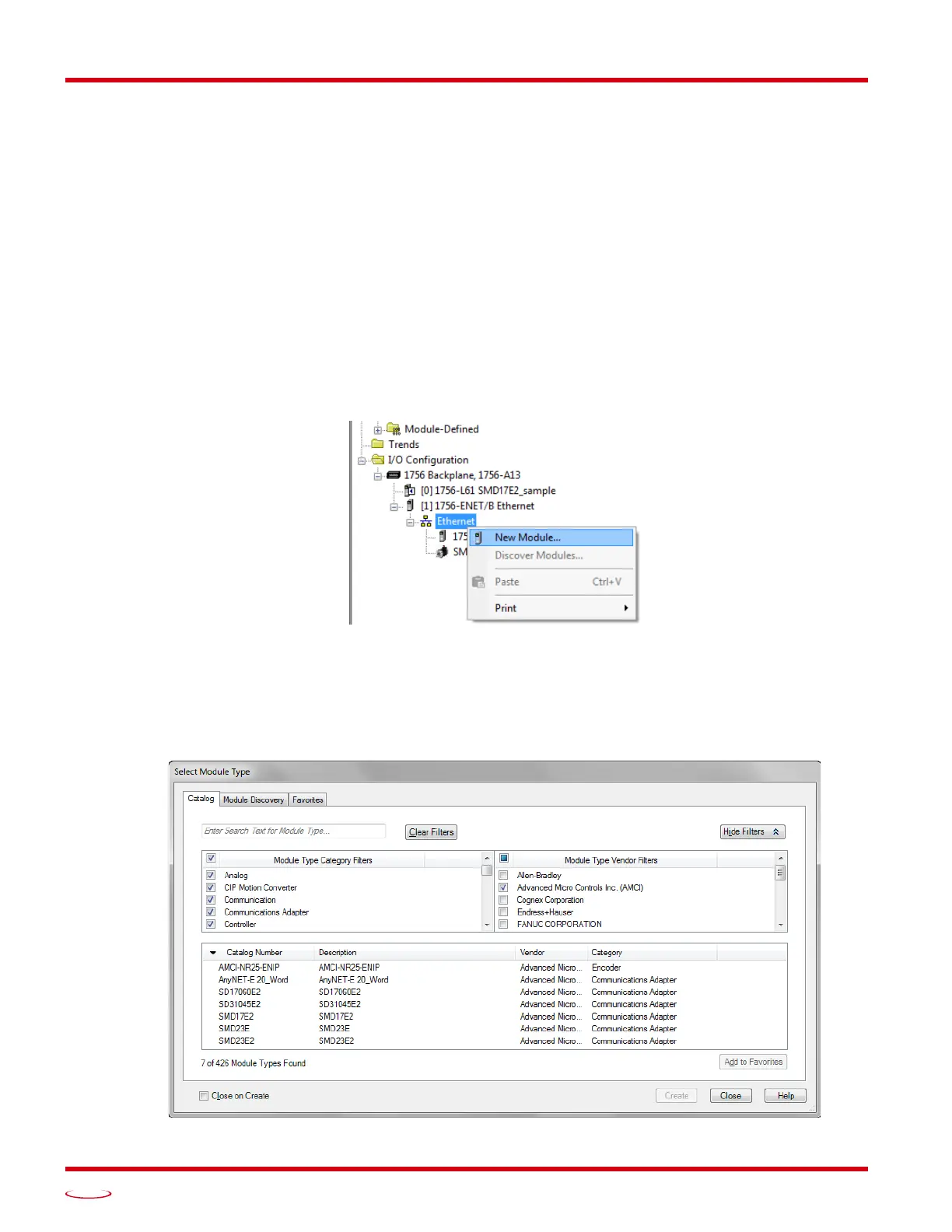
You can add an AMCI SMD17E2 to the project once the Ethernet port (built-in or bridge module) is configured.
As shown in figure
T3.6 below, the Ethernet port will be listed under the I/O Configuration tree.
1) Right click on the Ethernet port and then click on “New Module...” in the pop-up menu.
Figure T3.6 Adding an AMCI Ethernet Driver
2) In the resulting Select Module Type screen, select “Advanced Micro Controls In. (AMCI)” in the Vendor
Filters. This will limit the results to catalog numbers from AMCI.
3) Select “SMD17E2” in the resulting list.
4) Click on the [Create] button to create the module.
5) Click on [Close] if necessary to close the Select Module Type screen.
Figure T3.7 Selecting the Networked Driver



 To Next Page