HOMING AN SMD17E2
SMD17E2 User Manual
ADVANCED MICRO CONTROLS INC.
56
Homing Profiles (continued)
Profile with Backplane_Proximity_Bit
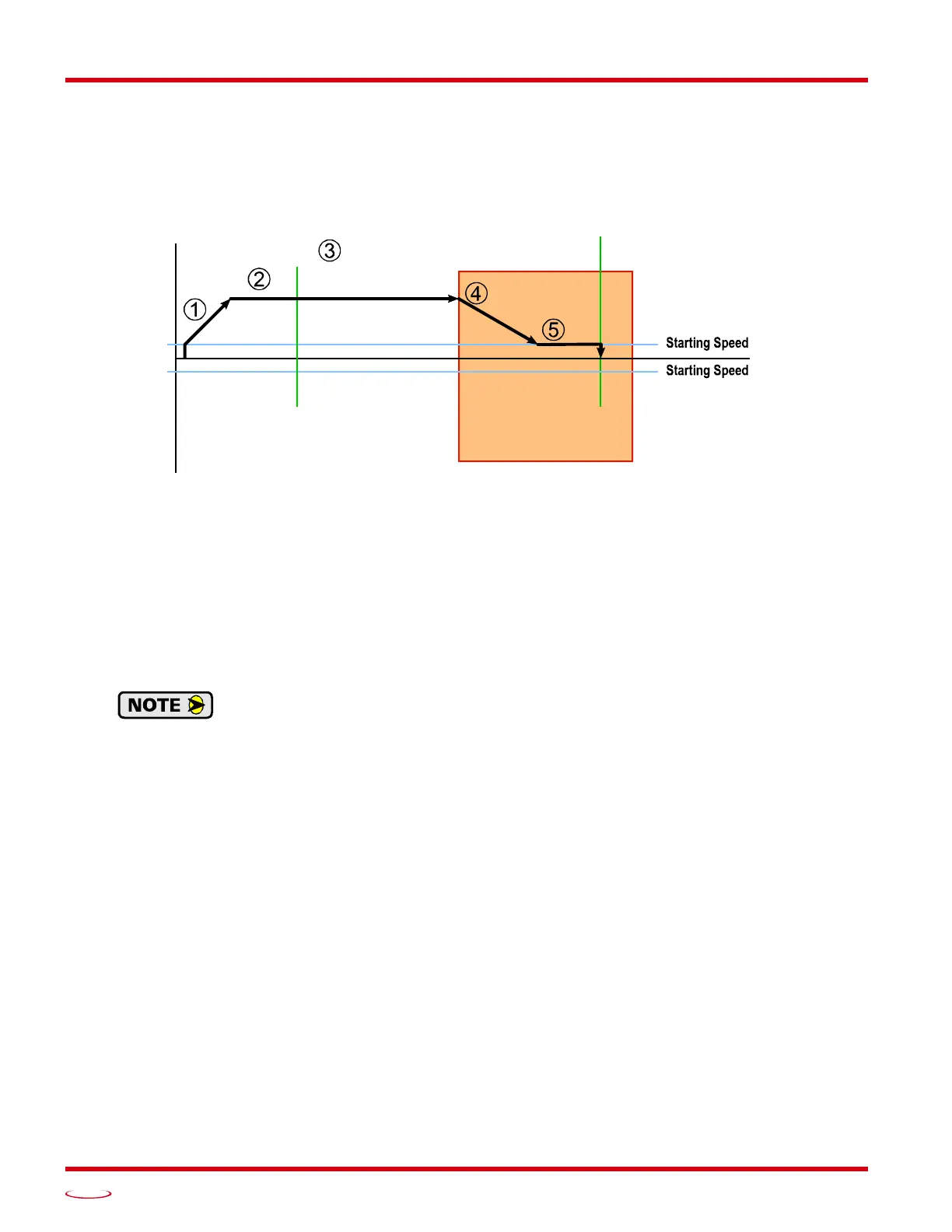
Figure R4.2 below shows the move profile generated by a CW Find Home command when you use the Home
Input with Backplane_Proximity_Bit.
Figure R4.2 Homing with Proximity
1) Acceleration from the configured Starting Speed to the Programmed Speed
2) Run at the Programmed Speed
3) Ignores the Home Input because Backplane_Proximity_Bit has not made a 01 transition.
4) Deceleration towards the Starting Speed when the Backplane_Proximity_Bit transitions from 0 to 1.
The axis will stop as soon as the Home Input becomes active.
5) The Starting Speed is the minimum speed the profile will run at. If the axis decelerates to the Starting
Speed before reaching the Home Input, it will continue at this speed.
Figure R4.2 shows the Backplane_Proximity_Bit staying active until the SMD17E2 reaches
its home position. This is valid, but does not have to occur. As stated in step 4, the unit starts to
hunt for the home position as soon as the Backplane_Proximity_Bit makes a 0
1 transition.
(CW)
P
D
POSITION
Home
Proximity Bit
Active
Home
Input
Home Input



 To Next Page