ETHERNET/IP EXPLICIT MESSAGING
SMD17E2 User Manual
ADVANCED MICRO CONTROLS INC.
114
5.3 Add the Message Instructions to your Ladder Logic
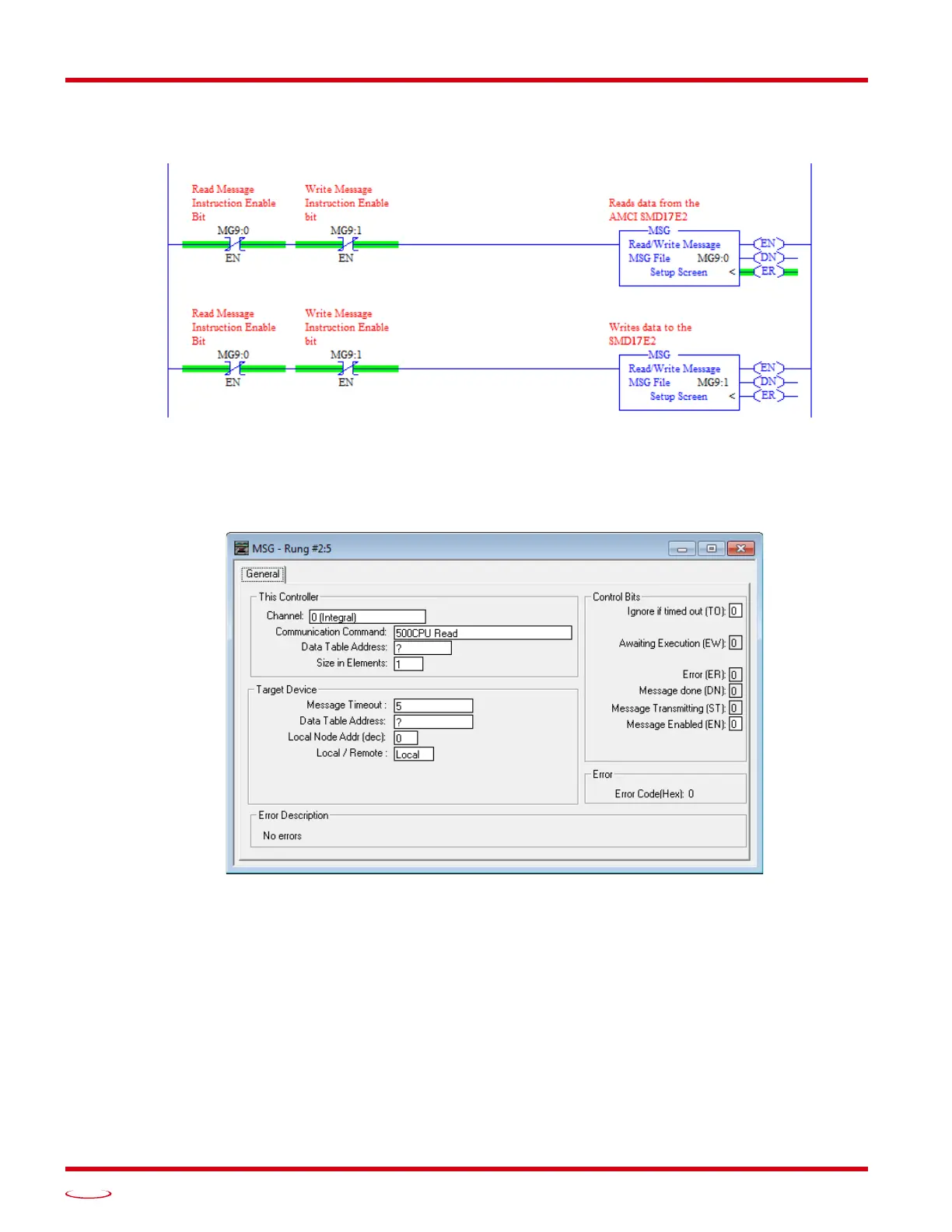
The following rungs show how you can alternately read data from and write data to your SMD17E2.
Figure T5.1 Message Instruction Example
1) Double click on Setup Screen text inside the Message Instruction. The following window will open.
Note that this is the default window and its appearance will change considerably as you progress
through these steps.
Figure T5.2 Message Instruction Setup Screen
2) Double click in the Channel field, click on the , select “1 (Integral)”, and press Enter.
3) Double click in the Communication Command field, click on the , select “CIP Generic” and press
Enter.
4) If the Message Instruction is being used to read data from the SMD17E2, enter the integer file where
the data will be placed in the Data Table Address (Received) field and press enter.
5) If the Message Instruction is being used to write data to the SMD17E2, enter the integer file where
the source data will be located in the Data Table Address (Send) field and press Enter.
6) Enter “20” as the number of bytes needed in either the Size In Bytes (Receive) or Size In Bytes (Send)
fields. The SMD17E2 requires 20 bytes for both Receive and Send.
7) Enter a RIX address in the Extended Routing Info field. Please note that each Message Instruction
must have its own RIX address.



 To Next Page