20 Gear Drive, Plymouth Ind. Park, Terryville, CT 06786
Tel: (860) 585-1254 Fax: (860) 584-1973 http://www.amci.com
SMD17E2 User Manual
ETHERNET/IP EXPLICIT MESSAGING
115
5.3 Add the Message Instructions to your Ladder Logic (continued)
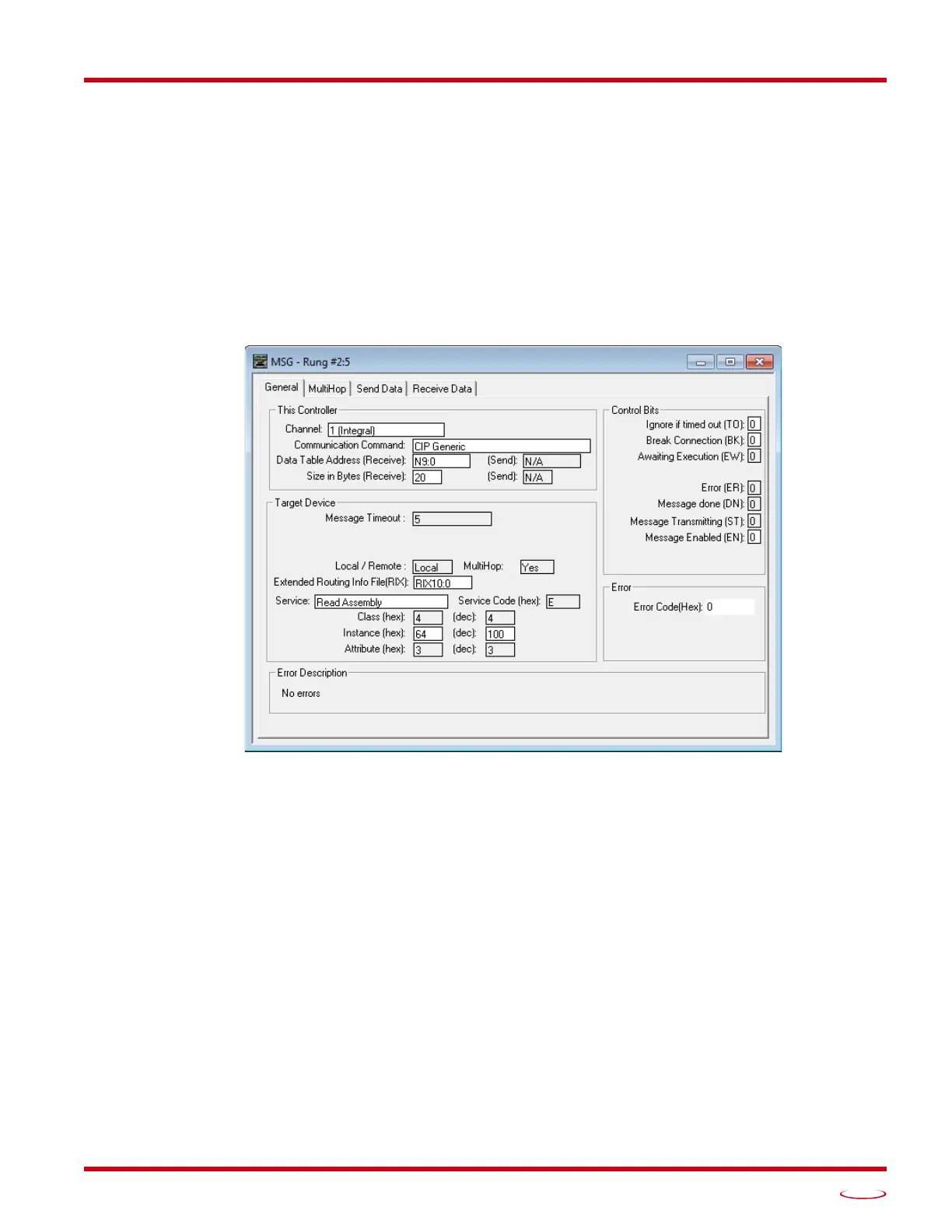
8) Double click in the Service field and select “Read Assembly” for a Message Instruction that is being
used to read data from the SMD17E2, or “Write Assemble” for a Message Instruction that is being
used to send data to the SMD17E2, and press Enter.
9) For Read operations, the Service Code field will change to “E” (hex). For Write operations, the Ser-
vice Code field will change to “10” (hex). For both read and write operations, the Class field will
change to “4” (hex), and the Attribute field will change to “3” (hex).
10) For Read operations, enter a value of 100 decimal (64 hex) in the Instance field.
For Write operations, enter a value of 150 decimal (96 hex) in the Instance field.
The figure below show a typical configuration for Message Instructions being used to read data from the
SMD17E2. Please note that the Data Table Address (Receive) field may be different in your application.
Figure T5.3 Read Message Instruction Setup Screen



 To Next Page