20 Gear Drive, Plymouth Ind. Park, Terryville, CT 06786
Tel: (860) 585-1254 Fax: (860) 584-1973 http://www.amci.com
SMD17E2 User Manual
PROFINET NETWORK CONFIGURATION
125
7.4 Add the SMD17E2 to the PROFINET Network (continued)
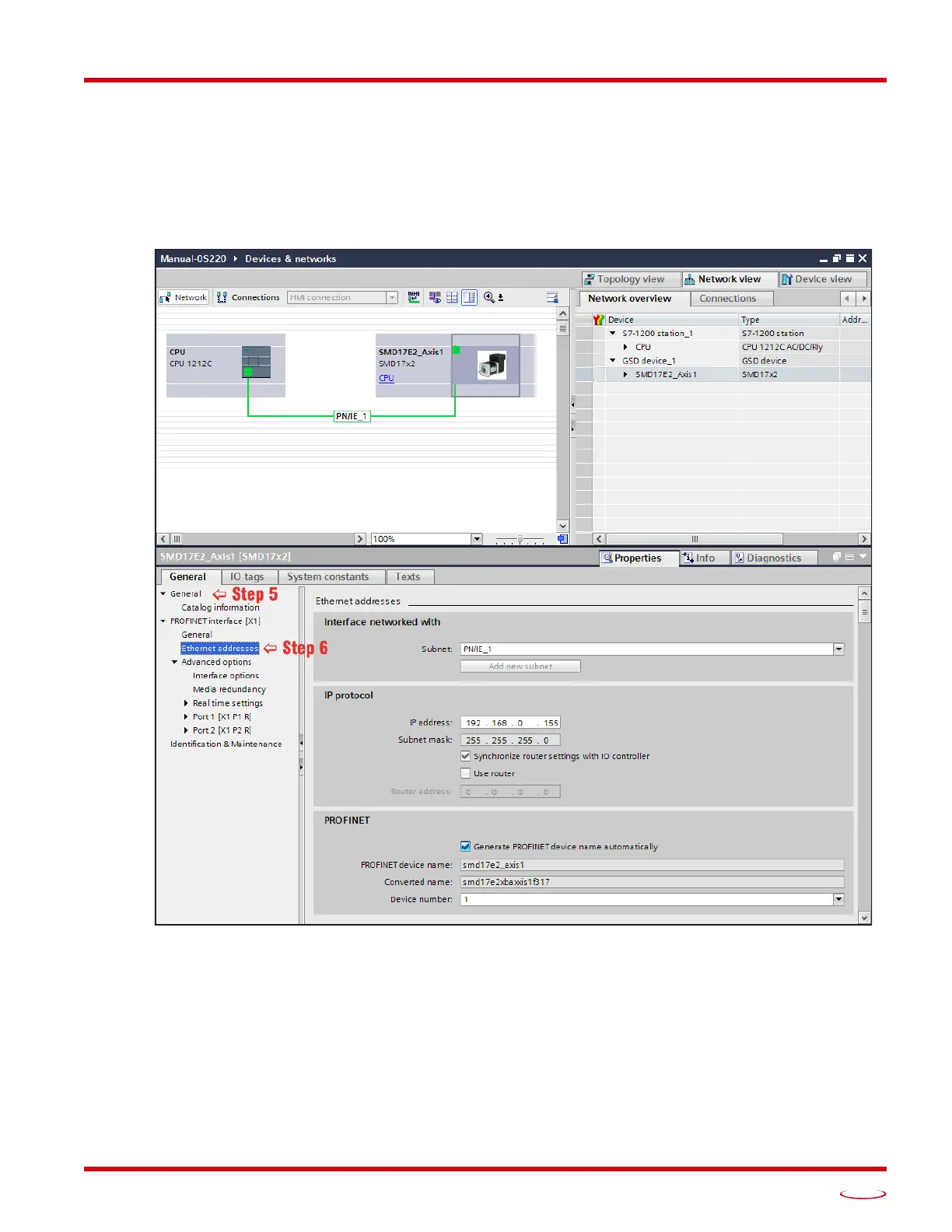
5) Right click on the SMD17 icon and select “Properties” from the pop up menu. The Inspector window will
open at the bottom of the screen. Under the “General” tab, select the “
General” heading. You can rename
the SMD17 by changing the Name: field.
6) Under the “
PROFINET interface [x1]” heading, select “Ethernet addressing”. Under the IP protocol
section, set the desired IP address and subnet mask for the SMD17.
Figure T7.3 Networked Driver IP Addressing



 To Next Page