EKI-1526(TI) | 1528(TI) User Manual 8
2.1.3 LED Indicators
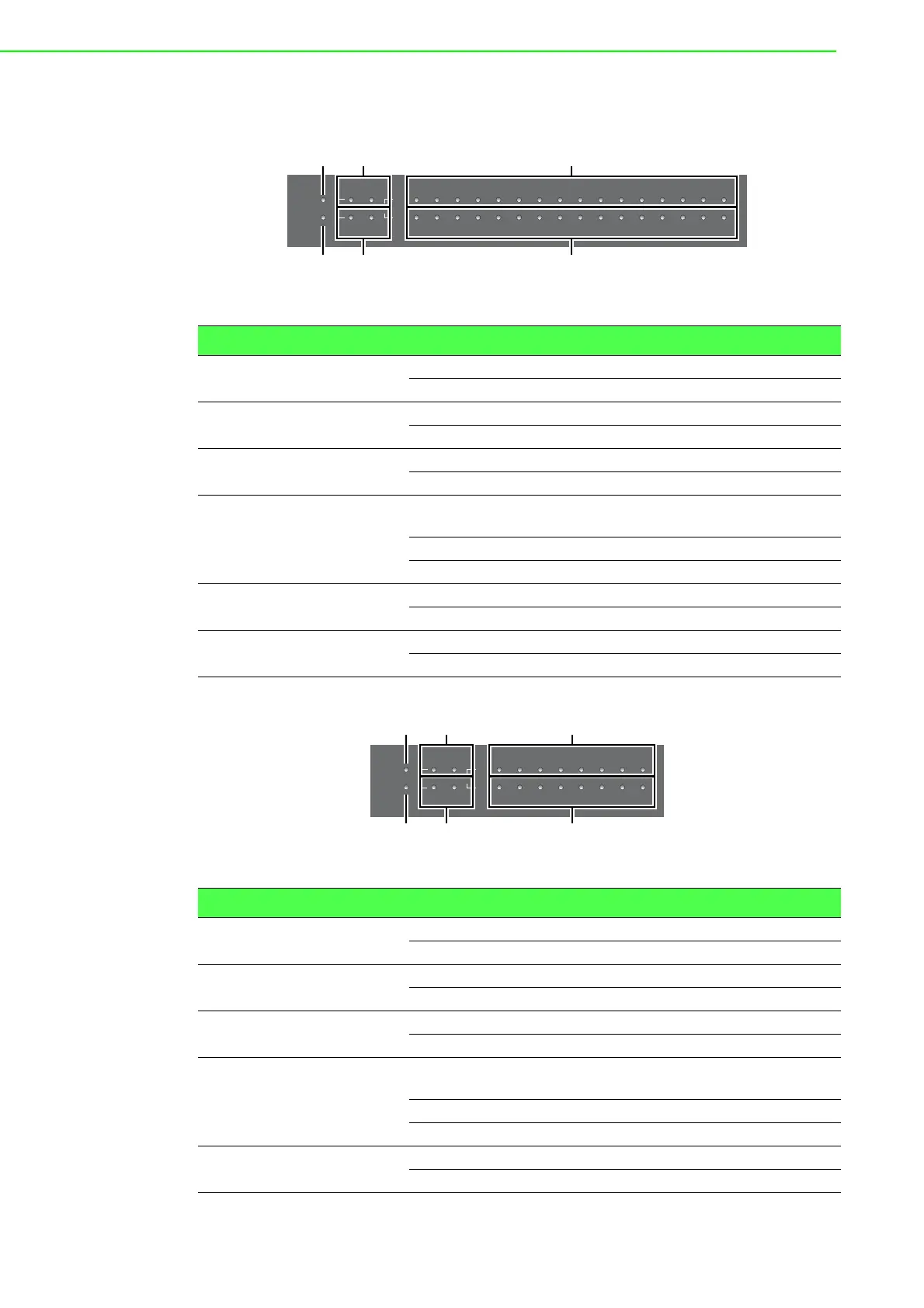
The following view shows the EKI-1526/EKI-1526T/EKI-1526I/EKI-1526TI.
Figure 2.7 System LED Panel
The following view shows the EKI-1528I/EKI-1528TI.
Figure 2.8 System LED Panel
No. LED Name LED Color Status Description
1 PWR GREEN ON Power is on
OFF Power is off or power error condition exists
2 Link/Active GREEN ON Valid network link
OFF Invalid network link
3 RX GREEN ON Data being received
OFF No data being received
4 Status AMBER ON The device server has been located by utility’s
location function
BLINKING System is ready (1cycle/sec.)
OFF System is not working
5 Speed AMBER ON 1000 Mbps speed
OFF 10/100 Mbps speed
6 TX AMBER ON Data being transmitted
OFF No data being transmitted
No. LED Name LED Color Status Description
1 PWR GREEN ON Power is on
OFF Power is off or power error condition exists
2 Link/Active GREEN ON Valid network link
OFF Invalid network link
3 RX GREEN ON Data being received
OFF No data being received
4 Status AMBER ON The device server has been located by utility’s
location function
BLINKING System is ready (1cycle/sec.)
OFF System is not working
5 Speed AMBER ON 1000 Mbps speed
OFF 10/100 Mbps speed
Status
Rx
Tx
Speed
Serial
LAN 1 2
Link/Active
12345678910111213141516
PWR
Status
Rx
Tx
Serial
LAN 1 2
Link/Active
12345678
PWR


 To Next Page