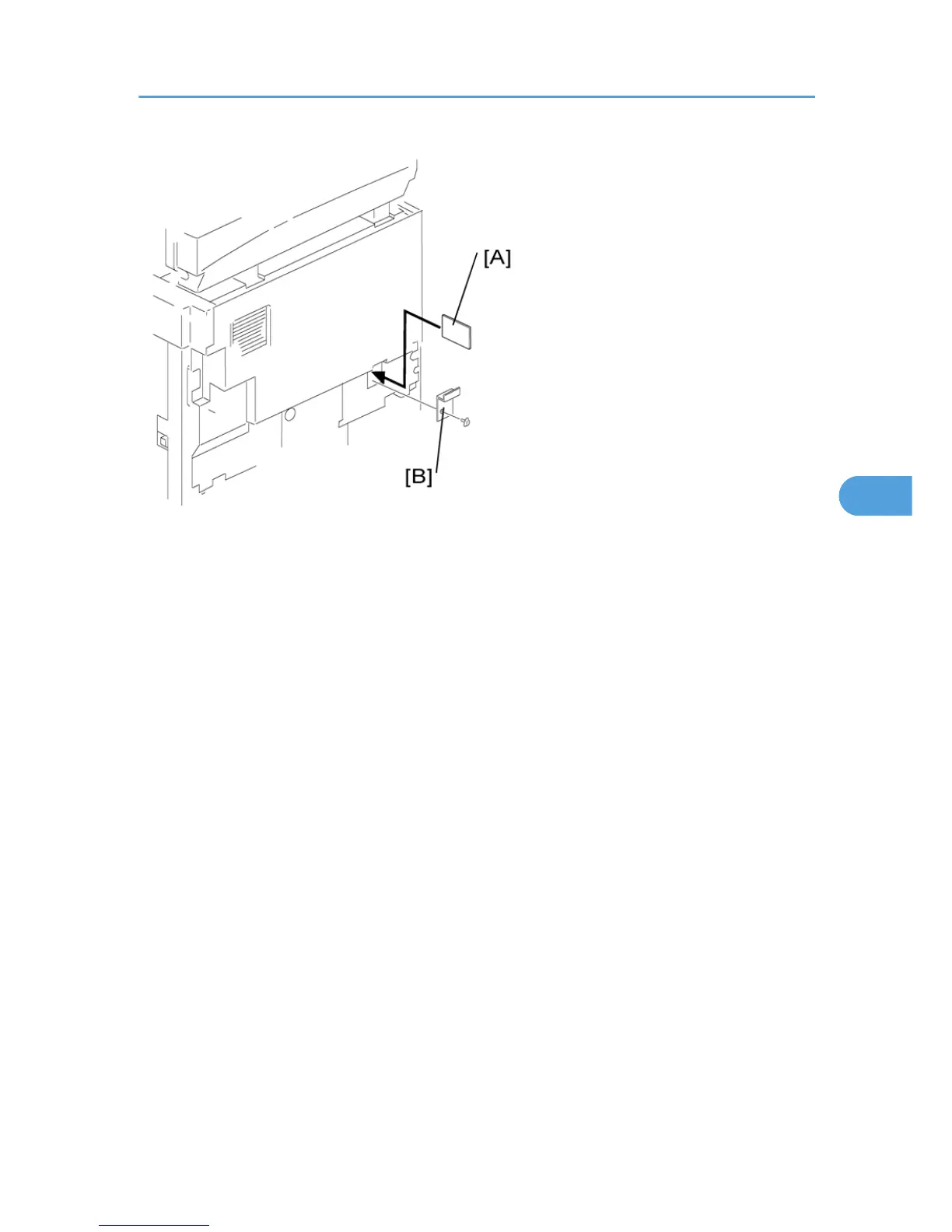
1. Turn off the main switch.
2.
Remove the card cover [B] (1 rivet).
3. Turn the face of the flash memory card [A] ("A" is printed on it) toward your left-hand side, and insert
it into the card slot.
4. Turn on the main switch.
5. Start the SP mode and select SP 5824 1.
6. The machine erases the settings on the card (if any), then writes the machine’s settings to the flash
memory card. This takes about 20 seconds. If uploading fails, an error message appears. If an error
message appears, retry the upload procedure.
7. Turn off the main switch.
8. Remove the memory card.
- NVRAM Download (SP 5825 1) -
SP 5825 1 copies the data from the flash memory card to the NVRAM. The following data is NOT copied
(the data in the NVRAM remains unchanged).
• SP 8221 1 (ADF Original Feed [Front])
• SP 8381 1 (Total: Total Printer Pages)
• SP 8382 1 (Copy Application: Total Print Pages)
• SP 8391 1 (Large Size Print Pages [A3/DLT, Larger])
1. Turn off the main switch.
2. Remove the card cover [B] (1 rivet).
Using SP Modes
113



 To Next Page