Getting to know your telephone
8AL91432ENAD ed01.1 6/94
1 Getting to know your telephone
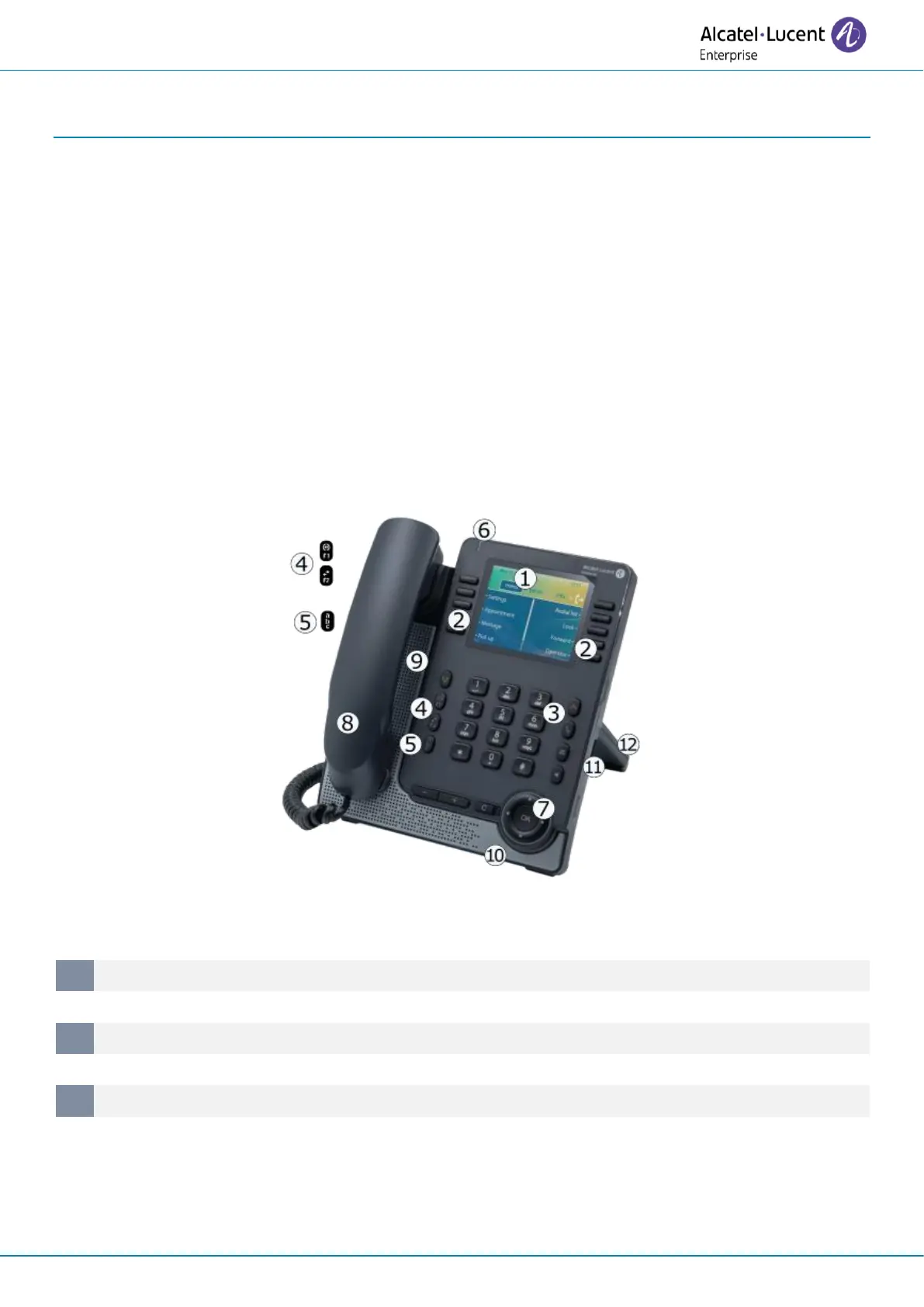
1.1 ALE-30h Essential DeskPhone / ALE-30 Essential DeskPhone
The ALE-30h Essential DeskPhone is part of hybrid models and offers digital or IP mode on the same
network interface via a single Digital or Fast Ethernet port.
The ALE-30 Essential DeskPhone is part of IP models and provides a dual Gigabit Ethernet port.
With its large color display associated to 2x5 dedicated softkeys, and intuitive navigation keys, your
desk phone provides high audio quality for telephone calls either in full duplex hands-free mode or
when using the ergonomic handset (wideband in IP mode, narrow band in Digital mode). You can
enhance your experience by connecting a new alphabetic keyboard or a color 2x10 keys expansion
module. ALE-30h and ALE-30 can be used in your company at your office or at home for remote
working in IP mode. ALE-30h can also be used at your office in Digital mode.
1.1.1 Phone description
Status Led indicator / Ambiant light sensor
Flashing blue: default incoming calls.
Flashing orange (manager/assistant): as assistant, manager’s incoming call.
Flashing purple (supervisor): as supervisor, supervisee’s incoming call.












 To Next Page