Accessories
8AL91432ENAD ed01.1 85/94
4.4 Wall mounting kit
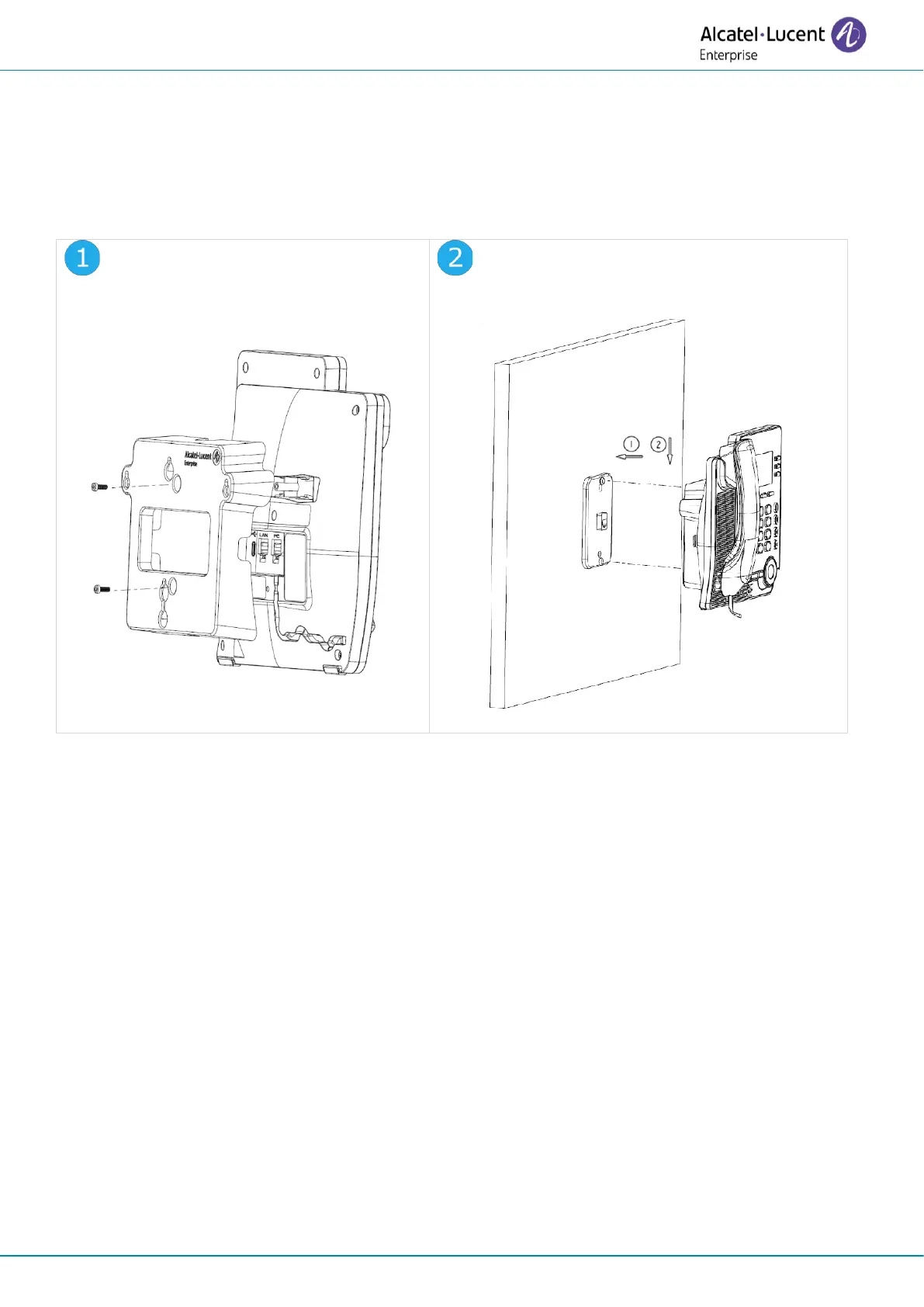
To mount your phone on the wall, you need to install a standard wall plate that you can easily find on
the market. Follow the manufacturer's instructions to install the wall plate on the wall. When the wall
plate is fixed, you can prepare your phone and mount it on the wall. The wall mount kit is sold
separately (refer to the following chapter for the reference: Ordering information).
Fix the support with the phone by
using the 2 screws provided (the size of
screw is M3x8mm).
Hang the assembled phone with wall
mounted kit on the wall plate.
4.5 Third parties headset certified in Developer and Solution Partner
Program (DSPP)
The mission of the DSPP is to support a broad ecosystem of developers and partners throughout the
desk phone lifecycle. In this context, certification tests are performed between partner applications
or devices and Alcatel-Lucent Enterprise’s platforms. It certifies proper inter-working with partner
applications or devices.
Consult the list of available headsets: “List of certified 3rd parties Headsets for Hard phones and Soft
phones.”.












 To Next Page