Page 136
Allied Telesis AT-8000S Switch
Web Browser Interface User’s Guide
Mapping Queues
This section contains the following topics:
• Mapping CoS Values to Queues
• Mapping DSCP Values to Queues
Mapping CoS Values to Queues
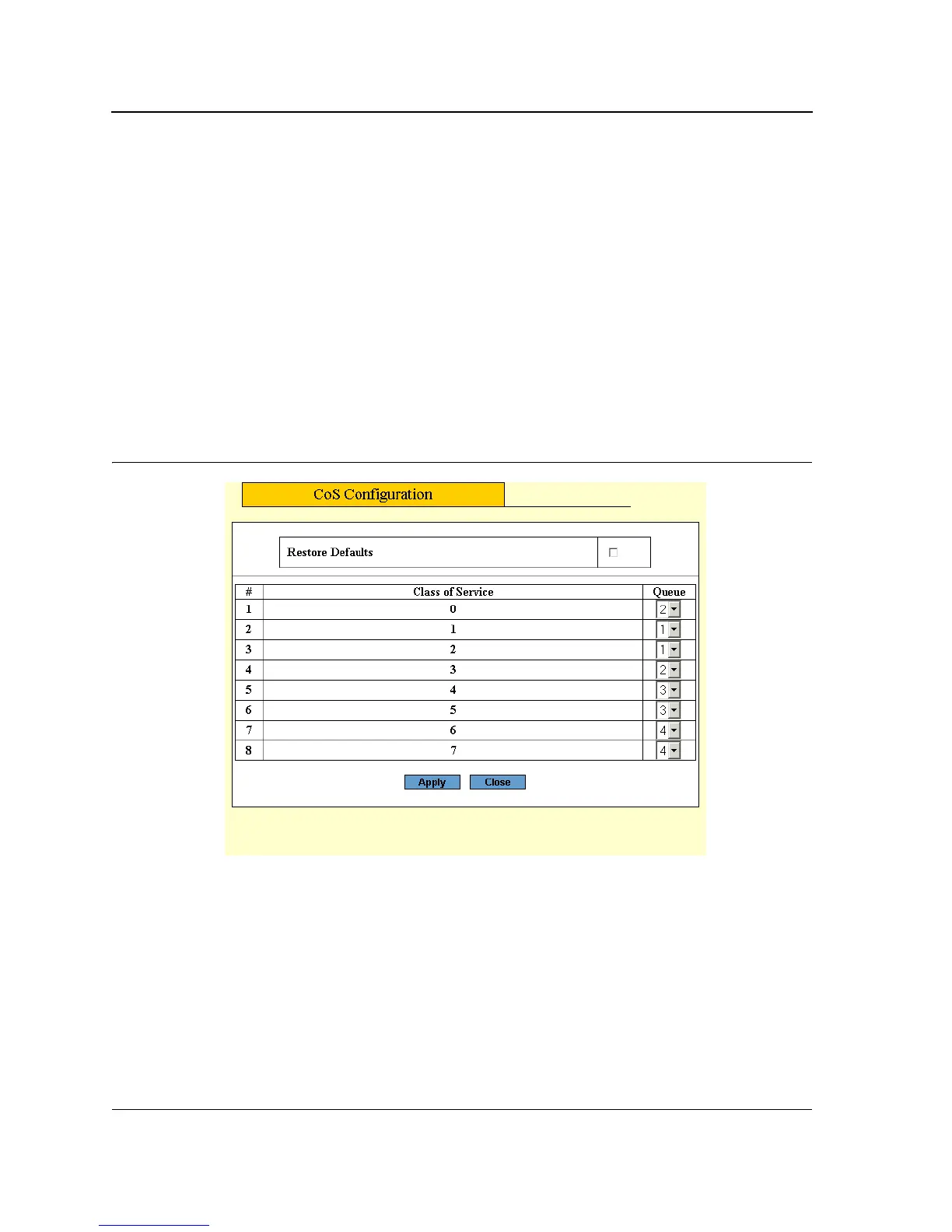
The Configure CoS Page contains fields for classifying CoS settings to traffic queues.
To set CoS to queue:
1. Click Services > Queuing & Scheduling. The CoS Queuing & Scheduling Page opens:
2. Select the Configure CoS Priority to Egress Queues values.
3. Click Configure CoS.
4. Click Configure. The Configure CoS Page opens:
Figure 87: Configure CoS Page
The Configure CoS Page contains the following fields:
• Restore Defaults — Allows you to restore default settings.
• Class of Service — Specifies the CoS priority tag values, where zero is the lowest and 3 is the highest.
• Queue — Defines the traffic forwarding queue to which the CoS priority is mapped. Four traffic priority
queues are supported, where zero is the lowest and 3 is the highest.
5. Modify the Queue values or select Restore Defaults.
6. Click Apply. The CoS to Queue mapping settings are saved and the device is updated.



 To Next Page
 Loading...









