Configuring Ports
Aggregating Ports
Page 63
Defining Trunk Settings
The Trunk Settings Page contains parameters for defining Trunks. To define a port trunk:
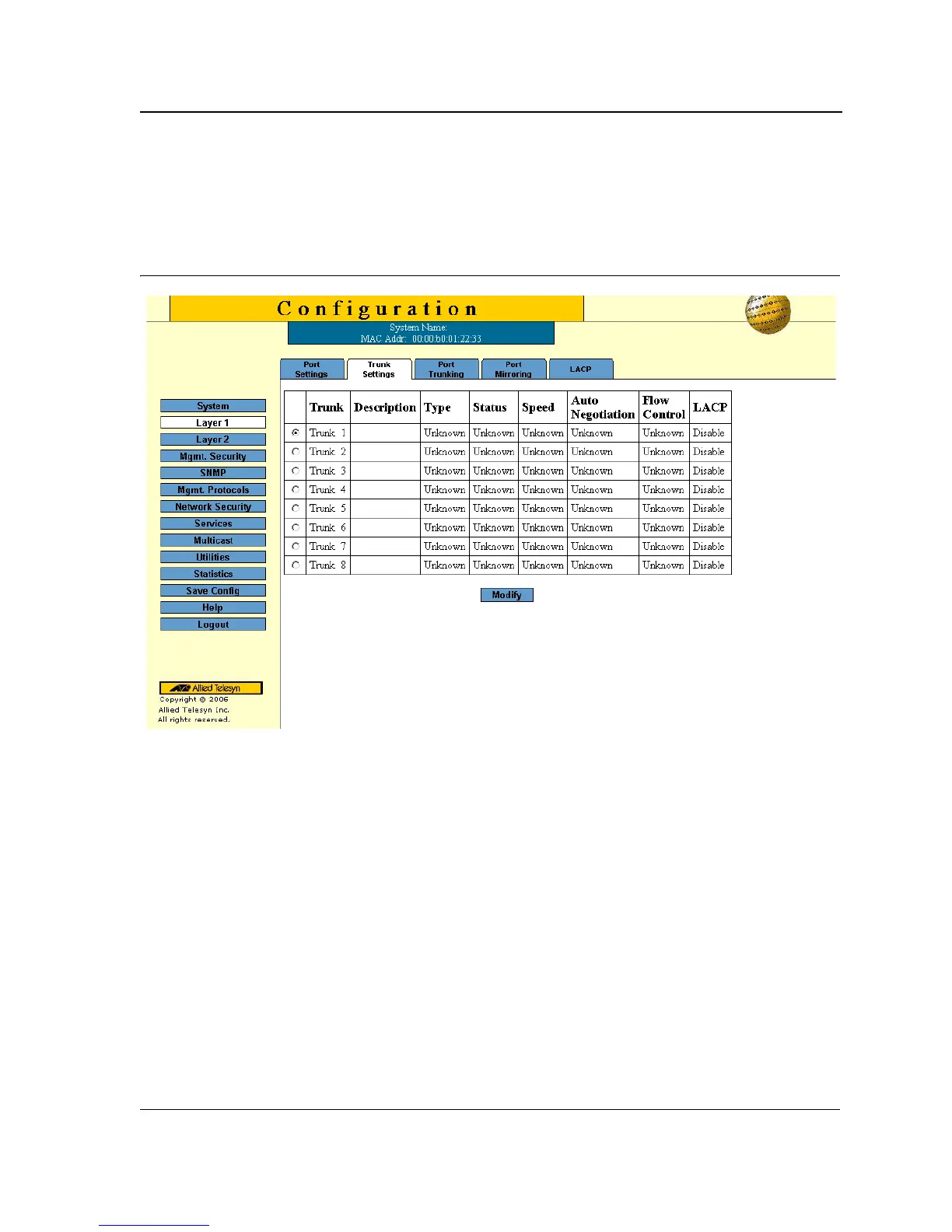
1. Click Layer 1 > Port Trunking. The Trunk Settings Page opens:
Figure 37: Trunk Settings Page
The Trunk Settings Page displays information about the currently defined trunks and contains the following fields:
• Trunk — Displays the trunk name.
• Description — Displays the user-defined trunk name and/or description.
• Type — Indicates the type of LAG defined by the first port assigned to the trunk. For example, 100-Copper,
or 100-Fiber.
• Status — Indicates if the LAG is currently linked. The possible field values are:
– Up — Indicates the LAG is currently linked, and is forwarding or receiving traffic.
– Down — Indicates the LAG is not currently linked, and is not forwarding or receiving traffic.
• Speed — Displays the configured aggregated rate for the trunk. The possible field values are:
– 10 — Indicates the port is currently operating at 10 Mbps.
– 100 — Indicates the port is currently operating at 100 Mbps.
– 1000 — Indicates the port is currently operating at 1000 Mbps.
• Auto Negotiation — Displays the auto negotiation status of the trunk. Auto negotiation is a protocol between
two link partners that enables a port to advertise its transmission rate, duplex mode, and flow control abilities
to its partner.



 To Next Page
 Loading...









