Page 98
Allied Telesis AT-8000S Switch
Web Browser Interface User’s Guide
Defining MSTP Interfaces
Network administrators can assign MSTP settings to a specific interface (port or LAG) using the MSTP Interface
Settings Page.
To define MSTP interface settings:
1. Click Layer 2 > MSTP. The MSTP Page opens.
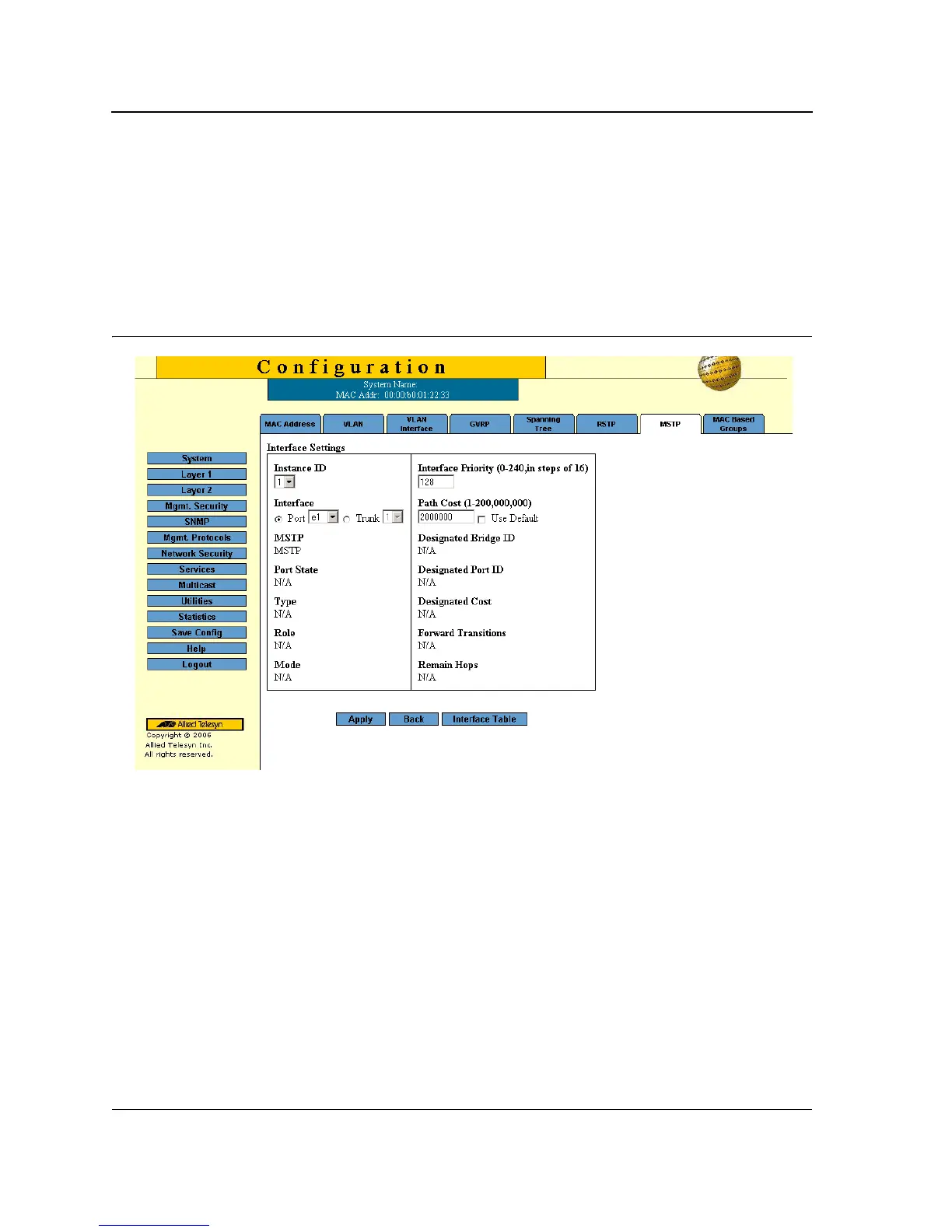
2. Click Configure next to the Configure Interface Settings option. The MSTP Interface Settings Page opens:
Figure 60: MSTP Interface Settings Page
The MSTP Interface Settings Page
contains the following fields:
• Instance ID — Lists the MSTP instances configured on the device. The possible field range is 0-7.
• Interface Priority — Defines the interface priority for the specified instance. The default value is 128.
• Interface — Displays the interface for which the MSTP settings are displayed. The possible field values are:
– Port of Unit — Specifies the port for which the MSTP settings are displayed.
– LAG — Specifies the LAG for which the MSTP settings are displayed.
• Path Cost — Indicates the port contribution to the Spanning Tree instance. The field range is 1-200,000,000.
• MSTP — Specifies whether or not MSTP is enabled on the interface. The possible field values are:
– Enable — Enables MSTP on the interface.
– Disable — Disables MSTP on the interface.
• Port State — Indicates whether the port is enabled for the specific instance. The possible field values are:
– Enable — Enables the port for the specific instance.



 To Next Page
 Loading...









