Page 164
Allied Telesis AT-8000S Switch
Web Browser Interface User’s Guide
Defining RMON Alarms
The RMON Alarm Page contains fields for setting network alarms. Network alarms occur when a network
problem, or event, is detected. Rising and falling thresholds generate events.
To set RMON alarms:
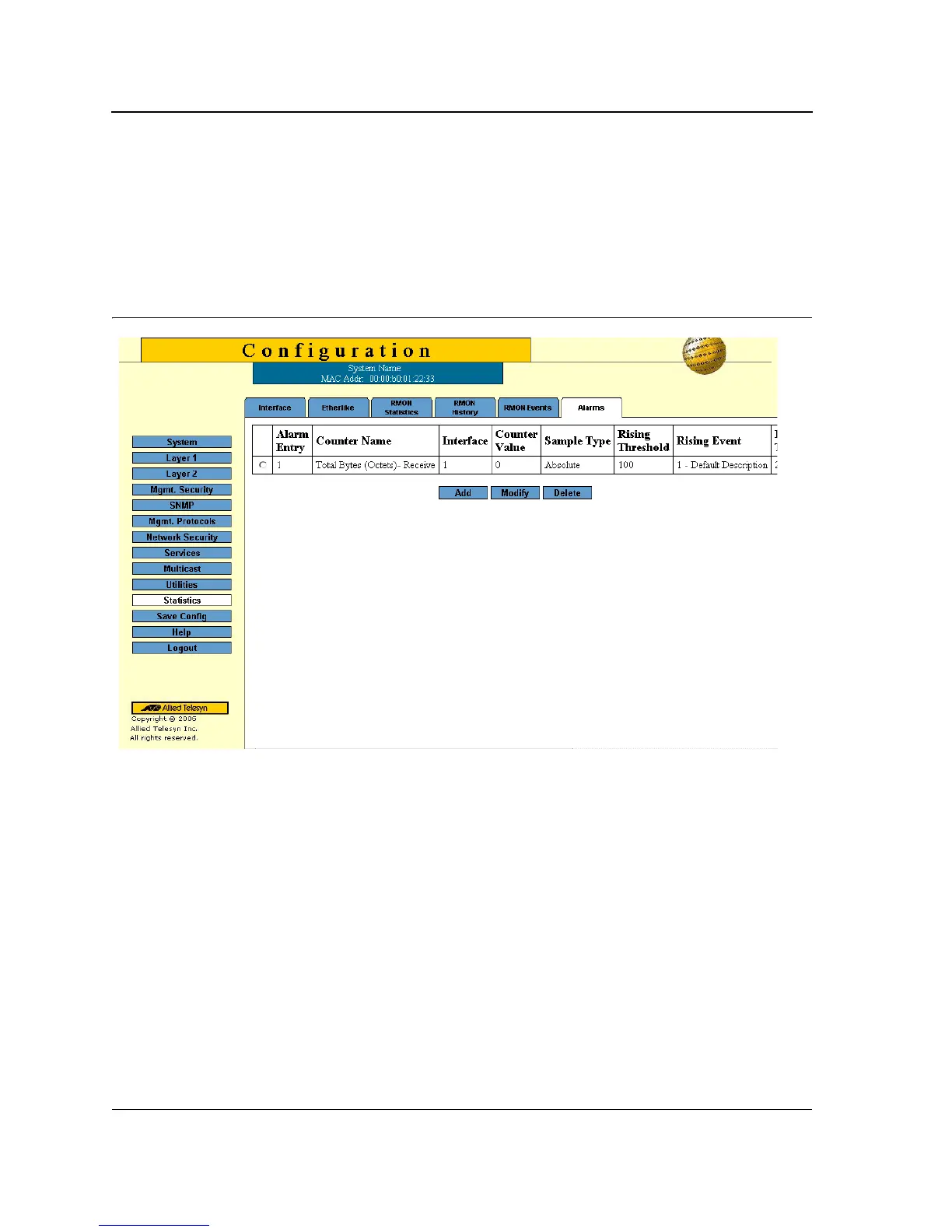
1. Click Statistics > Alarm. The RMON Alarm Page opens:
Figure 108:RMON Alarm Page
The RMON Alarm Page contains the following fields:
• Alarm Entry — Indicates a specific alarm.
• Counter Name — Displays the selected MIB variable.
• Interface — Displays interface for which RMON statistics are displayed. The possible field values are:
– Port — Displays the RMON statistics for the selected port.
– LAG — Displays the RMON statistics for the selected LAG.
• Counter Value — Displays the selected MIB variable value.
• Sample Type — Defines the sampling method for the selected variable and comparing the value against the
thresholds. The possible field values are:
– Delta — Subtracts the last sampled value from the current value. The difference in the values is
compared to the threshold.



 To Next Page
 Loading...









