61
English
Audio Processor
Operation
Divider
CONT.
X-OVER/
LEVEL/
T-CR/
P.UP
P.DOWN
C H STEP
Custom
PSET
RETURN
vol. 35
L
R
2-WAY
1
2
SET UP
x
3
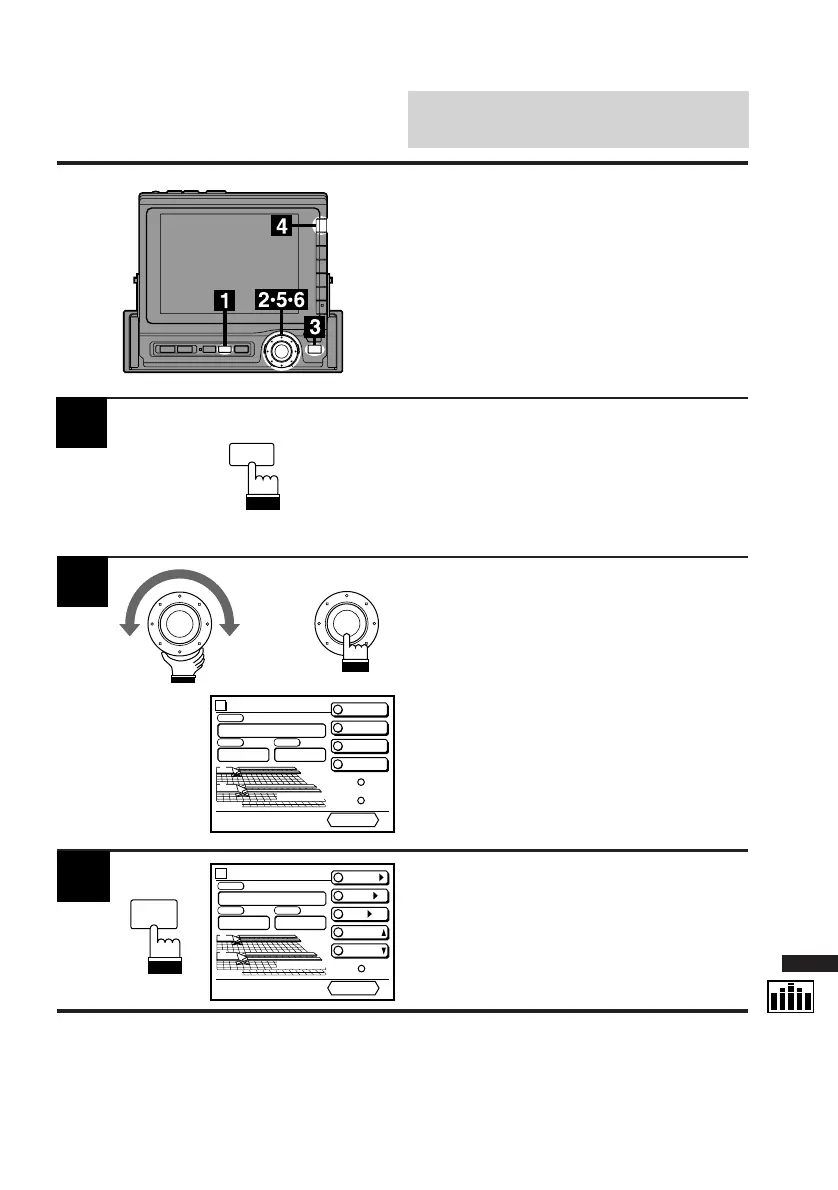
Press the FUNC button.
The contents of the Function Guide screen
changes.
FUNC
Turn the rotary switch and select the "DIV.
cont." menu. Press the rotary switch.
The display changes to the DIV. cont. (Divider
Control) screen.
Press the SET UP button.
The Set Up screen appears.
Adjusting Cross-Over
(X-Over) Point of 2-Way
Divider
If optional Alpine Channel Divider(s) are
connected, you can control the Divider(s) from
the CVA-1000E.
Use this procedure when one or two 2-way-
system channel dividers are connected.
Divider
PRESET 2
PRESET 3
PRESET 4
C H STEP
Custom
PSET
RETURN
vol. 35
L
R
2-WAY
PRESET 1
1
2
3
4



 To Next Page