Altai Technologies Ltd. All rights reserved
C1n Series WIFI AP/CPE Web-admin Configuration Manual
TPS15-003_rev1.3
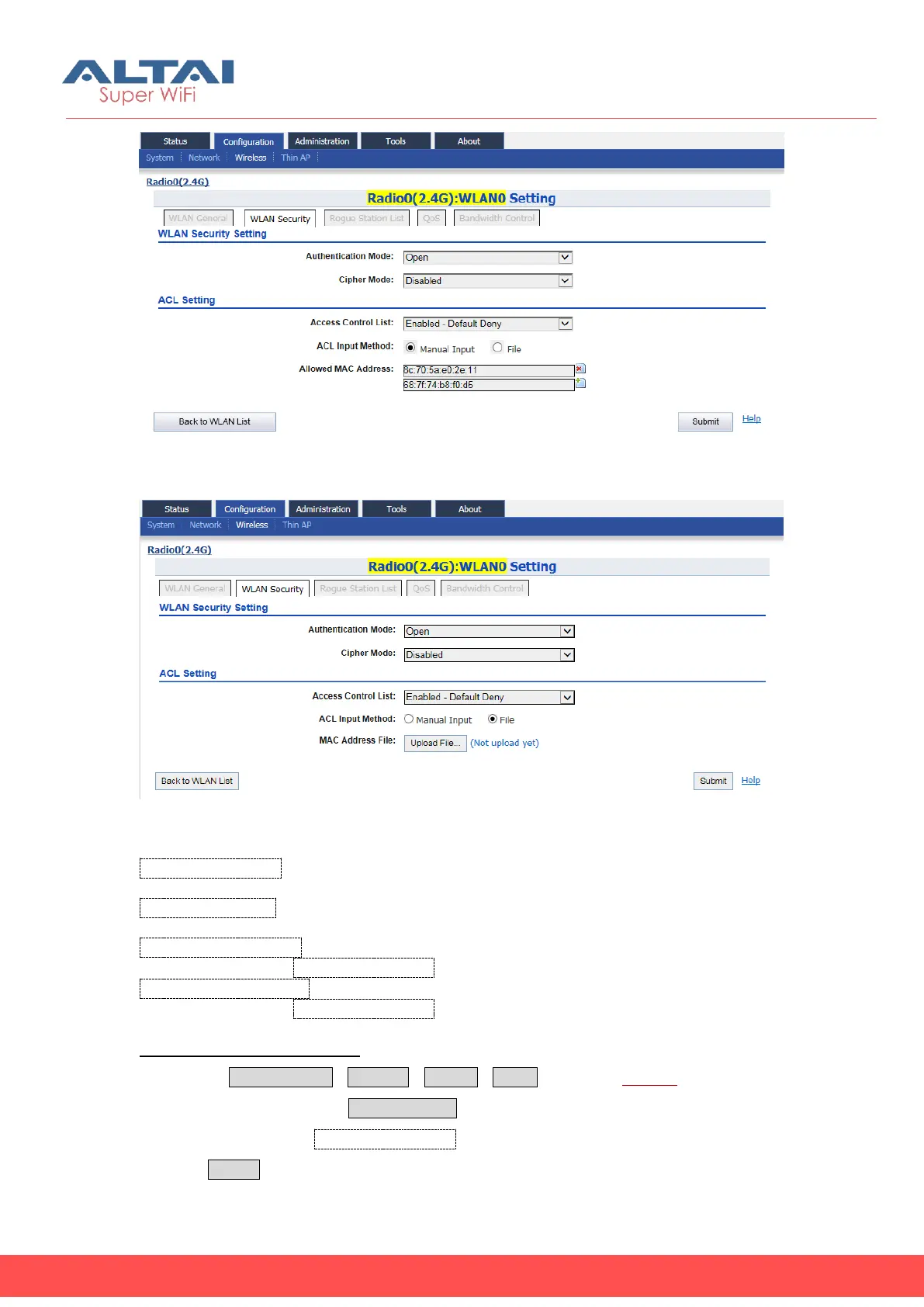
Figure 5-33 ACL-Default Deny
Figure 5-34 ACL-ACL Input Method
Access Control List: Specify the modes of ACL; the options are “Disabled”, “Enabled-
Default Allow”, and “Enable-Default Deny”.
ACL Input Method: Specify the source of ACL; user may manual input the list or
upload the list from text file.
Denied MAC Address: Specify the MAC addresses in the list will be blocked; this
option is available if Access Control List is configured as “Enabled-Default Allow”
Allowed MAC Address: Specify the MAC addresses in the list can access only; this
option is available if Access Control List is configured as “Enable-Default Deny”.
Disable ACL function in WLAN:
1. Select ConfigurationWirelessRadio0WLAN to edit “More…” behind the
WLAN, and then select WLAN Security to access to security configuration page
2. Select “Disable” in Access Control List
3. Click Submit



 To Next Page