Altai Technologies Ltd. All rights reserved
C1n Series WIFI AP/CPE Web-admin Configuration Manual
TPS15-003_rev1.3
In Thin AP mode:
AP will accept the wireless access controller’s management;
AP Execute 802.11 PHY and MAC layer function;
AP will complete encryption/decryption of 802.11 packets;
AP will complete Radio interface statistics …etc.
AC controls AP and gives the configuration information to AP;
AC controls user’s access to a wireless network, user’s data forwarding and data
statistics;
AC response for user’s roaming management and security control…etc.
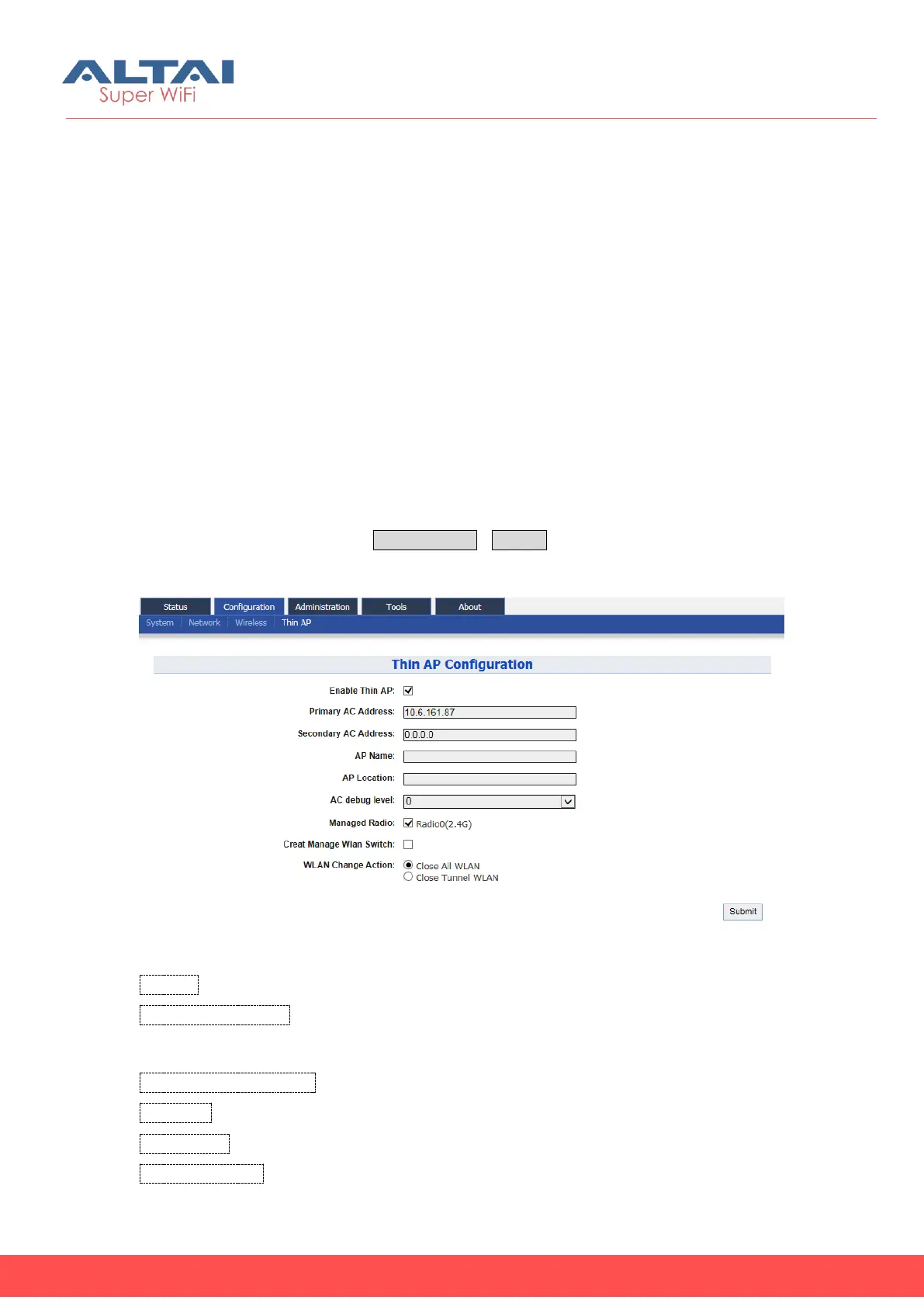
User may configure Thin AP via ConfigurationThin AP.
Figure 5-57 Thin AP Configurations
Thin AP : Enable or disable Thin AP mode.
Primary AC Address: Specify the Primary AC’s IP address or domain name. Thin AP
can also acquire AC’s IP address from DHCP Server by DHCP options (DHCP option60
or option 43) when it’s configured to a DHCP client.
Secondary AC Address: Specify the Secondary AC’s IP address.
AP Name:Specify the Thin AP’s name if necessary.
AP Location: Specify the AP Location information if necessary.
AC debug level: Set AC debug level information (from 0-10).



 To Next Page