User Role
If the VSA and VLAN derivation rules are not matching, then the user VLAN can be derived by a user role.
VLANs Created for an SSID
If the VSA and VLAN derivation rules are not matching, and the User Role does not contain a VLAN, the user
VLAN can be derived by VLANs configured for an SSID or an Ethernet port profile.
Configuring VLAN Derivation Rules
The VLAN derivation rules allow administrators to assign a VLAN to the IAP clients based on the attributes
returned by the RADIUS server.
You can configure VLAN derivation rules for an SSID profile by using the Instant UI or the CLI.
In the Instant UI
To configure VLAN derivation rules:
1. Perform the following steps:
l To configure VLAN derivation rule for a WLAN SSID profile, navigate to Network > New > New WLAN
> VLAN or Network > edit > Edit <WLAN-profile> > VLAN. Select the Dynamic option under the
Client VLAN assignment.
l To configure VLAN derivation rule for a wired network profile, navigate to Wired > New > New Wired
Network > VLAN or Wired > Edit > Edit Wired Network > VLAN. The VLAN tab contents are
displayed.
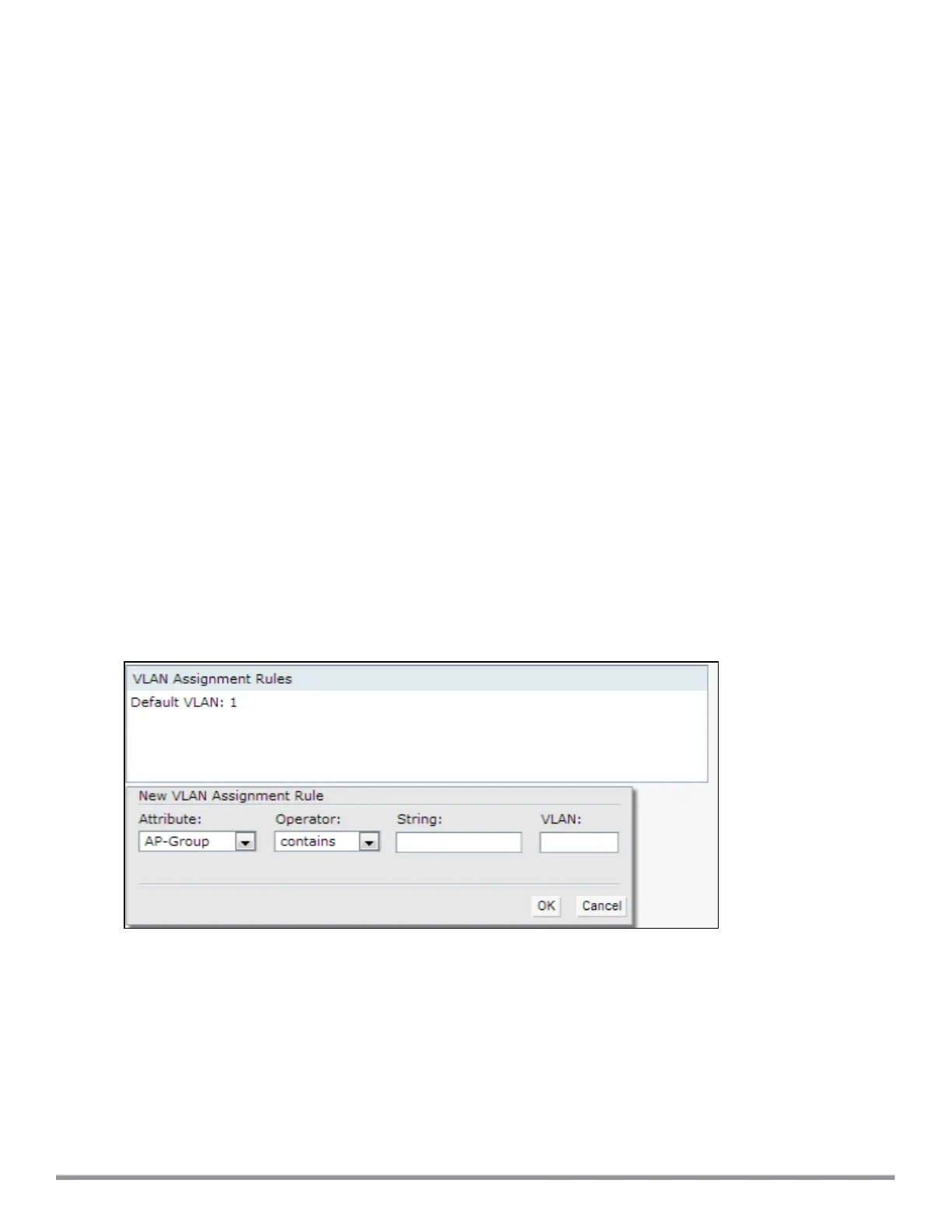
2. Click New to create a VLAN assignment rule. The New VLAN Assignment Rule window is displayed. In
this window, you can define a match method by which the string in Operand is matched with the attribute
values returned by the authentication server.
Figure 48 VLAN Assignment Rule Window
3. Select the attribute from the Attribute drop-down list. The list of supported attributes includes RADIUS
attributes, dhcp-option, dot1x-authentication-type, mac-address, and mac-address-and-dhcp-options. For
information on a list of RADIUS attributes, see RADIUS Server Authentication with VSA on page 151.
4. Select the operator from the Operator drop-down list. The following types of operators are supported:
l contains—The rule is applied only if the attribute value contains the string specified in Operand.
l Is the VLAN—The rule is applied if the VLANis the same as the one returned by the RADIUSattribute.
l equals—The rule is applied only if the attribute value is equal to the string specified in Operand.
l not-equals—The rule is applied only if the attribute value is not equal to the string specified in Operand.
l starts-with—The rule is applied only if the attribute value starts with the string specified in Operand.
Aruba Instant 6.5.0.0-4.3.0.0 | User Guide Roles and Policies | 206



 To Next Page