IAP Platform ArubaOS Release Instant Release
IAP-224/225 ArubaOS 6.3.1.1 or later
versions
Instant 4.0 or later versions
RAP-155/155P ArubaOS 6.3.0 or later
versions
Instant 3.3 or later versions
RAP-108/109 ArubaOS 6.2.0.0 or later
versions
Instant 3.2 or later versions
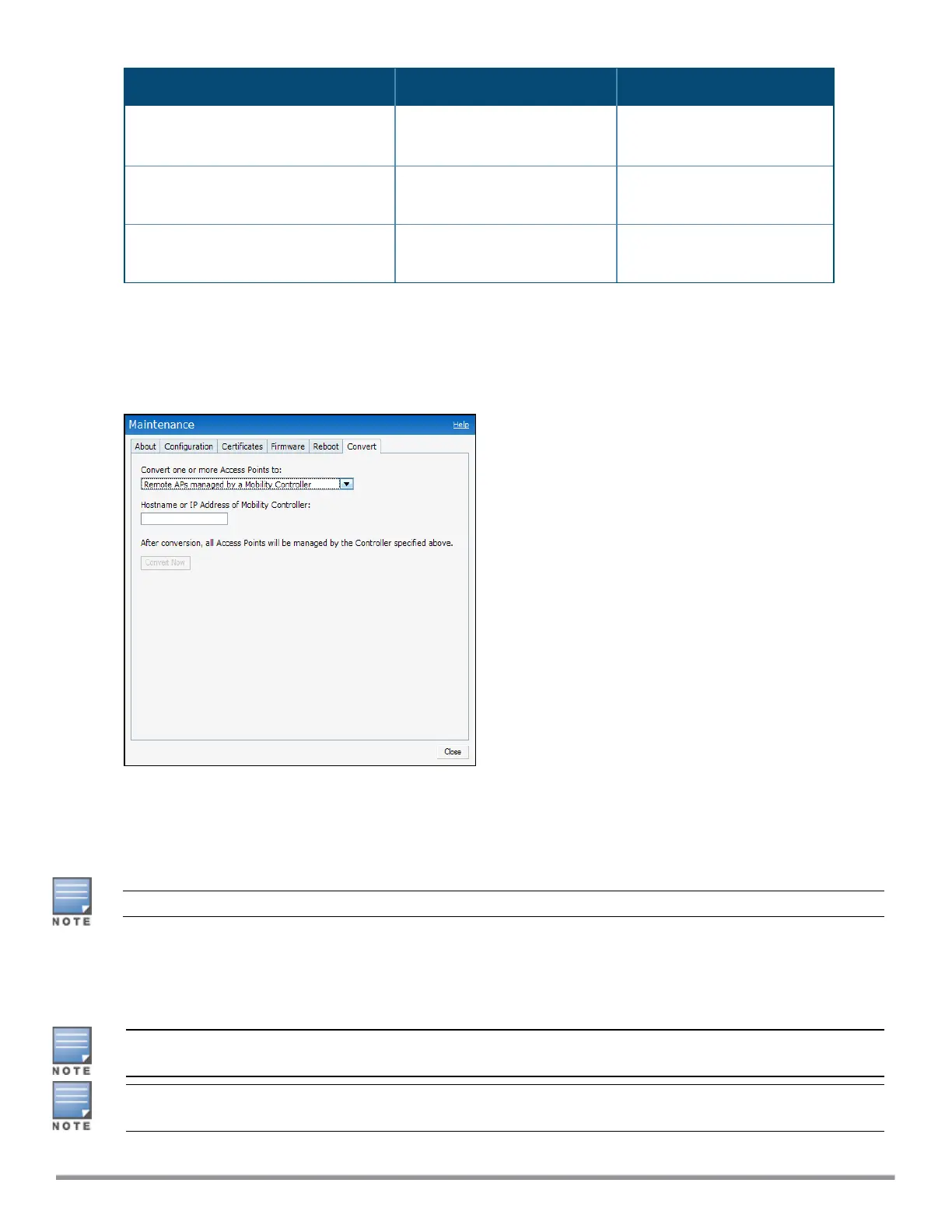
To convert an IAP to a Remote AP:
1. Click Maintenance in the Instant main window.
2. Click the Convert tab. The Convert tab contents are displayed.
Figure 106 Maintenance—Convert Tab
3. Select Remote APs managed by a Mobility Controller from the drop-down list.
4. Enter the host name (fully qualified domain name) or the IP address of the controller in the Hostname or
IP Address of Mobility Controller text box. Contact your local network administrator to obtain the IP
address.
Ensure that the Mobility Controller IP address is reachable by the IAPs.
5. Click Convert Now to complete the conversion. The IAP reboots and begins operating in the Remote AP
mode.
6. After conversion, the IAP is managed by the mobility controller.
For IAPs to function as Remote APs, configure the IAP in the Remote AP whitelist and enable the FTP service
on the controller.
If the VPN setup fails and an error message is displayed, click OK, copy the error logs, and share them with
your local administrator.
Aruba Instant 6.5.0.0-4.3.0.0 | User Guide IAP Maintenance | 356



 To Next Page