391 | ClearPass Guest Setup Aruba Instant 6.5.0.0-4.3.0.0 | User Guide
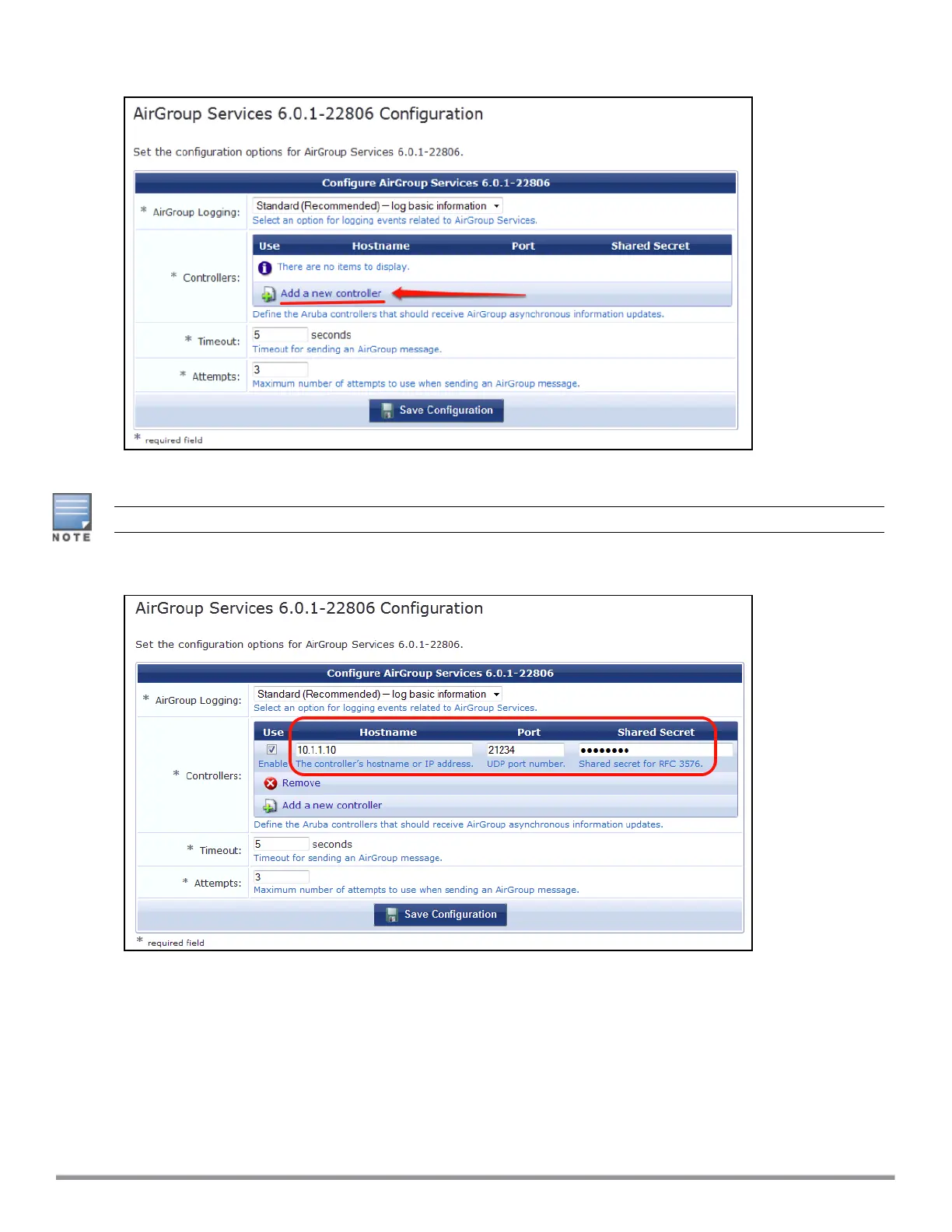
Figure 115 Add a New Controller for AirGroup Services
4. Update the parameters with appropriate values.
Ensure that the port configured matches the CoA port (RFC 3576) set on the IAP configuration.
Figure 116 Configure AirGroup Services: Controller Settings
5. Click Save Configuration.
In order to demonstrate AirGroup, either an AirGroup Administrator or an AirGroup Operator account must be
created.
Creating AirGroup Administrator and Operator Account
To create a AirGroup administrator and AirGroup operator account using the ClearPass Policy Manager UI:
1. Navigate to the ClearPass Policy Manager UI, and navigate to Configuration > Identity > Local Users.



 To Next Page