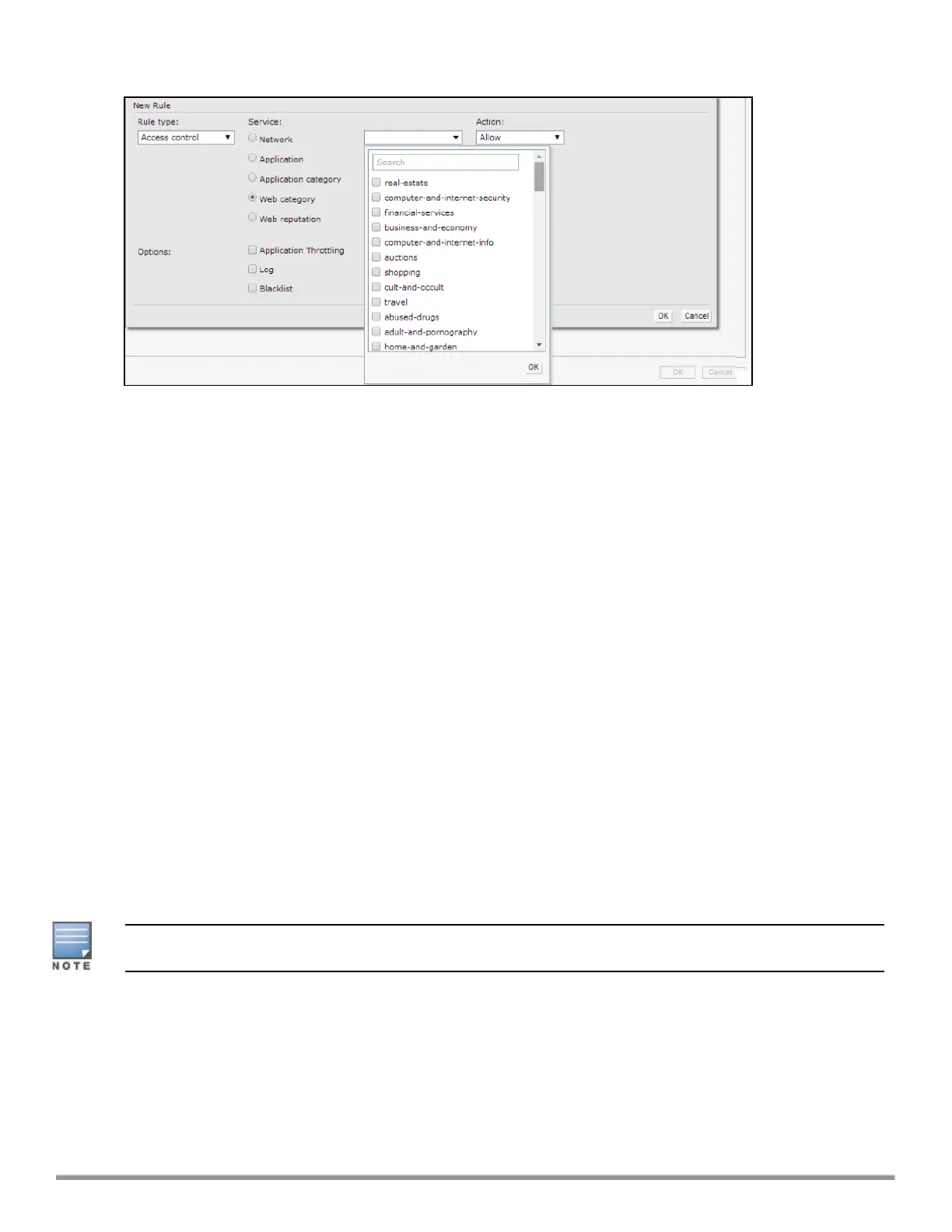
Figure 71 Web Policy Enforcement
b. Select the categories to which you want to deny or allow access. You can also search for a web category
and select the required option.
c. From the Action drop-down list, select Allow or Deny as required.
d. Click OK.
5. To filter access based on the security ratings of the website:
a. Select Web reputation under Service.
b. Move the slider to the required security rating level. Move the slider to select a specific web reputation
value to deny access to websites with a reputation value lower than or equal to the configured value or
to permit access to websites with a reputation value higher than or equal to the configured value. The
following options are available:
n Trustworthy—These are well known sites with strong security practices and may not expose the user
to security risks. There is a very low probability that the user will be exposed to malicious links or
payloads.
n Low risk—These are benign sites and may not expose the user to security risks. There is a low
probability that the user will be exposed to malicious links or payloads.
n Moderate risk—These are generally benign sites, but may pose a security risk. There is some
probability that the user will be exposed to malicious links or payloads.
n Suspicious—These are suspicious sites. There is a higher than average probability that the user will be
exposed to malicious links or payloads.
n High risk—These are high-risk sites. There is a high probability that the user will be exposed to
malicious links or payloads.
c. From the Action drop-down list, select Allow or Deny as required.
For a complete list of categories and information about each of these categories, visit the BrightCloud®
Security Services web page at http://www.brightcloud.com/tools/change-request-url-ip.php.
6. To set a bandwidth limit based on web category or web reputation score, select Application Throttling
check box and specify the downstream and upstream rates in Kbps. For example, you can set a higher
bandwidth for trusted sites and a low bandwidth rate for high-risk sites.
7. If required, select the following check boxes :
l Log
l Blacklist
l Disable scanning
Aruba Instant 6.5.0.0-4.3.0.0 | User Guide Deep Packet Inspection and Application Visibility | 274



 To Next Page