Chapter One
1 - 10
Introducing Froment Load Banks
1 - 11
Movable Load Banks
Many Froment load banks are supplied for applications where they will be permanently
installed at a particular site location. However, in some applications the load bank is as a
temporary measure that is only required whilst generator tests are carried out.
This is quite common, for instance, with a new generator installation where the load bank
is used during commissioning and acceptance testing.
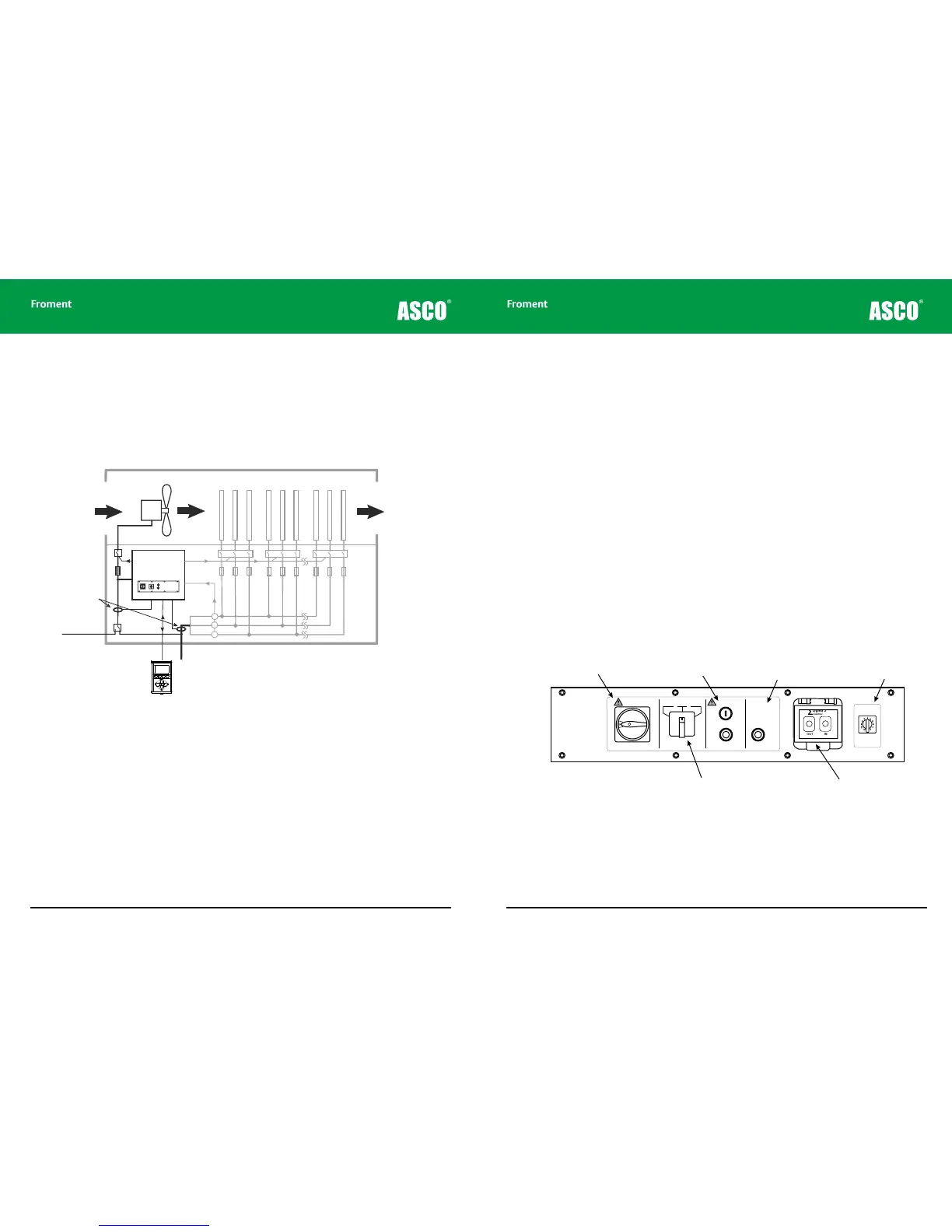
Figure 1-8 Additional components required for a movable load bank
Because of the temporary nature of the installation there are some specific design
dierences between a load bank intended for permanent installation and one intended to
be “movable”.
These include:
External power supply inlet. The load bank’s fans and control electronics can be powered
by the generator under test or (as recommended by Froment) a completely separate,
external power source. To make providing external power simple on a movable load bank,
a suitably rated IEC60309 connector is mounted on the unit either externally or behind a
lockable door with cable access.
Hot air
outlet
Cold air
inlet
Fan
motor
Air duct
Sigma II
Load bank
controller
Front panel controls
Load elements
Load
contactors
Fan
contactor
Current/Voltage
Transformers
Supply-on-test
External supply for
fan and controls
Remote control
Power supply selector switch. The load bank switch panel is fitted with a selector switch,
allowing easy selection between O, Internal supply (generator under test) or external
(Auxiliary) supply. The switch is not fitted where the load system is designed for a supply
that is incompatible with the fan supply, for example, on low voltage AC, DC, or 400Hz load
banks.
Phase rotation sensor and reversing contactors. These ensure that the fans on load
banks with three phase fans automatically rotate in the correct direction, irrespective of
how the phases are connected.
Control cable socket. The switchplate is fitted with a socket which allows Sigma 2 control
cables to be quickly attached and removed.
Multiple power cable entry options. Froment load banks designed for permanent
installations are provided with a non-ferrous gland plate that allows a fully compliant IP54
installation. The movable load banks are provided with a choice of cable entry options:
• Through a pre-punched, non-metallic plate fitted with protecting shutters or grommets.
• Through a protected slot.
• Through a nonferrous gland plate.
• Via optional externally mounted multipole (IEC60309) or single pole plug and socket
connectors.
Figure 1-9 Typical movable load bank control panel.
OUT IN
Sigma 2
Control
∑
Fan and controls
supply isolator (Emergency Stop)
Fan and controls
supply source
selector
Manual stop/start
buttons
Sigma control
interface cable
sockets (in/out)
Load bank
number selector
Supply on test
status indicator
LB00060
LOAD BANK NUMBER
When controlling more
than one load bank, each
must have a different
number set on this switch.
Sigma 2
Control
∑
All doors must be shut
and guards fitted before
running this equipment.
Remove load and allow
elements to cool before
stopping the fan.
START
STOP/
RESET
Warning! Isolator for fan
and controls supply only.
Other supplies may enter this load
bank. Isolate all before working on
this equipment.
Select “Internal” only when the
Fan & Controls Supply Selector
supply-on-test equals the control circuit
rated voltage and frequency.
OFF ExternalInternal
Supply-on-Test
Status
Off: No Voltage
On: Normal
Operation
Flashing: Out of
Limits
© NJ Froment & Co. Ltd. This document may not be copied
or disclosed in whole or part without prior written authority.



 To Next Page