5 - 14
Chapter Five
5 - 15
Status Screen
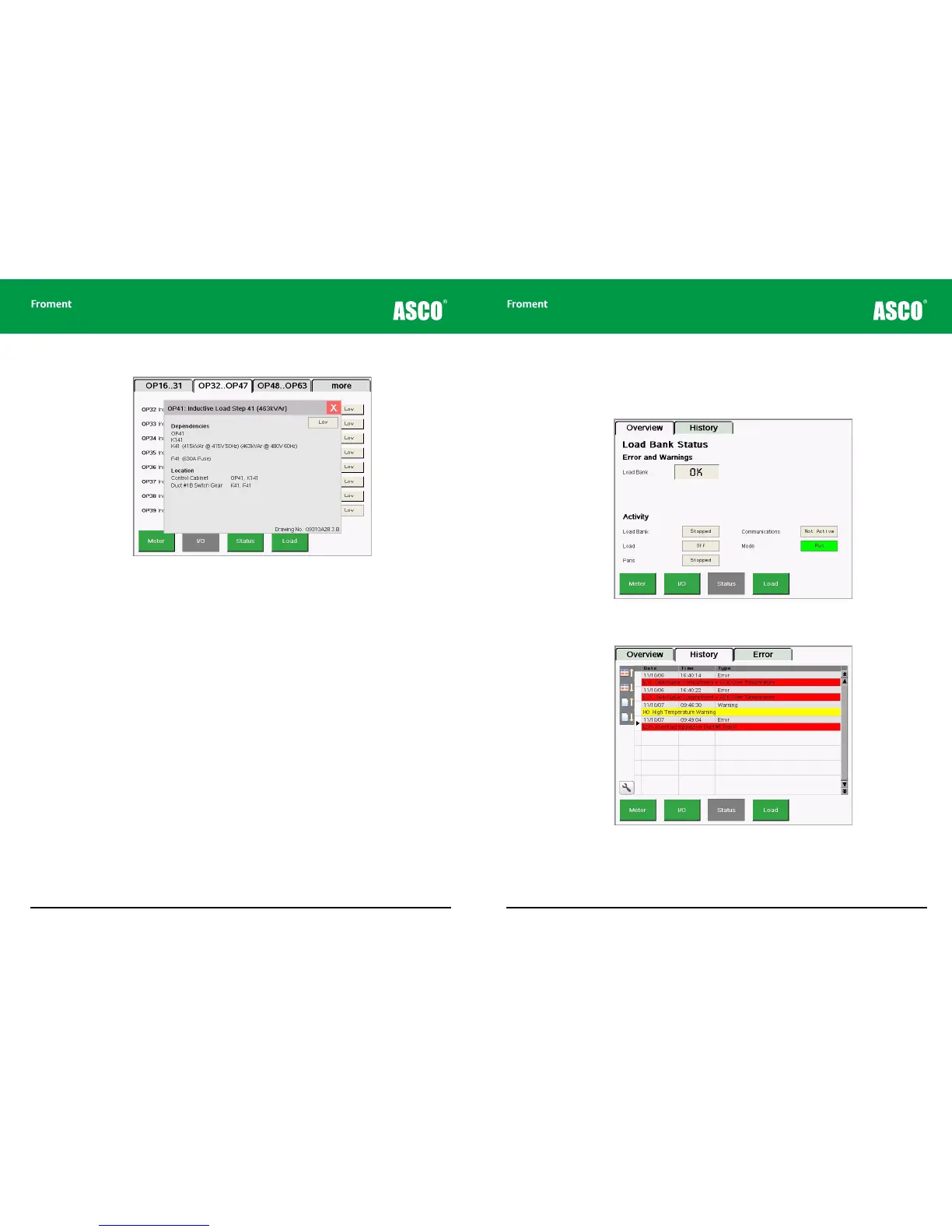
Tapping the Status key opens the Status screen, which normally has two tabs, Overview
and History.
Figure 5-7 The Status/Overview screen provides a view of the current activity and any active
errors or warnings.
Figure 5-8 The Status/History screen provides a detailed listing of system events such as
errors or warnings.
Maintenance & Troubleshooting
Figure 5-6 Tapping an input or output key opens a pop-up window with more detailed
information.
The I/O screens show the state of each input or output. These are shown green when they
are active. Low = 0Vdc and high = +24Vdc.
The detailed view shows the input or output’s dependencies by listing the component
identifications for the selected circuit.
In the example above:
• Load Bank Module output OP41 drives relay K141 which in turn drives the load step
contactor K41.
• K41 is 415kVAr inductive load step rated at 415V/50Hz or 463kVAr at 480V/60Hz.
• The load step fuse is F41 rated at 630A.
The location of each component is also detailed along with the Froment drawing number
which shows the circuit.



 To Next Page