4 - 8
Using the Sigma Hand-held
The Hand-held’s on screen menu system is designed to be simple and intuitive, and the
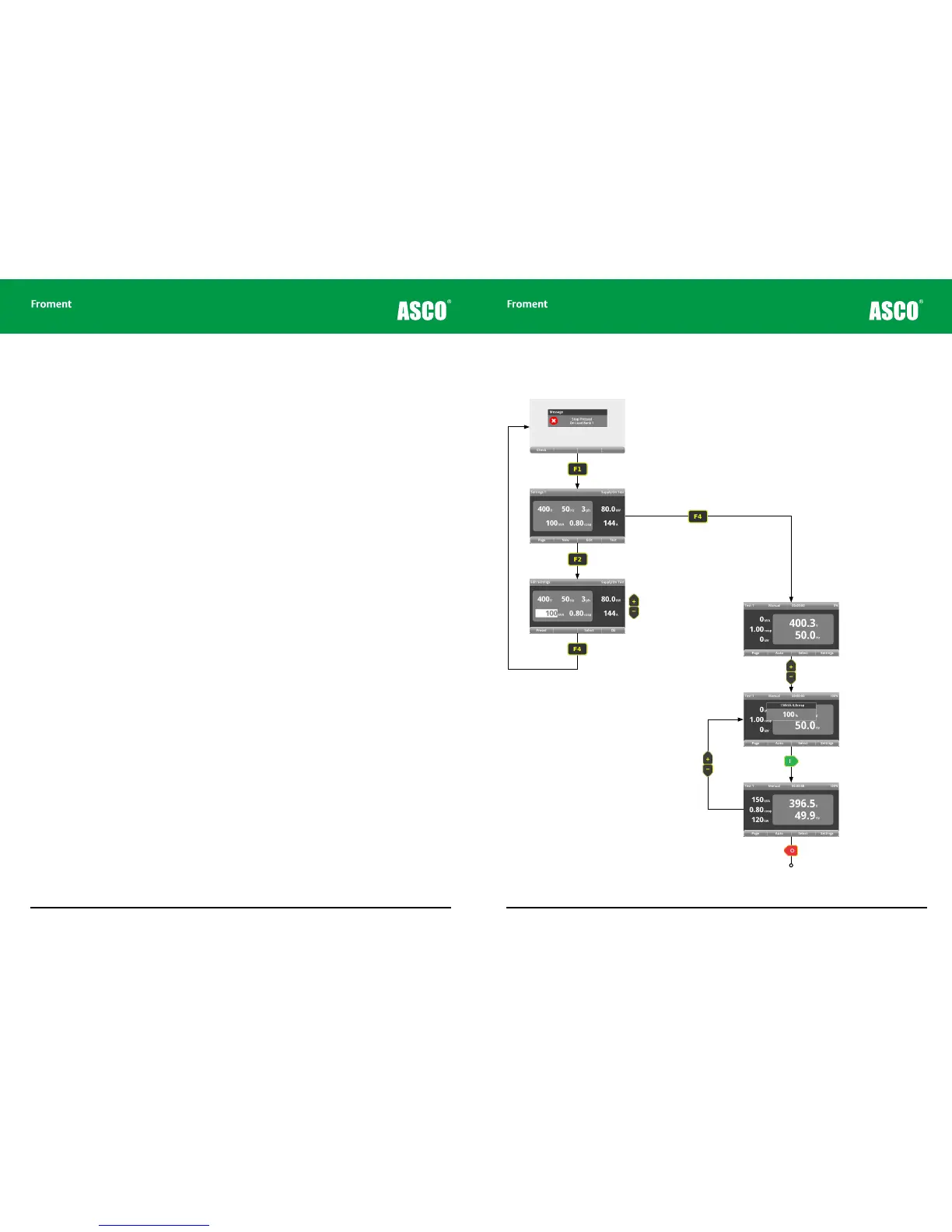
best way to learn it is to use it. The quick-start demonstration on the following page shows
how you can carry out a full manual generator test with only a few key presses.
There are two parts to the sequence. The first part is to make sure that the generator
specification shown on screen matches the details that are shown on the generator’s rating
plate. This is important because having the correct generator size information allows the
Hand-held to calculate the load that is to be applied correctly. This provides protection
from overload during testing and will allow the percentage loads applied to be calculated
accurately.
The second part is concerned with carrying out the test itself. Various percentage loads
are applied, and the Sigma instrumentation is used to view the generator’s response.
However, there is much more to the Hand-held than the ability to conduct basic manual
tests. We will explain all this in more detail and cover the use of automatic test sequences
and other advanced features later in the chapter.
General assumptions
The following explanation assumes that:
• The load bank has been installed according to the instructions provided and all of the
necessary safety precautions have been followed.
• A Hand-held unit is connected to the load bank using an appropriate cable.
• Both the fan and controls supply and the Supply-on-Test are connected and any circuit
breakers are closed.
Hand-held Reference Guide
4 - 9
Hand-held Quick Start
Figure 4-5 Hand-held quick start manual test sequence.
Press the start button on the
load bank control panel. Press F1
(Check) to go to the supply on
test settings page.
If the supply on test settings are
correct, press F4 (TEST) to start
testing the supply.
Settings not correct? Press F2 (NEW). The
voltage and frequency will be measured and
set to the nearest standard values (if there is
no supply they will be set to defaults).
Use the + or - keys (or
F1 PRESET) to adjust
the supply size.
Press F4 (OK) when the
values match those on the
generators rating plate.
Test 1-4 is the first of the
four test instrumentation
pages provided by the
Hand-held.
Select the percentage load required
using the + or - keys.
A pop up will appear show-
ing the adjusted value and
this is also displayed on
the right of the status line.
Apply the load by pressing the I key. The
LED will light, indicating a test in progress.
Press the I key again for load correction.
The status line displays
the elapsed time since the
load was applied.
Press the O key to reject
the load and end the test.
Preselect the percentage load
required for the next load change
using the + and - keys.
Chapter Four



 To Next Page