CHAPTER 4 REFERENCE GUIDE
EFD1000 PRO MAX PFD Pilot’s Guide
Page 4-79
091-00005-002 ()
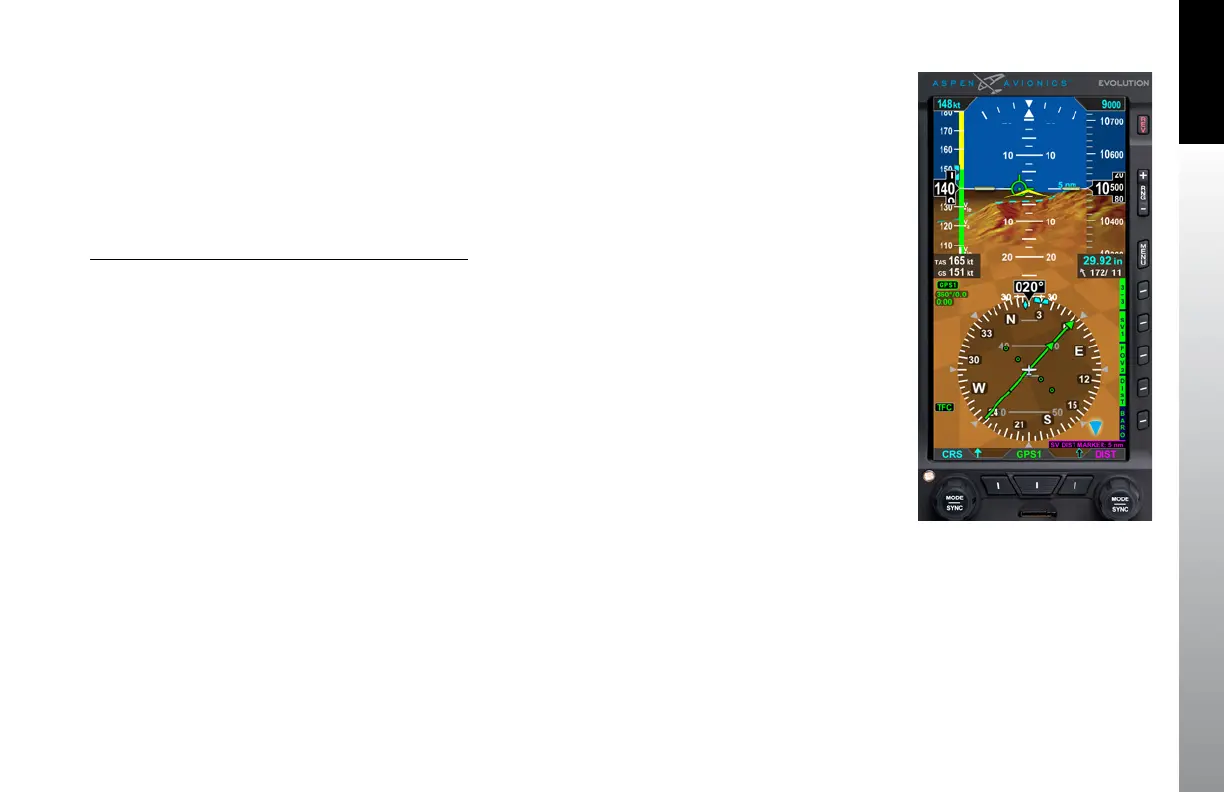
4.10.1.3 SV Distance Marker
The DIST Hot Key presents a cyan dashed line (Distance Line) representing the ground
distance ahead of the aircraft (Figure 4-119). The Distance Marker is used to estimate
the ground distance from the aircraft to a feature on the display. The selectable distance
options are OFF, 1nm thru 20nm (in 1nm increments), 20nm, 25nm, 30nm, and 40nm.
The maximum distance ESV presents the virtual horizon is 40nm.
To edit the Distance Line and SV Distance Marker
1. Press the DIST Hot Key (The Right Knob label turns magenta and displays
“SV DIST MARKER” with the distance selected).
2. Rotate the Right Knob to the desired distance setting or press and hold the
Right Knob to automatically SYNC the Distance Line to the 5nm range
Figure 4-119
SV Distance Marker



 To Next Page