CHAPTER 2 CONTROLS AND DISPLAY
EFD1000 PRO MAX PFD Pilot’s Guide
Page 2-10
091-00005-002 () EFD1000 PRO MAX PFD Pilot’s Guide
Page 2-11
091-00005-002 ()
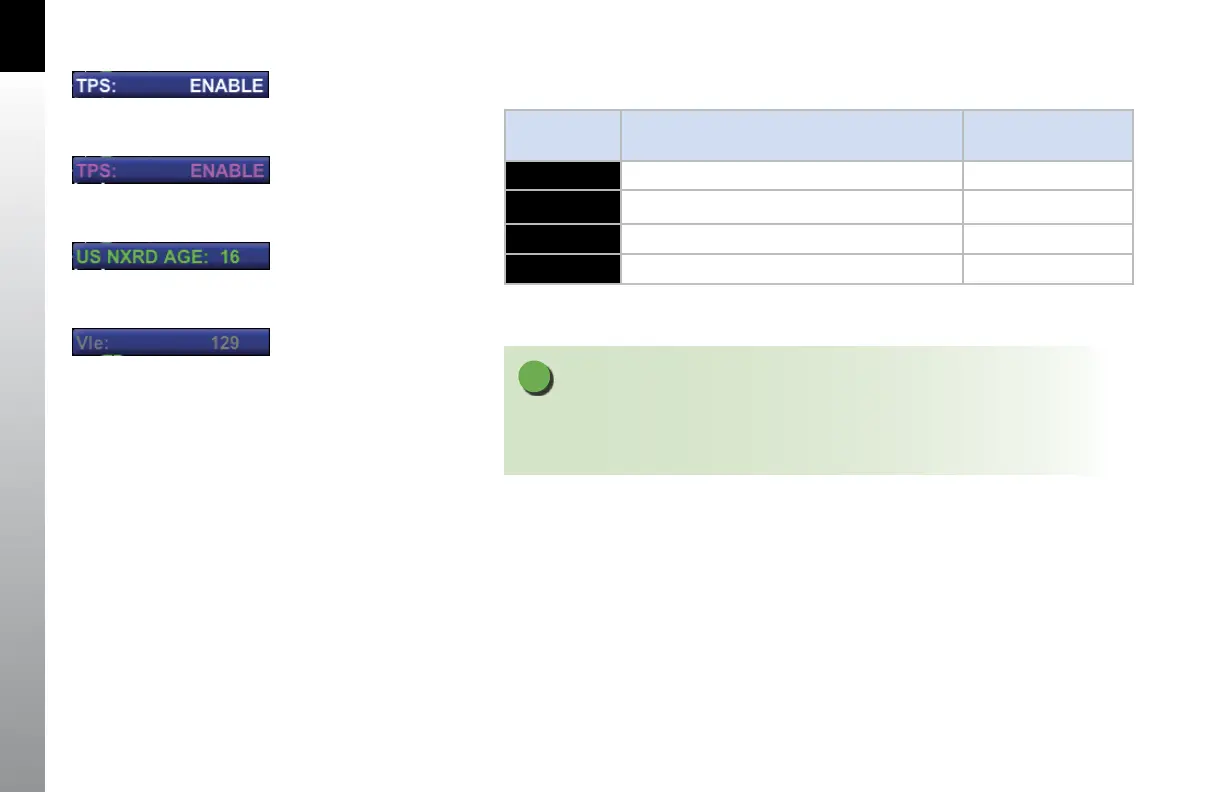
The MENU text will display in one of the four colors listed and described in Table 2-4.
DISPLAY
TEXT
DESCRIPTION DISPLAY
WHITE
Editable option Figure 2-9
MAGENTA
Editable option enabled Figure 2-10
GREEN
Status Only Figure 2-11
GR AY
Disabled (Not available for selection or editing) Figure 2-12
Table 2-4 Menu Text
NOTE
Pressing the Right Knob returns to Navigation mode and allows selection of other menu
options on different pages. Pressing another menu key on the current menu page saves
any changes made and activates the newly selected option for editing.
Figure 2-9
Menu Text - Editable
Figure 2-10
Menu Text - Enabled for Editing
Figure 2-11
Menu Text - Status Only
Figure 2-12
Menu Text - Disabled



 To Next Page