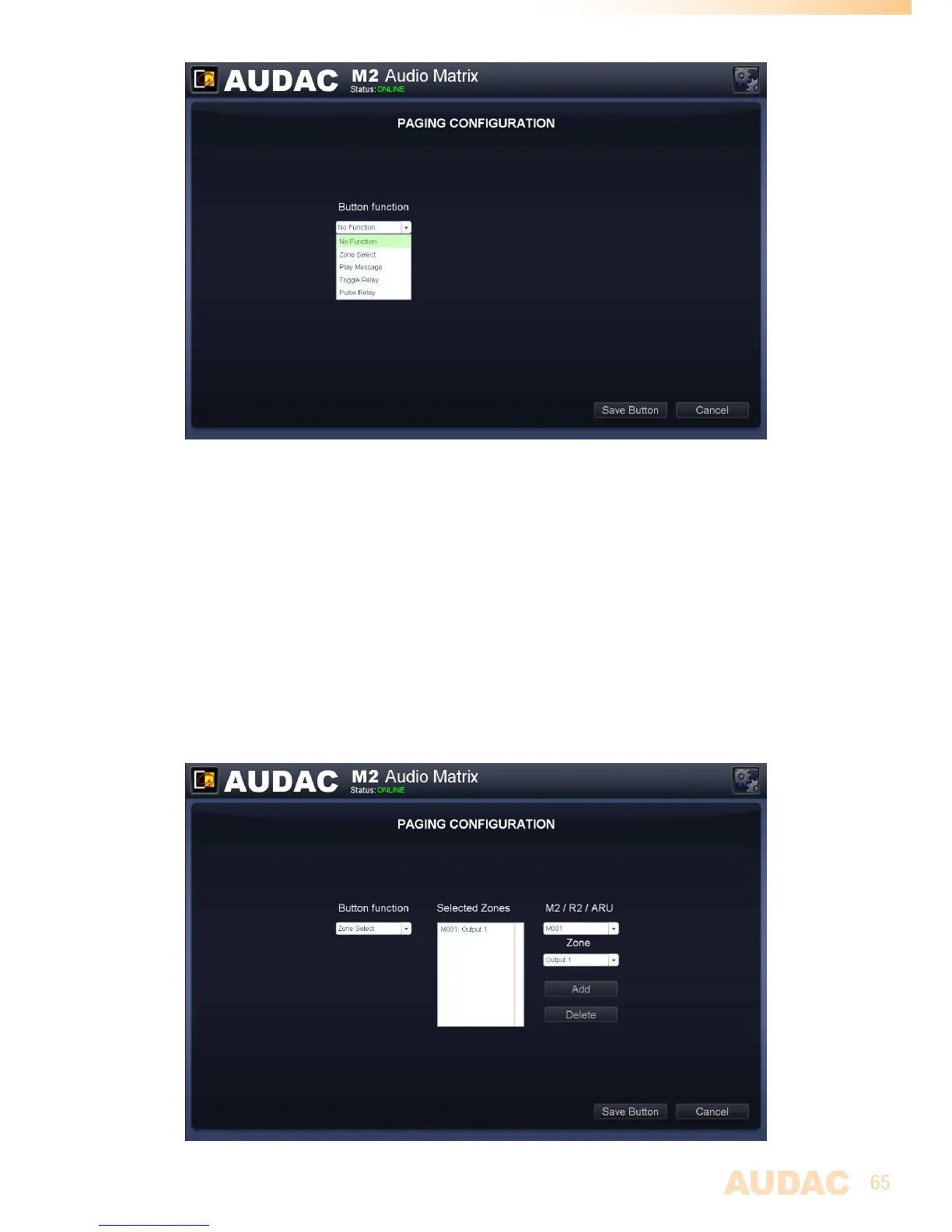
M2 Paging Button functions
Zone Select:
Usingtheoutputselectfunctions,theoutputsonwhichtheannouncementshouldbe
audibleuponpressingthecorrespondingbuttoncanbeselected.Theselectedoutputs
areshowninthelistbox.Outputscanbeaddedtothislistboxbyselectingtheminthe
twodropdownlistsontherightsidefollowedbyclickingthe‘Add’button.Outputscanbe
removedfromthislistboxbyselectingthemandclickingthe‘Delete’button.
Inthefirstdropdownlist,theaddressofthedeviceonwhichtheannouncementshouldbe
audiblecanbeselected.Intheseconddropdownlist,theoutputoftheselecteddeviceon
whichtheannouncementshouldbeaudiblecanbeselected.
Upto40zones,from5cascadedM2’scanbeprogrammedunderonebutton.
ThepriorityofpagingisbasedontheAPMaddressconfiguration.
M2 Paging output selection


 To Next Page