420HD IP Phone for Microsoft Skype for Business
User's Manual 12 Document #: LTRT-11898
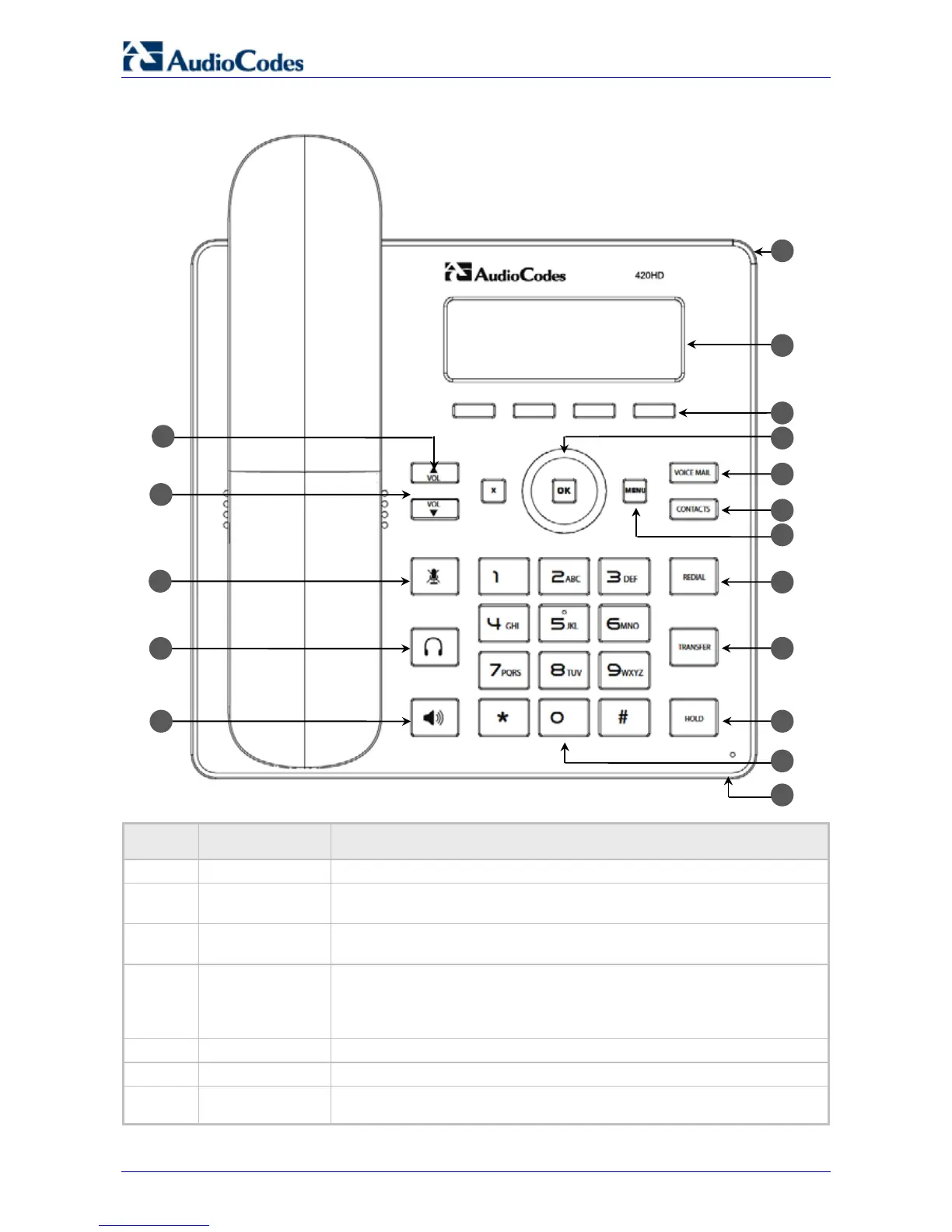
Figure 2-1: Front View
Table 2-1: Font View Description
Item # Label/Name Description
1 Ring LED
Flashing blue light indicates an incoming call.
2 LCD
Interactive screen displaying calling information, enabling you to set up
phone features.
3 Softkeys
See Section 3.2 on page 18 for details on the four softkeys and the
available functions they offer.
4
Navigation
Control / OK
Press the upper rim to scroll up menus/items. Press its lower rim to scroll
down. Press its left or right rim to move the cursor left or right (when
editing a contact number for example). Press the OK button to select a
menu/item/option.
Retrieves voice mail messages.
6 CONTACTS
Press to directly access the Personal directory and Corporate directory.











 To Next Page