27
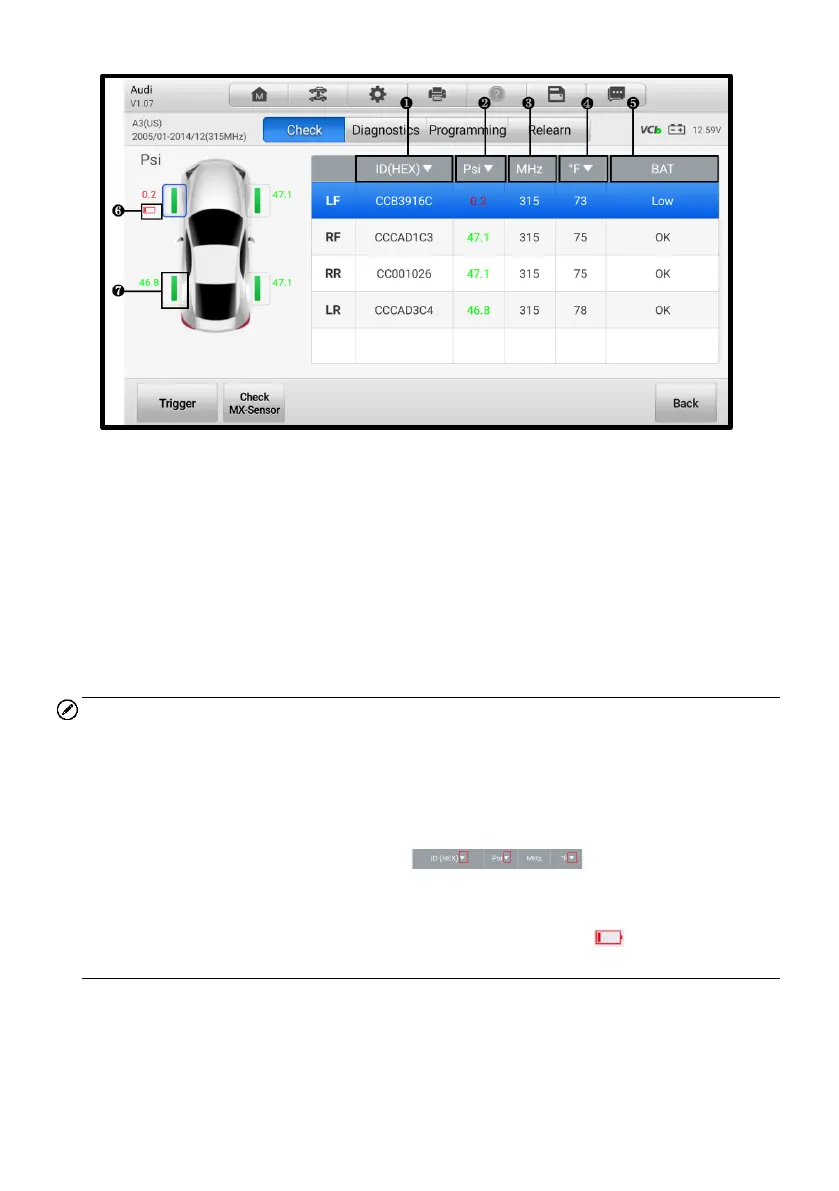
Figure 4-15 Check Screen
1. Sensor ID
2. Tire Pressure
3. Sensor Frequency
4. Tire Temperature
5. Sensor Battery Status
6. Low Battery Icon
7. Successfully Triggered
NOTE
1. The default check order on the tablet is LF (left front), RF (right front), RR (right
rear), and LR (left rear). The wheel positions correspond with the descriptions on
the right of the screen. If you select RF in the right table, the cursor will
automatically move to vehicle's RF wheel on the left screen. You can also change
the check order by manually moving the cursor to other wheels.
2. You can tap the drop-down button on the table header to
choose a unit of the sensor ID, tire pressure, and tire temperature according to
your preference.
3. If the battery level of a sensor is low, a red low battery icon will display beside
the wheel on the screen.














 To Next Page