15
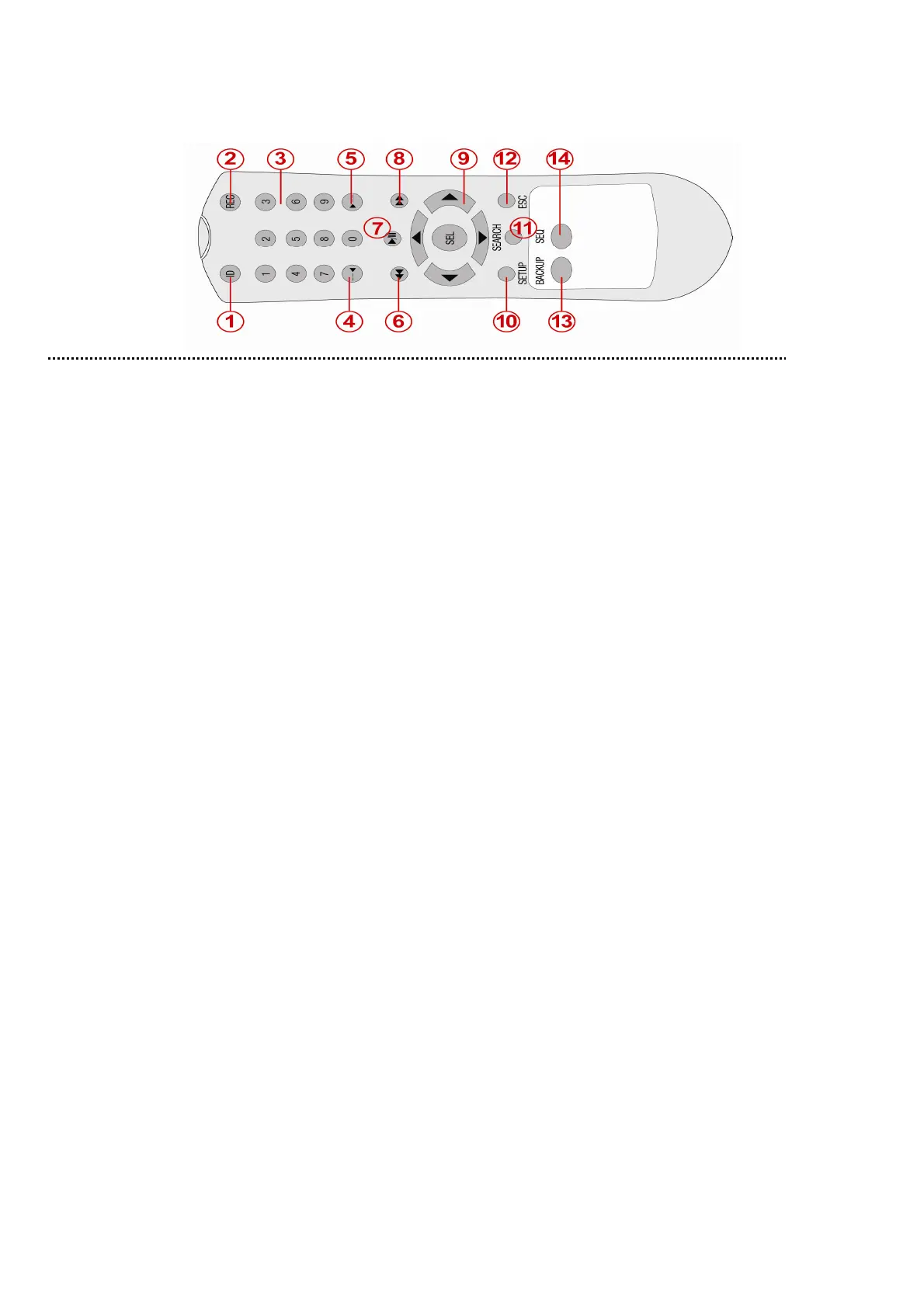
2-3. Remote control (Option)
① ID: When a remote control ID number is set in DVR, press it before number.
② REC: To start and stop manual recording.
③ Number: To select channel (1, 2, 3, & 4) or to enter DVR ID number.
④ F/REW: During playback - To move the playback position 60 seconds backward.
During pause - To move the playback position 1 frame backward.
⑤ F/ADV: During playback - To move the playback position 60 seconds forward.
During pause - To move the playback position moves 1 frame forward.
⑥ REW: To rewind the footage at 1x, 2x, 4x, and 8x speed during playback.
⑦ PLAY/PAUSE: To play or to pause the footage in playback mode.
⑧ FF: To fast forward the footage at 1x, 2x, 4x, and 8x speeds during playback.
⑨ Control button: Press to move the menu items or select channel.
⑩ SETUP: To launch SETUP menu.
⑪ SEARCH: To go to the search menu.
⑫ ESC: During setting - To return to previous menu screen.
During playback - To exit from playback
System Lock – to lock a system when pressing ESC button for 5 seconds.
System Unlock – to unlock a system when pressing ESC button for 5 seconds.
⑬ BACKUP: To start operations of backup in live or playback mode. (The same function button as
CAPTURE on the front panel of DVR)
⑭ SEQ: To start auto sequencing of the screen in full screen mode. (Toggle)
3. Setting up the DVR
The following sections detail the initial setup of a DVR.
3-1. Setup – Main Screen
When booting a system at first, the following messages display. After initializing, select a language and set
the time.



 To Next Page