Soft Keys 55
To add a new assignment:
1 Launch Pro Tools and confirm the EuControl is connected to the S3, indicated by a lit EuControl icon in the Menu Bar (Mac)
or the System Tray (Windows).
2 Press the Show Me switch.
3 Click the Section selector and choose the section of switches containing the switch you want to assign.
4 On-screen. double-click the switch you want to assign. The Soft Key Command Editor window opens.
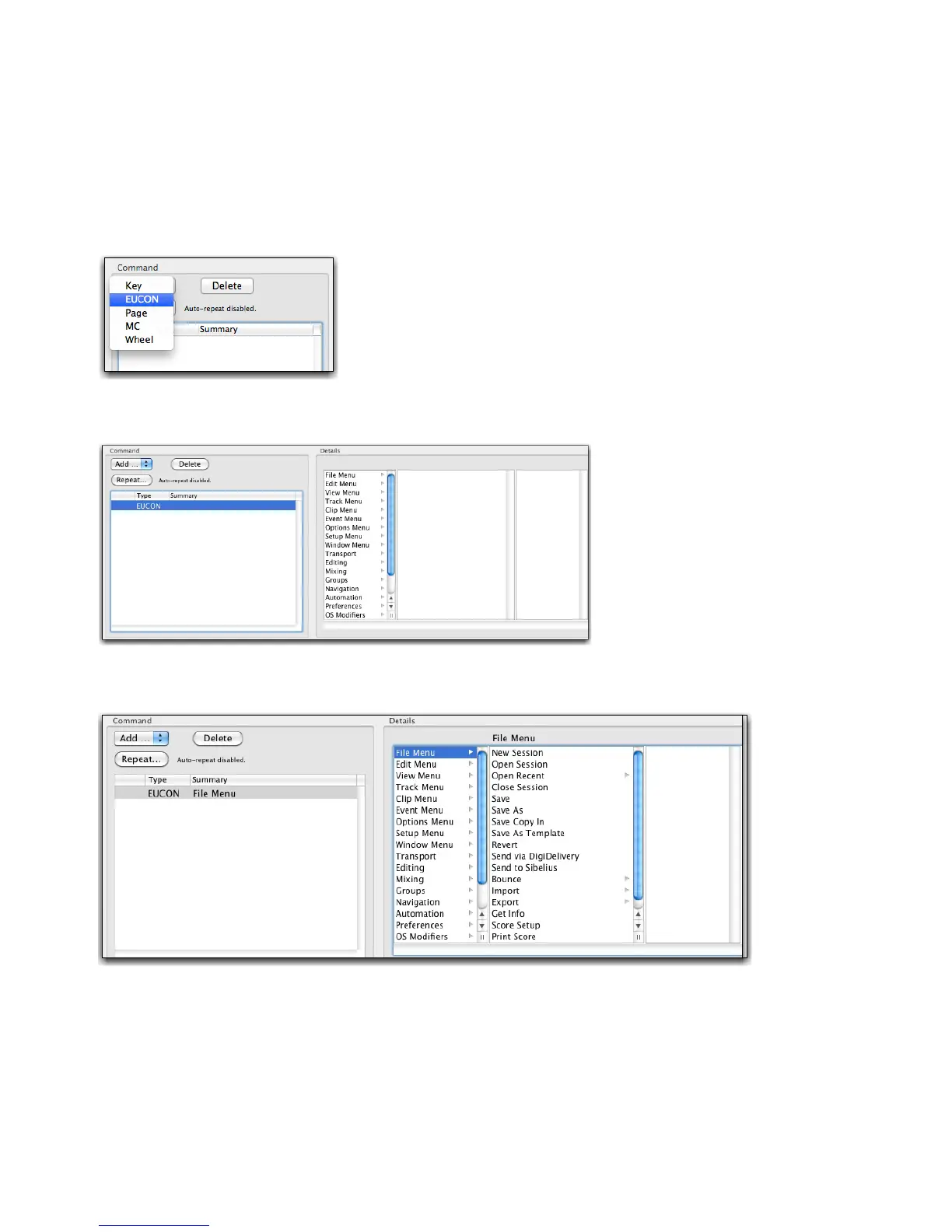
5 In the Command area, click Add and choose EUCON.
After you add a EUCON command, choices appear in the
Details area.
6 Click an item in the left-most list (level 1) within the Details area to reveal associated commands in the middle column.
7 Click a command to assign a command, or click an item with an arrow to reveal more commands in the third column and assign
as necessary.
8 Close the Soft Key Command Editor and return to the EuControl Settings window.
9 If desired, click the Save button in the Soft Keys tab to save the assignments.
Adding a new EUCON command
The Details area showing commands
An item selected in Level 1 (the first column) of the Details area












 To Next Page