Encore Presentation System • User’s Guide 67
3. Hardware Installation
Installation
táÇÉ=pÅêÉÉå=`çåÑáÖìê~íáçå=mäìë=táÇÉ=pÅêÉÉå=mêÉîáÉï
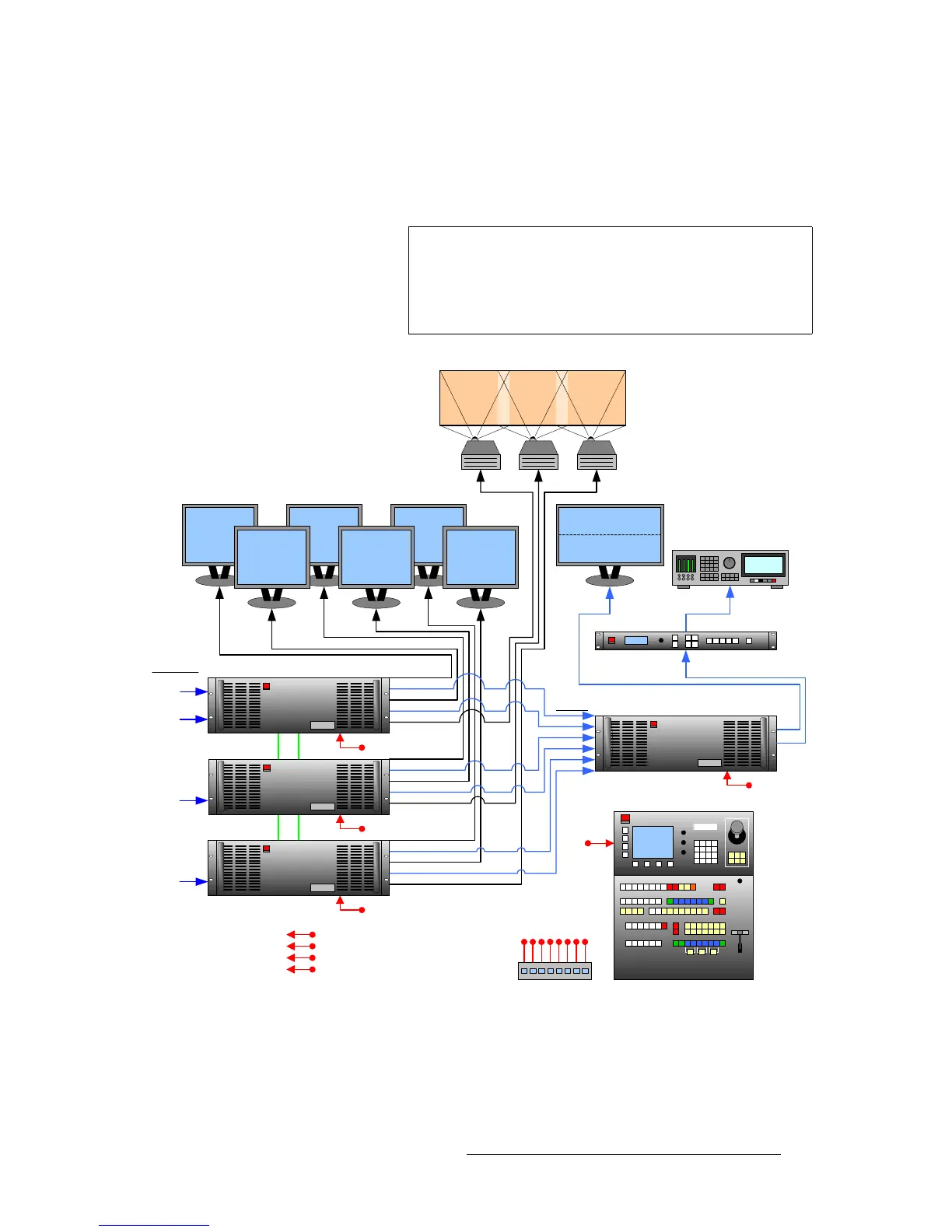
The figure below illustrates a “triple” wide screen configuration that includes a fourth
Processor, which is used to create a combined wide screen program/preview display.
Figure 3-4. Block Diagram, Wide Screen Encore Configuration with Wide Screen Preview
Important
Because the fourth Video Processor provides up to 6 PIPs,
this procedure is ideal for displaying a double or triple wide
screen configuration on a single monitor. For configurations
using more than 3 Processors, additional dedicated “preview”
Processors may be required, along with additional monitors.
PG 2 (Analog)
PVW (Analog)
PG 1
Projector #1 Projector #2 Projector #3
Program #1 Program #2 Program #3
Preview #1 Preview #2 Preview #3
Controller SC or LC
Encore Video Processor #1
VP #2
Ethernet Switch
Scaled
Sources
Unscaled
Sources
M/E Inputs
Unscaled
Sources
Unscaled
Sources
Widescreen Program
Widescreen Preview
Encore Video Processor #4
Scaler
Inputs
1A
1B
2A
2B
3A
3B
Video Recorder
ImagePRO
PVW
PG 1
PG 2 (DVI)
PVW (DVI)
PG 2 (Analog)
PVW (Analog)
PG 1
PG 2 (DVI)
PVW (DVI)
PG 2 (Analog)
PVW (Analog)
PG 1
PG 2 (DVI)
PVW (DVI)
VP #3
Program
Link
Source
Link
Program
Link
Source
Link
To:
Routers
ScreenPRO-II
PresentationPRO-II
ImagePRO



 To Next Page