R5906167 /00 ImagePRO–4K Video Processor
107
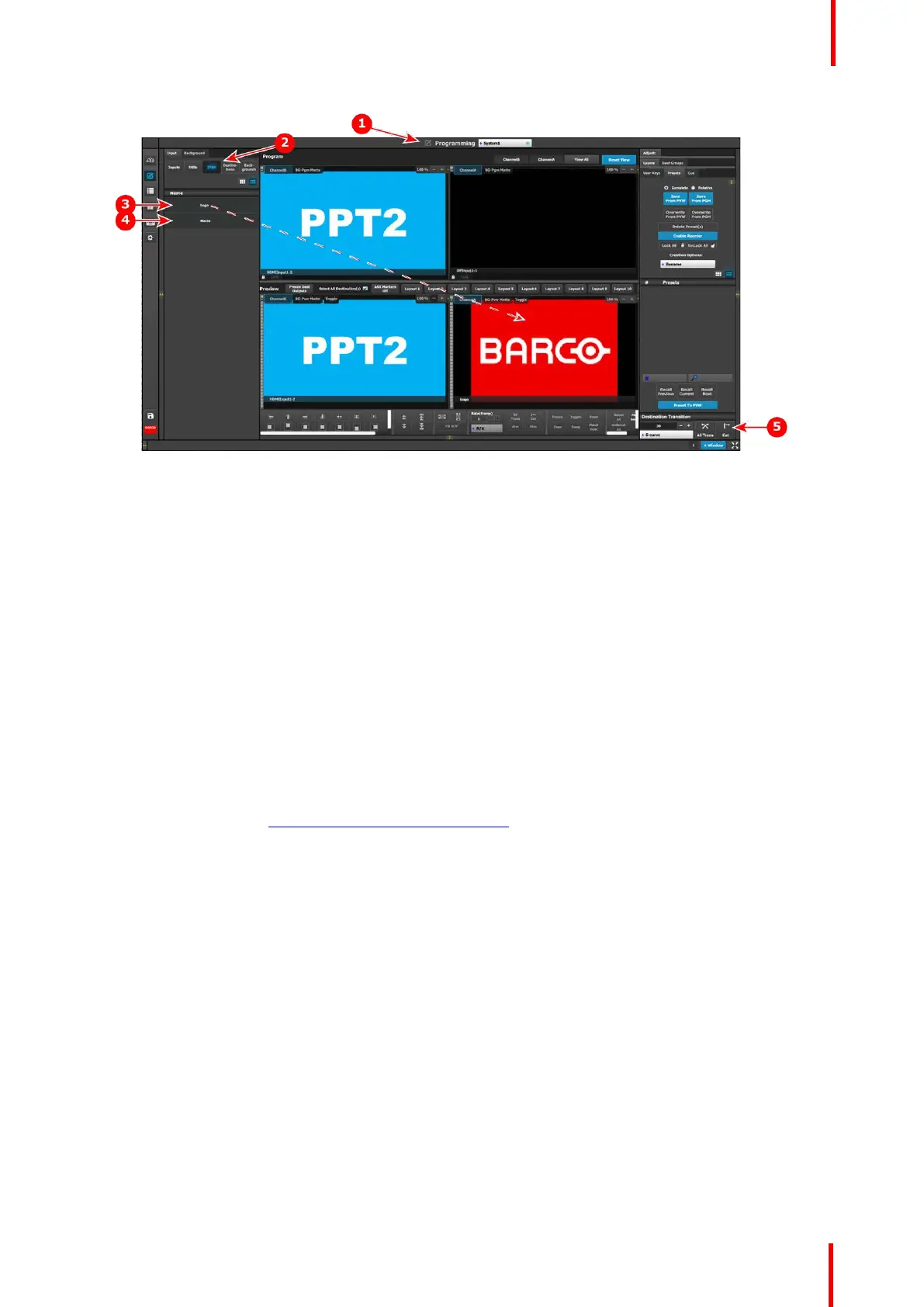
Image 7-5: ImagePRO–4K-specific programming controls
1. Programming menu
2. IP4K tab
3. Logo
4. Matte
5. All Trans and Cut keys
Programming menu: IP4K Logo and Matte
To assign a Logo to an Output (Aux) channel…
1. Select Logo from the IP4K tab.
2. Drag and drop the Logo to an Output (Aux) channel, for example to the ChannelA Preview.
• In Standard Program mode, the system automatically places the Logo in ChannelA Program.
• In Standard Preview mode, the operator must use either the All Trans key or the Cut key to place the
Logo in ChannelA Program.
• The IP4K tab is not available in Matrix Preview mode.
Use the same process to assign a Matte to an Output (Aux) channel.
For a more complete description of the Programming menu of the Event Master Toolset GUI, see Chapter 6 of
the “Event Master Devices User’s Guide” (found at the “Manuals, drawings & documentation” link on the E2
Product Support page at http://www.barco.com/td/R9004698).
Event Master Toolset



 To Next Page