40 Preparing the Pump and IV Sets
Manual 41018v0800 SIGMA Spectrum Infusion System
Revision B Operator’s Manual
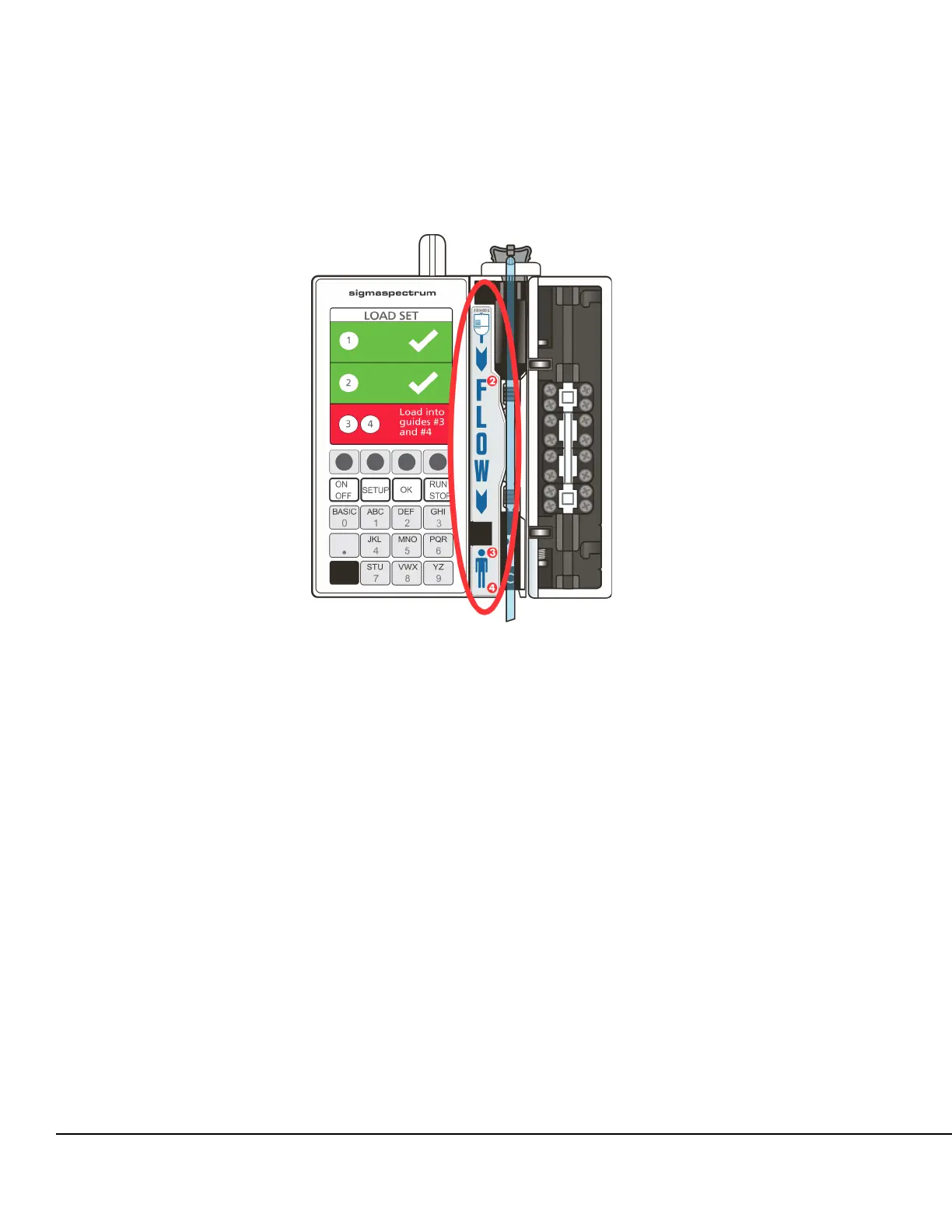
7. Observe the Direction of Flow diagram, which is to the left of the pumping mechanism. See
Figure 15.
8. Load the primed IV set tubing from the top to the bottom of the tubing channel.
NOTE: Before loading the tubing, ensure that the tubing channel is free of dirt and debris.
Ensure that the tubing follows the Direction of Flow diagram.
Ensure that the tubing is routed from the front of the slide clamp directly into the top of the
tubing channel.
Load the tubing without slack. This prevents the tubing from getting caught in the door or
from being loose in the Pump.
Do not use excessive force when inserting the administration set into the channel.
9. Push the tubing into load guide 2 and confirm that the display is green for load guide 2. See
Figure 15.
10. Push the tubing into load guides 3 and 4 and confirm that the display is green for load guides
3 and 4.
Figure 15. Direction of Flow Diagram.



 To Next Page