9.2.4 Text parameter
A text parameter represents a text that you can enter, e.g. a name for
the controller or for a function.
Calls up the parameter's help text
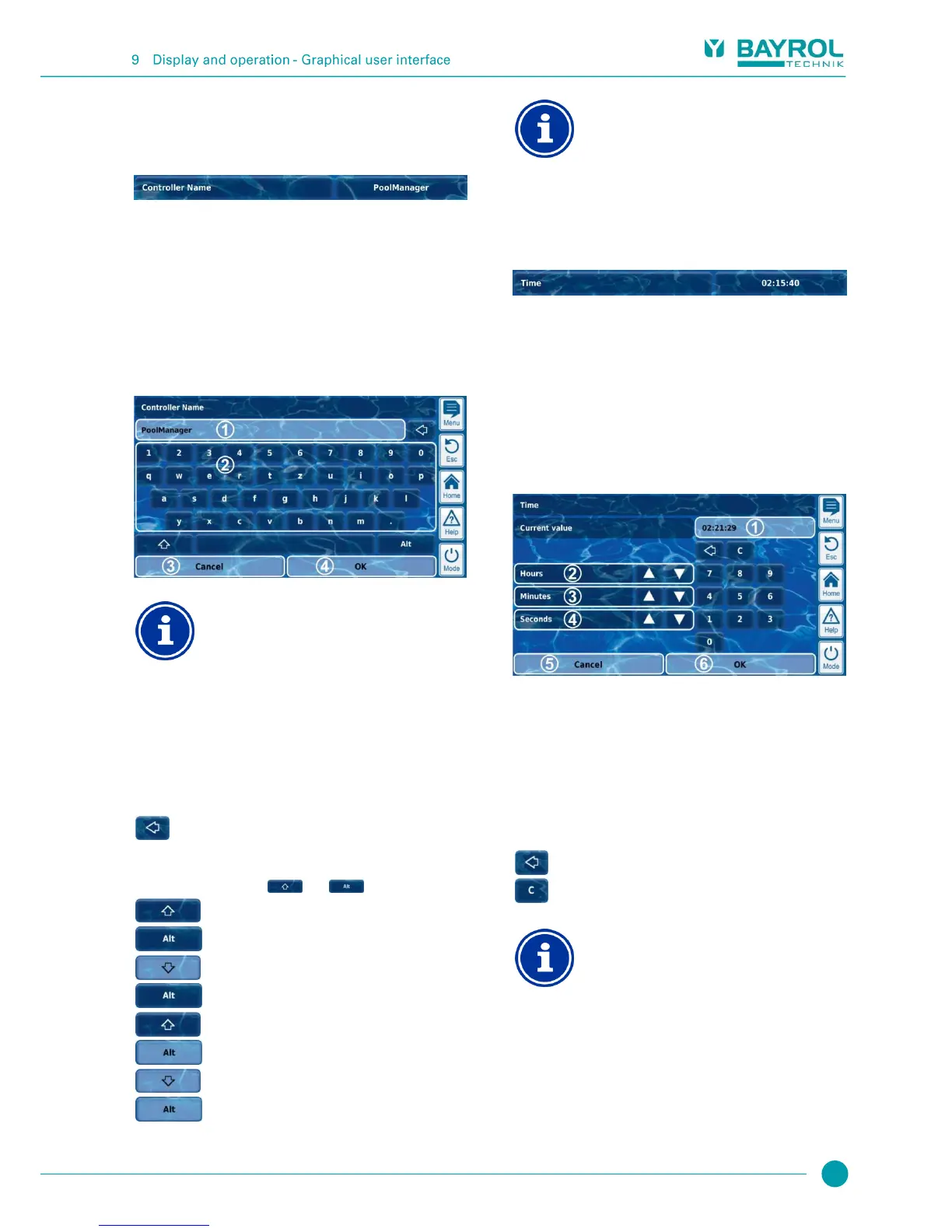
Calls up an entry screen in which the text can be entered.
9.2.4.1 Entry screen
There is a uniform entry screen with a screen keyboard for all text
parameters in which the desired text can be entered.
Deleting the current text
Once you start entering a text, the current text will be
automatically deleted.
Display of current text (or current input)
Keyboard area for text input
Cancel will close the entry screen.
The text will remain unchanged.
OK will apply the text entered and save it
permanently.
Delete the last character
There are a total of four different keyboard layouts available that can
be switched using the keys and as follows:
Standard keyboard layout 1:
Lower case letters and numbers
Standard keyboard layout 2:
Upper case letters and standard special characters
Alternative keyboard layout 1:
International special characters (lower case letters)
and numbers
Alternative keyboard layout 2:
International special characters (upper case letters)
and numbers
International keyboard layouts
If you set the language menu to Russian or Greek, then
the characters available on the screen keyboard will be
automatically adjusted accordingly.
9.2.5 Time parameters
Time parameters are used to enter and display a time, e.g. the current
clock time or a specific time for a waterfall feature to run.
Calls up the parameter's help text
Calls up the entry screen for time.
9.2.5.1 Entry screen
There is one uniform entry screen for all time parameters in which a
time can be set.
Display of current setting (or current input)
Incremental increase or decrease in hours
Incremental increase or decrease in minutes
Incremental increase or decrease in seconds
Cancel will close the entry screen.
The value will remain unchanged.
OK will apply the time set and save it permanently.
Setting the system time
When setting the system time, the internal real-time
clock is set to the configured time by pressing the OK
button.



 To Next Page