Checking an IP address via ping
Go to the search field (magnifying glass symbol) in
the Windows start menu, enter cmd, and press
enter
An input window will open
By entering the command ping, you can check
whether an specific IP address is already being
used on the network.
For example, ping 192.168.1.88 checks whether
there is a device that responds under the IP-
address indicated.
If there is no response, then the IP-address is
usually still available.
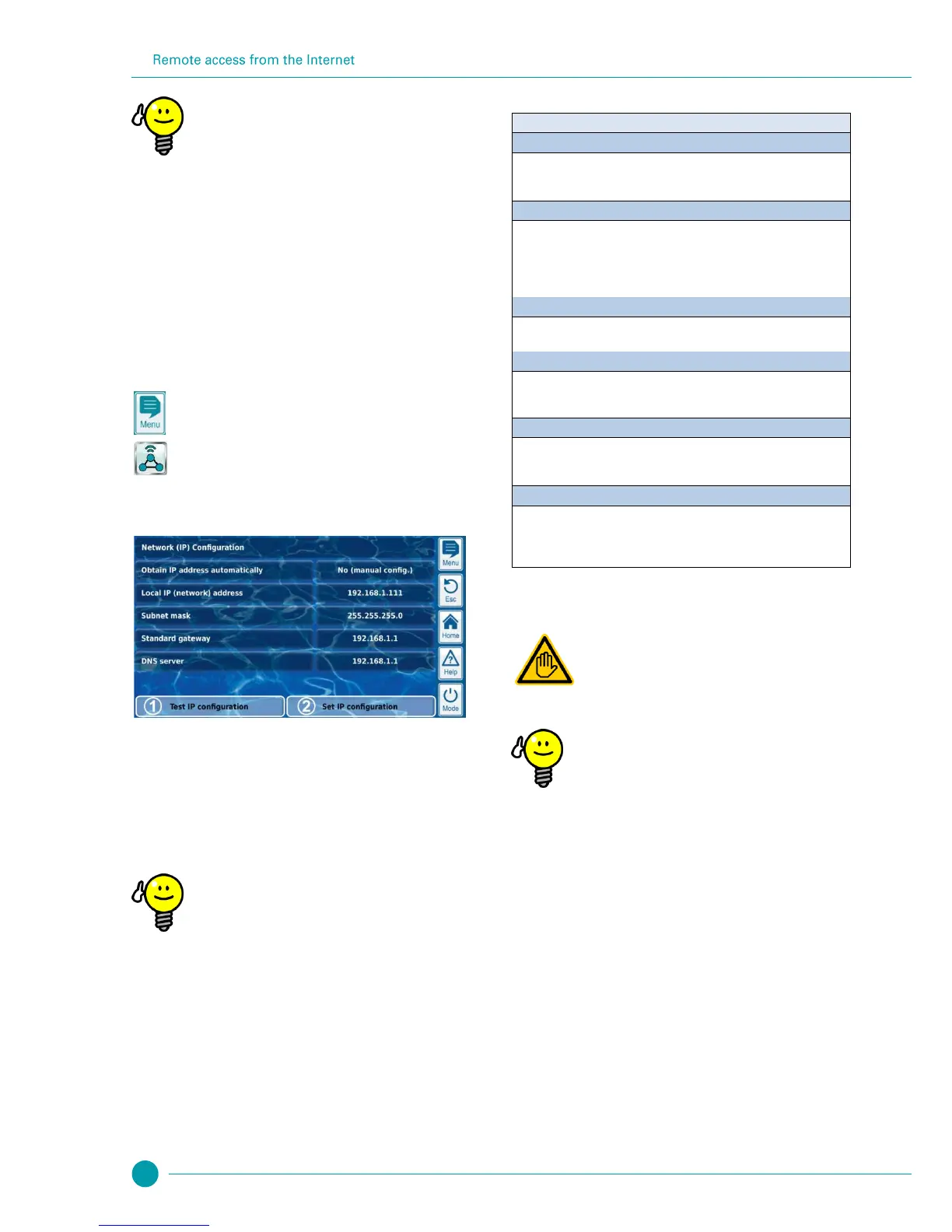
46.3 Menu Network (IP) configuration
You can reach PoolManager
®
network (IP) configuration (IP = Internet
Protocol) as follows:
Menu hotkey
Communication & interfaces
Network (IP) configuration
The following parameters can be configured in Network (IP)
configuration:
This function tests the current network configuration based
on various criteria and then issues a success or error
report.
Activate IP configuration
This function activates the current network settings. If the
function does not trigger, then the network settings will be
activated upon the next system boot.
Test IP configuration
Always run the test function prior to activating the IP
configuration. This helps to recognise and remediate
potential problems.
Menu Network (IP) configuration
Assistant for automatic network (IP) configuration
This assistant automatically determines a suitable network configuration,
which you can then store permanently.
Follow the instructions on the screen.
Obtain IP address automatically
Fixed to No (manual config.).
For automatic IP address sourcing via DHCP protocol, the problem would be
that it wouldn't be known initially and then could change again. However, the
IP address has to be known for remote access to PoolManager
®
. Therefore,
the IP address has to be entered manually and will therefore be known.
Local IP (network) address
Here, enter the desired IP address for your PoolManager
®
as described in
the previous section Local network (IP) address.
The subnet mask generally retains the standard value 255.255.255.0.
The subnet mask only has to be adjusted if your network is using a different
breakdown between network-ID and host-ID.
In general, the IP address is entered here for the network router to which
PoolManager
®
is connected. On many networks, the router has host-ID 1; but
that does not have to be the case.
The DNS server (Domain Name Server) translates URLs (e.g.
www.bayrol.de) into the respective IP addresses on the Internet.
In general, the network router usually assumes this task, i.e. you enter the IP
address of your network router here as well.
47 Remote access from the Internet
Required user qualification:
IT SPECIALIST
Configuration of remote access from the Internet must
be performed by an IT SPECIALIST as defined in the
chapter User qualification.
Set-up by an IT specialist
Setting up remote access via the Internet does not
represent a challenge for an IT specialist and should be
taken care of quickly. However, without well-founded IT
expertise, set-up can take a very long time or even be a
complete failure. Additionally, security against
unauthorised access can be compromised.
That is why remote access via the Internet should
always be set up by an IT specialist.
To access PoolManager
®
from the Internet, you first have to integrate
it into your local network as described in the previous chapter Remote
access from the local network.
If the local network has a connection to the Internet, then remote
access to PoolManager
®
from the Internet can be set up. The local
network's Internet connection is generally realised via the network
router, e.g. via a DSL connection to an Internet service provider.
However, in order to facilitate remote access from the Internet, there
are several preparations to be made.
Initially, PoolManager
®
is not connected to the Internet. Rather, only
the network router is. The router has its own unique IP address on the
Internet. That IP address is not identical to the router's IP address on
the local network. Thus, the router has two different IP address, one
on the local network (such as 192.168.1.1) and one on the Internet
(such as 84.59.41.24).



 To Next Page