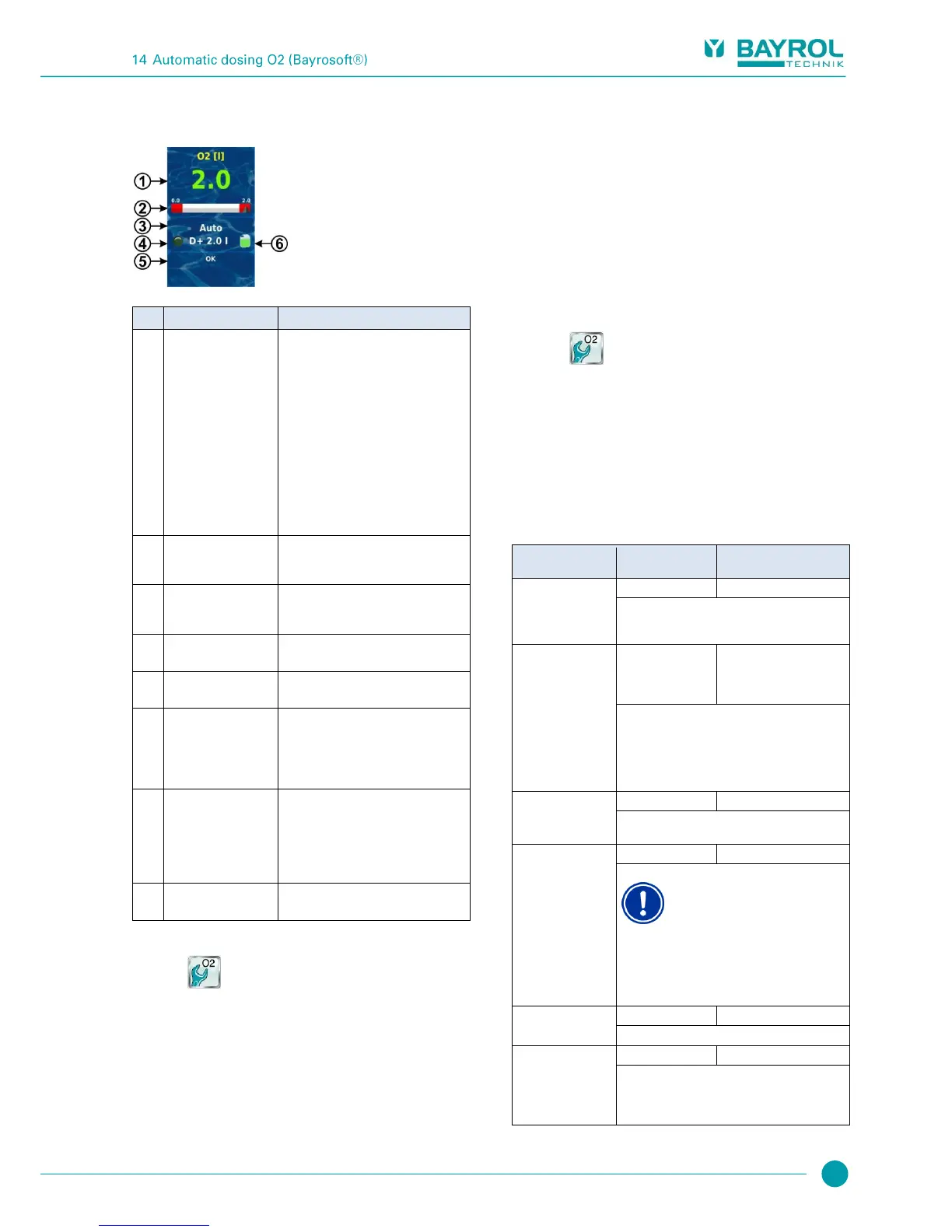
Programmed dosing
amount
(Basic dosing amount)
During ongoing dosing, the amount
already dosed is displayed, i.e. the display
rises continuously from 0.0 litres to the
total dosing amount.
After completing dosing, the display jumps
back to the programmed dosing amount.
Colour of the value display:
green Normal operation,
everything OK
yellow Dosing blocked
(missing flow signal
or start delay)
red Alarm, dosing blocked!
The value scale graphically shows the
amount already dosed during an ongoing
dosing.
Auto / off / alarm / flow / start delay
("x min") / ongoing dosing (display of
remaining time in minutes "x min")
The LED symbol illuminates while the O2
(Bayrosoft
®
) dosing pump is running.
Current dosing direction
(or type of dosing)
D+ for automatic dosing and M for manual
dosing (M = "manual")
(or programmed
basic dosing amount)
While dosing is running, this shows the
total amount of the current dosing (main
dosing, refresh dosing, or manual dosing).
After completing dosing, the display jumps
back to the programmed dosing amount.
All active alarms are shown regarding the
O2 (Bayrosoft
®
) module.
Alarms that are no longer active disappear
from the display, even if they have not yet
been acknowledged.
If there is no active alarm, "OK" appears.
Fill level for the Bayrosoft
®
canister
(red / yellow / green)
14.3 Main Menu O2 (Bayrosoft
®
)
The menu Main Menu O2 (Bayrosoft
®
) contains the following
sub-menus.
Configuration O2 (Bayrosoft
®
)
Configuration of all relevant parameters for automatic O2 dosing
Additional dosings
In this menu, supplemental dosings can be configured; see section
Additional dosings.
Operating hours
In this menu, the permissible times for Bayrosoft
®
dosing can be
restricted. This can be used when, for example, if no dosing during
night-time hours is preferred.
Planned Dosings
Display of the next planned main and refresh dosages. There is also
an option to reschedule the planned dosings.
Average Temperature
Display of average temperature value measured for the entire week
and for the individual 1/3 weeks
Date & Time
Here, correct configuration of the current weekday, date, and time can
be checked and corrected as needed.
The menu Planned Dosings (also accessible via the menu
O2 (Bayrosoft
®
) contains the following information:
Display of the next planned dosings with date and time. The main
dosing and the two refresh dosings are displayed.
When needed, dosing planning can be rescheduled in this menu.
In this case, the current plan is discarded and an entirely new plan is
performed, starting from the current weekday and time.
Note: Additional dosings are NOT displayed.
14.4 Configuration O2 (Bayrosoft
®
)
The following settings can be configured:
Standard setting
Default set Europe
When entering the pool volume, the Bayrosoft
®
dose
amount is automatically adjusted to match the pool
size (0.5 litre per 10 m³ of pool volume).
0.5 litre per 10 m³ of pool
volume
(e.g. 2.0 l for 40 m³ pool
volume)
Here, the basic dosing amount is indicated for
automatic O2 dosing.
The standard value based on the pool volume can
be adjusted again. The actual main dosing amount
and the two refresh dosings depend on the average
water temperature measured.
Temperature compensation should be set to "high" if
the Bayrosoft
®
refresh dosings prove to be too low.
Here, the Bayrosoft
®
dosing pump
capacity is entered. This setting
absolutely must be set correctly for the
pump used. Otherwise, PoolManager
®
will not correctly calculate the required
pump runtime for a dosing, and
Bayrosoft
®
dosing amounts won’t be
correct!
The dosing capacity for the standard
Bayrosoft
®
dosing pump is 3.0 l/h.
Weekday for the main dosing.
After turning on PoolManager
®
and also after every
12 hours of operation, the Bayrosoft
®
pump is briefly
started for approx. 6s in order to hinder product
deposits.



 To Next Page