13
®®
Operating from a Keypad
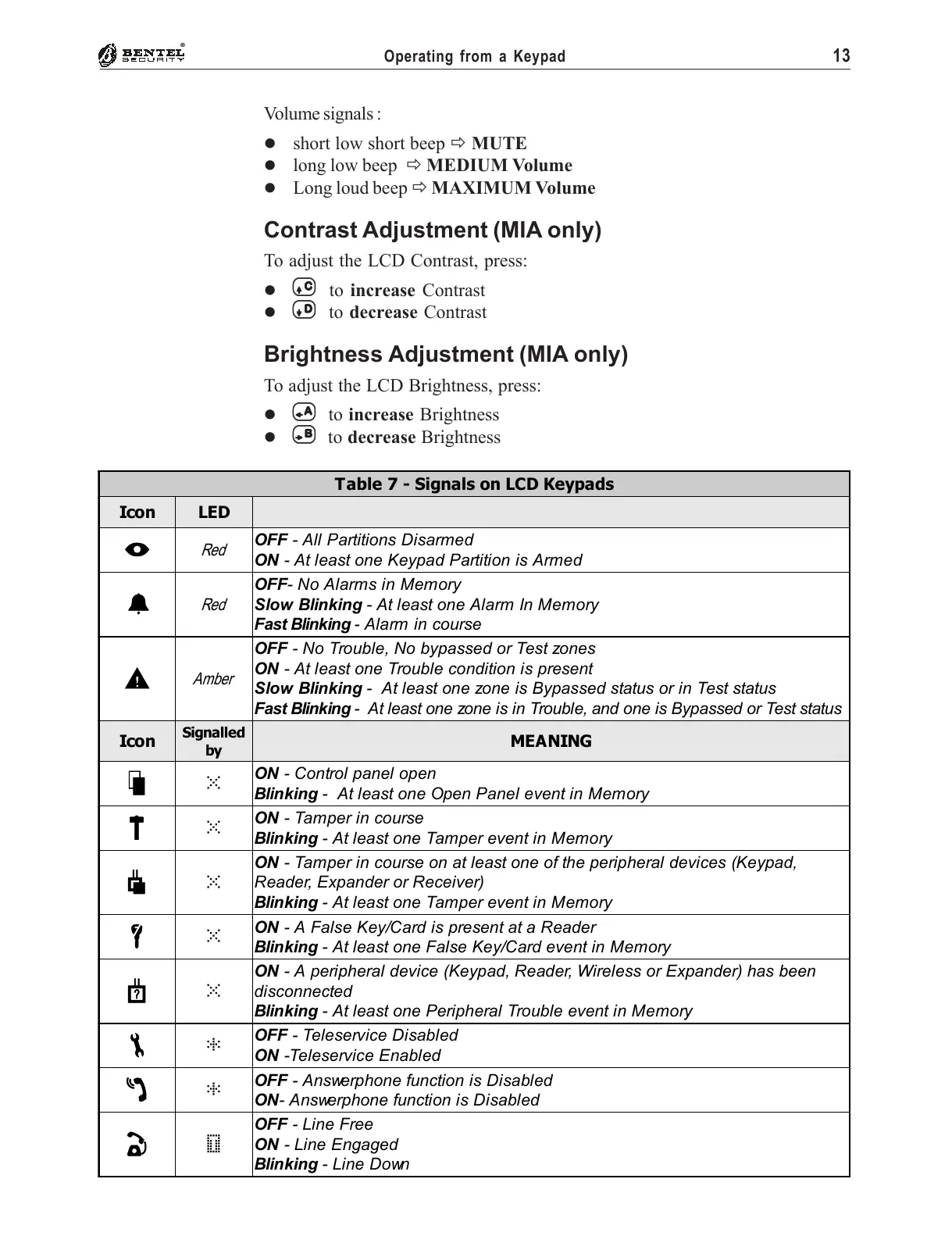
Table 7 - Signals on LCD Keypads
Icon LED
I
Red
OFF - All Partitions Disarmed
ON - At least one Keypad Partition is Armed
a
Red
OFF- No Alarms in Memory
Slow Blinking - At least one Alarm In Memory
Fast Blinking - Alarm in course
G
Amber
OFF - No Trouble, No bypassed or Test zones
ON - At least one Trouble condition is present
Slow Blinking - At least one zone is Bypassed status or in Test status
Fast Blinking - At least one zone is in Trouble, and one is Bypassed or Test status
Icon
Signalled
by
MEANING
S
û
ON - Control panel open
Blinking - At least one Open Panel event in Memory
T
û
ON - Tamper in course
Blinking - At least one Tamper event in Memory
b
û
ON - Tamper in course on at least one of the peripheral devices (Keypad,
Reader, Expander or Receiver)
Blinking - At least one Tamper event in Memory
f
û
ON - A False Key/Card is present at a Reader
Blinking - At least one False Key/Card event in Memory
s
û
ON - A peripheral device (Keypad, Reader, Wireless or Expander) has been
disconnected
Blinking - At least one Peripheral Trouble event in Memory
t
*
OFF - Teleservice Disabled
ON -Teleservice Enabled
r
*
OFF - Answerphone function is Disabled
ON- Answerphone function is Disabled
i
ÿ
OFF - Line Free
ON - Line Engaged
Blinking - Line Down
Volume signals :
% short low short beep " MUTE
% long low beep " MEDIUM Volume
% Long loud beep " MAXIMUM Volume
Contrast Adjustment (MIA only)
To adjust the LCD Contrast, press:
%
CC
CC
C to increase Contrast
%
DD
DD
D to decrease Contrast
Brightness Adjustment (MIA only)
To adjust the LCD Brightness, press:
%
AA
AA
A to increase Brightness
%
BB
BB
B to decrease Brightness










 To Next Page