9
®®
Operating from a Keypad
LED Keypads have lights and/or backlighted keys (see Figure 5) that will turn
ON or blink to indicate specific conditions. The LED Keypads can be used for
system control only.
Real-time signals
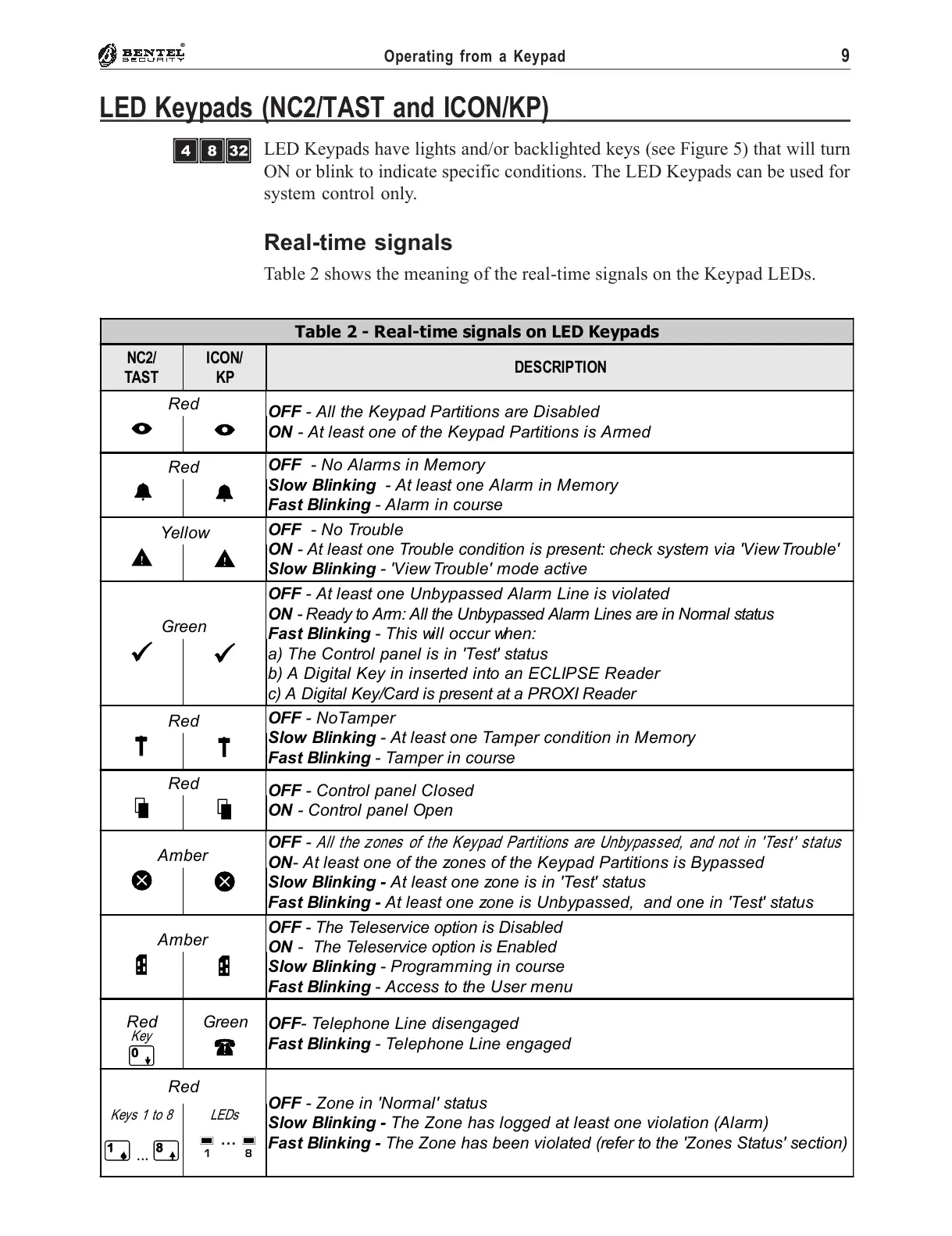
Table 2 shows the meaning of the real-time signals on the Keypad LEDs.
Table 2 - Real-time signals on LED Keypads
NC2/
TAST
ICON/
KP
DESCRIPTION
Red
OFF - All the Keypad Partitions are Disabled
ON - At least one of the Keypad Partitions is Armed
I
I
Red
OFF - No Alarms in Memory
Slow Blinking - At least one Alarm in Memory
Fast Blinking - Alarm in course
a
a
Yellow
OFF - No Trouble
ON - At least one Trouble condition is present: check system via 'View Trouble'
Slow Blinking - 'View Trouble' mode active
G
G
Green
OFF - At least one Unbypassed Alarm Line is violated
ON - Ready to Arm: All the Unbypassed Alarm Lines are in Normal status
Fast Blinking - This will occur when:
a) The Control panel is in 'Test' status
b) A Digital Key in inserted into an ECLIPSE Reader
c) A Digital Key/Card is present at a PROXI Reader
V
V
Red
OFF - NoTamper
Slow Blinking - At least one Tamper condition in Memory
Fast Blinking - Tamper in course
T
T
Red
OFF - Control panel Closed
ON - Control panel Open
S
S
Amber
OFF -
All the zones of the Keypad Partitions are Unbypassed, and not in 'Test' status
ON- At least one of the zones of the Keypad Partitions is Bypassed
Slow Blinking - At least one zone is in 'Test' status
Fast Blinking - At least one zone is Unbypassed, and one in 'Test' status
X
X
Amber
OFF - The Teleservice option is Disabled
ON - The Teleservice option is Enabled
Slow Blinking - Programming in course
Fast Blinking - Access to the User menu
P
P
Red Green
OFF- Telephone Line disengaged
Fast Blinking - Telephone Line engaged
Key
0
x
Red
OFF - Zone in 'Normal' status
Slow Blinking - The Zone has logged at least one violation (Alarm)
Fast Blinking - The Zone has been violated (refer to the 'Zones Status' section)
Keys 1 to 8
1
...
8
LEDs
g ... g
1 8
LED Keypads (NC2/TAST and ICON/KP)
ÌÐè










 To Next Page