20
Multifunction Control Panel
®®
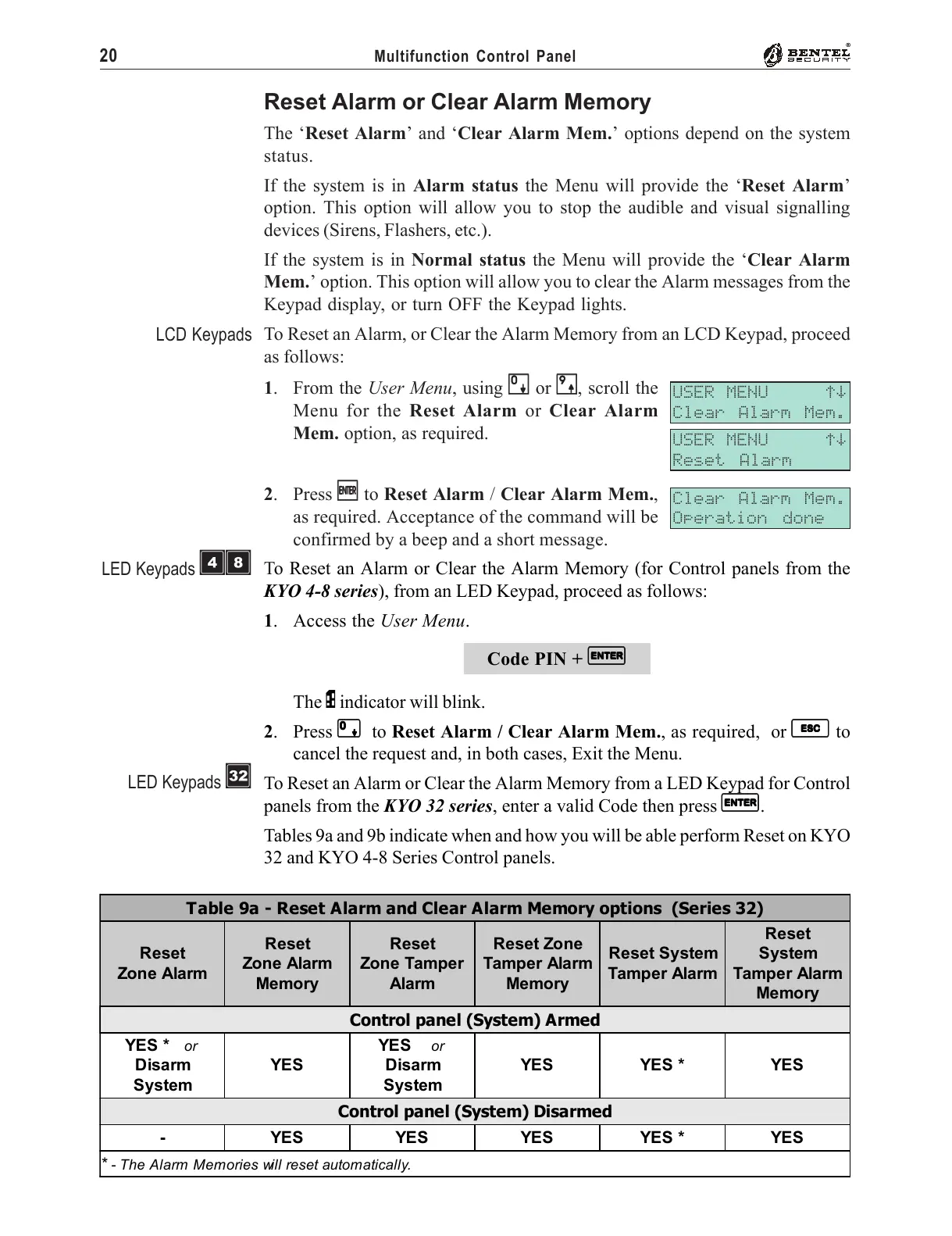
Table 9a - Reset Alarm and Clear Alarm Memory options (Series 32)
Reset
Zone Alarm
Reset
Zone Alarm
Memory
Reset
Zone Tamper
Alarm
Reset Zone
Tamper Alarm
Memory
Reset System
Tamper Alarm
Reset
System
Tamper Alarm
Memory
Control panel (System) Armed
YES *
or
Disarm
System
YES
YES
or
Disarm
System
YES YES * YES
Control panel (System) Disarmed
- YES YES YES YES * YES
*
- The Alarm Memories will reset automatically.
Reset Alarm or Clear Alarm Memory
The ‘Reset Alarm’ and ‘Clear Alarm Mem.’ options depend on the system
status.
If the system is in Alarm status the Menu will provide the ‘Reset Alarm’
option. This option will allow you to stop the audible and visual signalling
devices (Sirens, Flashers, etc.).
If the system is in Normal status the Menu will provide the ‘Clear Alarm
Mem.’ option. This option will allow you to clear the Alarm messages from the
Keypad display, or turn OFF the Keypad lights.
To Reset an Alarm, or Clear the Alarm Memory from an LCD Keypad, proceed
as follows:
1. From the User Menu, using
00
00
0 or
99
99
9, scroll the
Menu for the Reset Alarm or Clear Alarm
Mem. option, as required.
2. Press
EE
EE
E to Reset Alarm / Clear Alarm Mem.,
as required. Acceptance of the command will be
confirmed by a beep and a short message.
To Reset an Alarm or Clear the Alarm Memory (for Control panels from the
KYO 4-8 series), from an LED Keypad, proceed as follows:
1. Access the User Menu.
Code PIN +
EE
EE
E
The P indicator will blink.
2. Press
00
00
0 to Reset Alarm / Clear Alarm Mem., as required, or
ee
ee
e to
cancel the request and, in both cases, Exit the Menu.
To Reset an Alarm or Clear the Alarm Memory from a LED Keypad for Control
panels from the KYO 32 series, enter a valid Code then press
EE
EE
E.
Tables 9a and 9b indicate when and how you will be able perform Reset on KYO
32 and KYO 4-8 Series Control panels.
USER MENU áâ
Clear Alarm Mem.
Clear Alarm Mem.
Operation done
LCD Keypads
USER MENU áâ
Reset Alarm
LED Keypads ÌÐ
LED Keypads è










 To Next Page