21
®®
Operating from a Keypad
Arming and Disarming your System
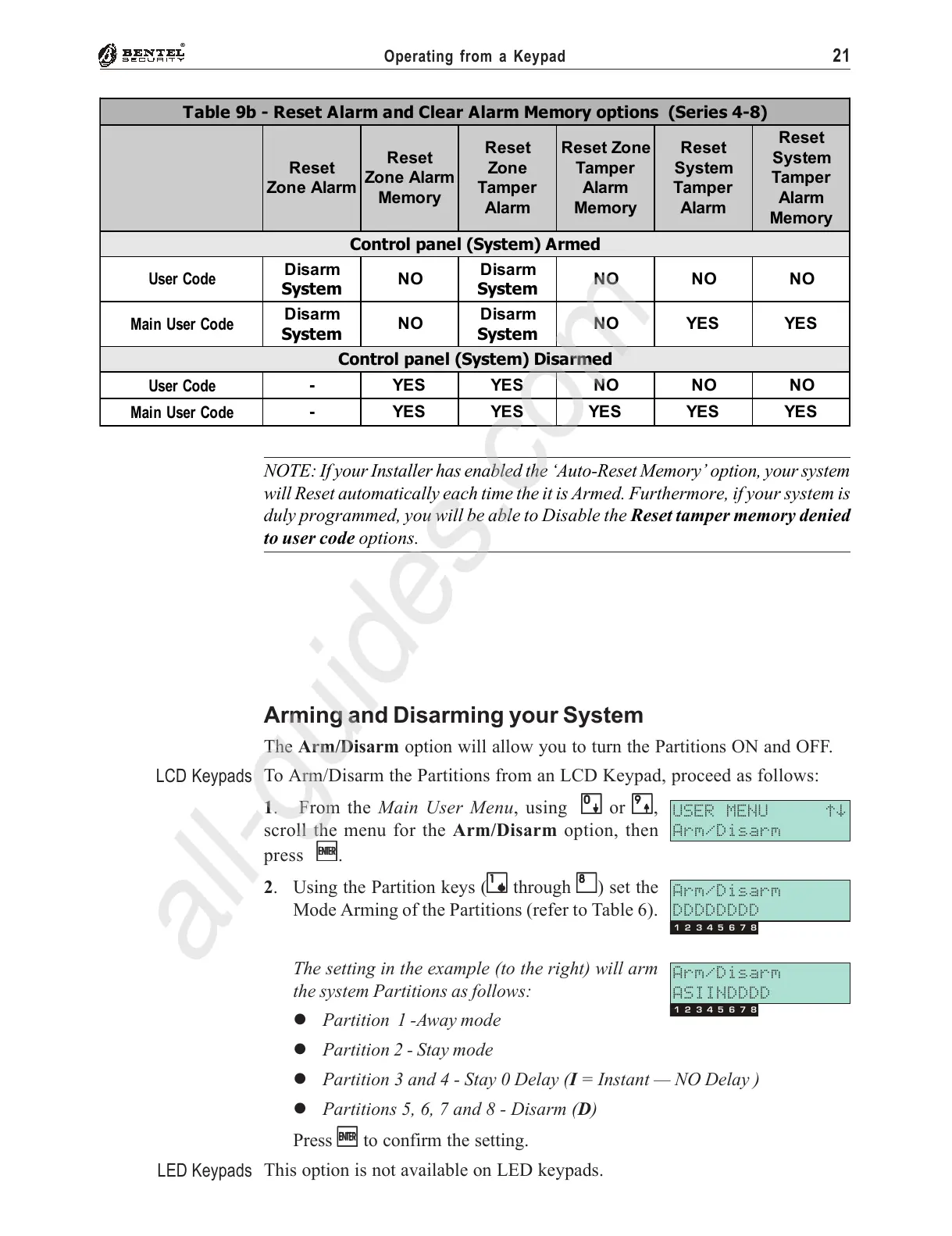
The Arm/Disarm option will allow you to turn the Partitions ON and OFF.
To Arm/Disarm the Partitions from an LCD Keypad, proceed as follows:
1. From the Main User Menu, using
00
00
0 or
99
99
9,
scroll the menu for the Arm/Disarm option, then
press
EE
EE
E.
2. Using the Partition keys (
11
11
1 through
88
88
8) set the
Mode Arming of the Partitions (refer to Table 6).
The setting in the example (to the right) will arm
the system Partitions as follows:
% Partition 1 -Away mode
% Partition 2 - Stay mode
% Partition 3 and 4 - Stay 0 Delay (I = Instant — NO Delay )
% Partitions 5, 6, 7 and 8 - Disarm (D)
Press
EE
EE
E to confirm the setting.
This option is not available on LED keypads.
USER MENU áâ
Arm/Disarm
Arm/Disarm
DDDDDDDD
13572468
Arm/Disarm
ASIINDDDD
13572468
LCD Keypads
LED Keypads
Table 9b - Reset Alarm and Clear Alarm Memory options (Series 4-8)
Reset
Zone Alarm
Reset
Zone Alarm
Memory
Reset
Zone
Tamper
Alarm
Reset Zone
Tamper
Alarm
Memory
Reset
System
Tamper
Alarm
Reset
System
Tamper
Alarm
Memory
Control panel (System) Armed
User Code
Disarm
System
NO
Disarm
System
NO NO NO
Main User Code
Disarm
System
NO
Disarm
System
NO YES YES
Control panel (System) Disarmed
User Code
-YESYESNONONO
Main User Code
- YES YES YES YES YES
NOTE: If your Installer has enabled the ‘Auto-Reset Memory’ option, your system
will Reset automatically each time the it is Armed. Furthermore, if your system is
duly programmed, you will be able to Disable the Reset tamper memory denied
to user code options.










 To Next Page