8
Multifunction Control Panel
®®
OPERATING FROM A KEYPAD
Introduction
Keypads
This Control panel accepts LCD Keypads — OMNIA/TAST-R, MIA-S and
MIA-D (see Figure 1), and LED Keypads — NC2/TAST and ICON/KP (see
Figure 2).
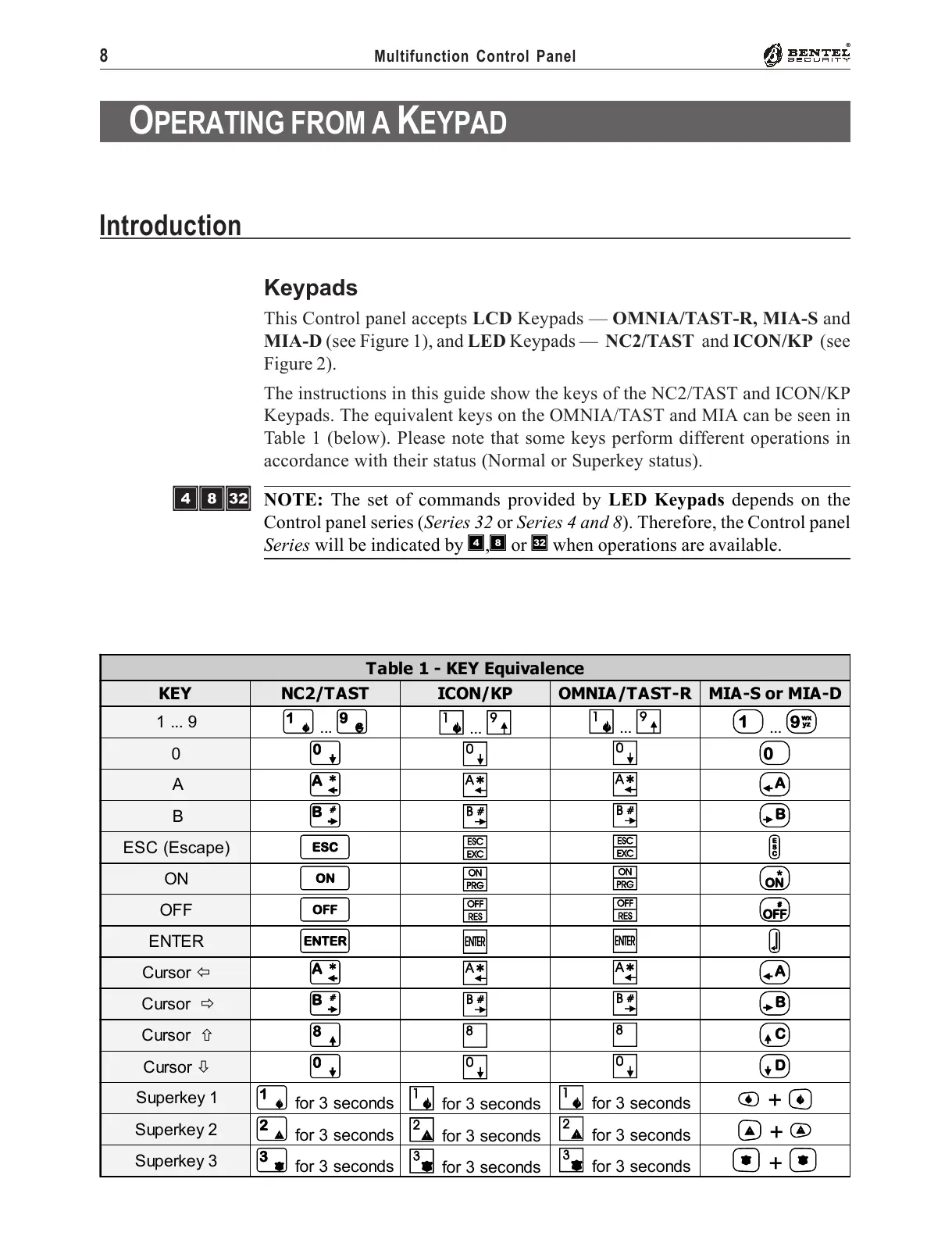
The instructions in this guide show the keys of the NC2/TAST and ICON/KP
Keypads. The equivalent keys on the OMNIA/TAST and MIA can be seen in
Table 1 (below). Please note that some keys perform different operations in
accordance with their status (Normal or Superkey status).
NOTE: The set of commands provided by LED Keypads depends on the
Control panel series (Series 32 or Series 4 and 8). Therefore, the Control panel
Series will be indicated by Ì,Ð or è when operations are available.
Table 1 - KEY Equivalence
KEY NC2/TAST ICON/KP OMNIA/TAST-R MIA-S or MIA-D
1 ... 9
1
...
9
1
...
9
1
...
9 1
...
9
0
0
0
0 0
A
A
A
A A
B
B
B
B B
ESC (Escape)
e
e
e e
ON
O
O
O O
OFF
o
o
o o
ENTER
E
E
E E
Cursor !
A
A
A A
Cursor "
B
B
B B
Cursor #
8
8
8 C
Cursor $
0
0
0 D
Superkey 1
1
for 3 seconds
1
for 3 seconds
1
for 3 seconds
Ì + Í
Superkey 2
2
for 3 seconds
2
for 3 seconds
2
for 3 seconds
P
+
p
Superkey 3
3
for 3 seconds
3
for 3 seconds
3
for 3 seconds
À + Á
ÌÐè










 To Next Page