130
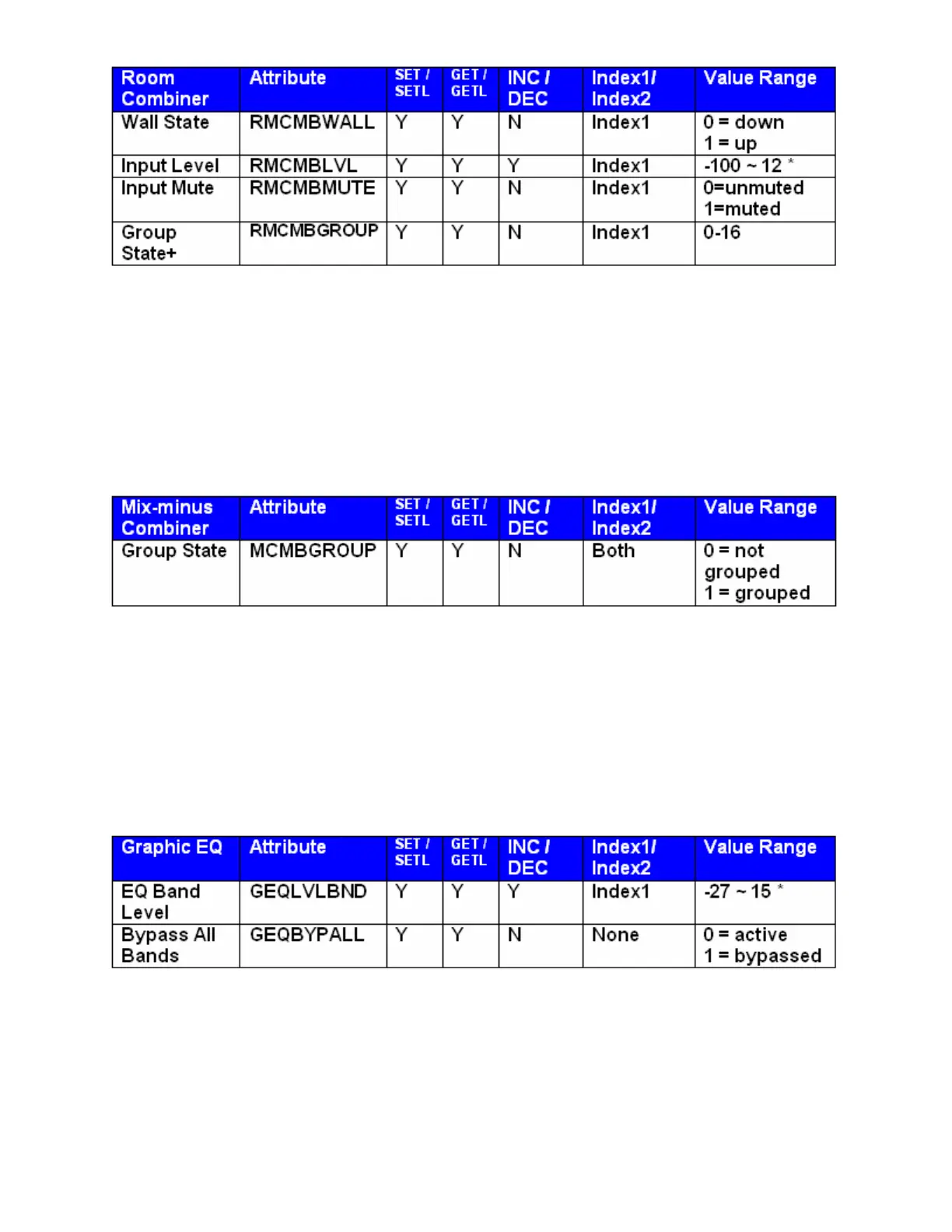
* Can contain a decimal number.
Example: In the string SET 1 RMCMBWALL 4 2 1 <LF>
We are telling Audia to set the 2nd 'wall' in the room combiner, Instance ID 4, up (separate rooms).
Note: For wall state, Index1 represents the wall being opened or closed.
+Note: The behavior of RMCMBGROUP is the same as that of the "Set Selected Group" commands in the
right-click-context menus in the Room Combiner control dialogue in the Audia Software: the specified room
is isolated, meaning all moveable walls at its borders are put up. All neighboring rooms maintain their
previous group assignments. Index1 represents the room being addressed.
Note: Index1 is the input number being addressed. Index2 is the group number; this is represented by a
letter in the software, but addressed as a number in ATP commands.
(Example: A=1, B=2, C=3….)
Equalizer Blocks
* Can contain a decimal number.
The Index field represents the filter to be controlled. EQ filter farthest to the left is #1, next one is #2 and so
forth. Upper left hand area of Graphic EQ dialog screen displays, which numbered filter, is being adjusted,
use this number as the Index1 for Graphic EQ strings.
Example: In the string SET 2 GEQBYPALL 9 1 <LF>
We are telling Audia
® to bypass all bands on Graphic EQ Instance ID 9.



 To Next Page